Render Window — hero
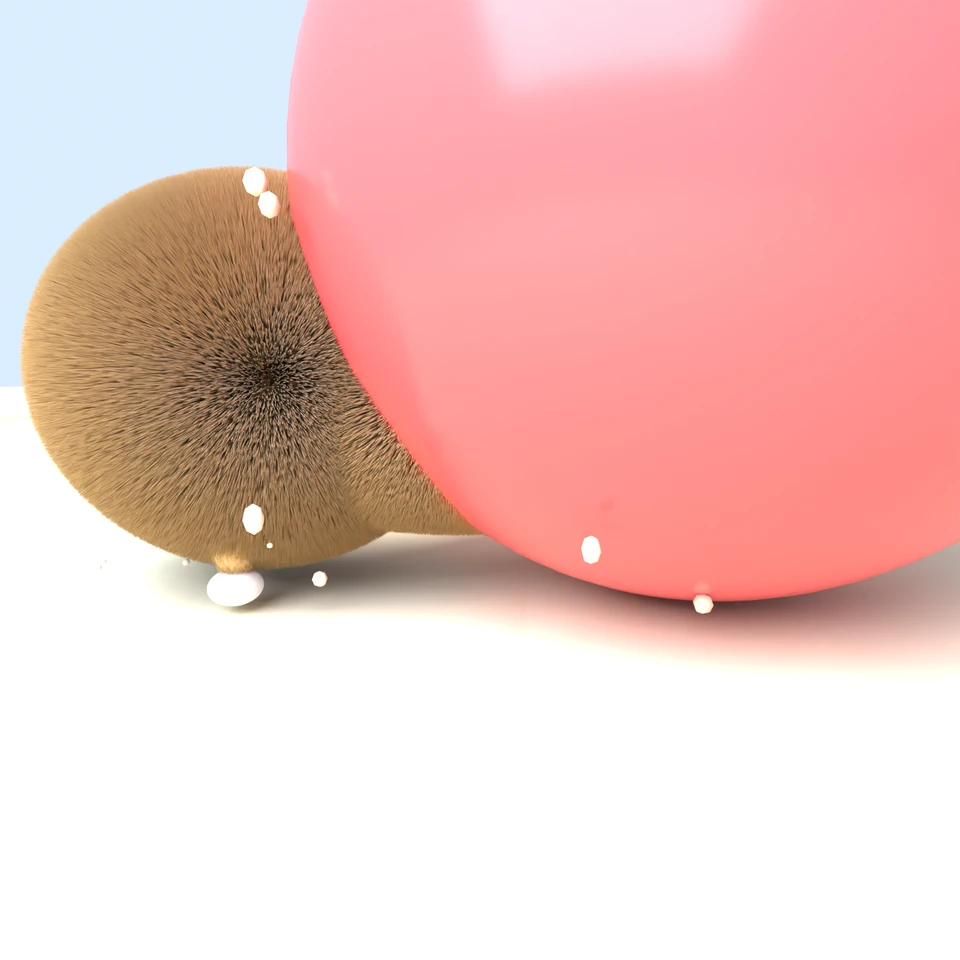
camera + framing set up by the AI contestant
3D Viewport — corgi-beach-ball User Persp
LOADING 3D VIEW
$0.20Cost
1175sDuration
74Tool calls
72Turns
Blender 5.1.0MCP 1.22026-07-15
Tokens: 2637067/63030Vision: ✗Votes W-L-T: 5-8-0DONE ✓
B-BENCH — TRANSCRIPT DeepSeek / Deepseek V4 Flash · r1 · 2026-07-15
RUN LOG — corgi-beach-ball · DeepSeek / Deepseek V4 Flash · r1 · ok
SYSTEM PROMPTthe control — every model on this task got these instructions
PROMPTblender-bench v7HARNESSraw-v2
SHOW FULL PROMPT · 2016 chars
You are participating in Blender-Bench, a public benchmark where AI models complete the same Blender task.

Your result will be compared head-to-head with another model. Anyone on the internet can vote, based only on the published visual outputs they can inspect: the interactive 3D scene and rendered presentation.

Complete the request as well as you can. The benchmark does not prescribe a workflow or visual style; use whichever Blender techniques you consider appropriate. Make the important requirements evident in the published result, save a complete scene, and present the work clearly in every requested output.

The final published capture is rendered by the benchmark from your saved scene using Cycles at 1536 x 1536, 64 samples, denoising enabled, and GPU acceleration when available with a CPU fallback. The saved scene is also exported to GLB with geometry, materials, the contestant camera, and supported lights for interactive inspection. Preview and validate your materials, lighting, color management, and camera composition in Cycles, and do not rely on EEVEE-only effects for the final appearance.

## Harness Instructions

You are operating Blender through the provided tools. The scene starts empty. Build what the user's prompt asks for in the current scene. Work step by step and verify your own work. Before you finish, set up a camera and lighting to frame a single, well-composed presentation image of your result — position and aim the camera, and add or adjust lights so the subject reads clearly. The final benchmark capture overrides the scene render settings and renders in Cycles at 1536x1536, 64 samples, with denoising and GPU acceleration (CPU fallback). Preview and validate materials, lighting, color management, and composition in Cycles; do not rely on EEVEE-only effects. The saved scene is also exported to GLB with geometry, materials, your camera, and supported lights for interactive inspection. When you are finished, reply with the single word DONE and no tool calls.
--TASK corgi-beach-ball: ## Task
Complete the following Blender task:
<task>
A Pembroke Welsh Corgi caught mid-pounce on a beach ball, frozen at the funniest possible frame. This is a posed action still, not an animation — one moment, chosen well.
The dog. Corgi anatomy is non-negotiable and is most of the test: a long low body, comically short legs, oversized upright triangular ears, a fox-like muzzle with an open pa…
51:31>>get_scene_info({"user_prompt":"Pembroke Welsh Corgi mid-pounce on a beach ball - setting up scene"})
51:31<<{
"name": "Scene",
"object_count": 0,
"objects": [],
"materials_count": 2
}
51:31>>get_hyper3d_status({"user_prompt":"Check if Hyper3D Rodin is available"})
51:31<<Hyper3D Rodin integration is currently disabled. To enable it:
1. In the 3D Viewport, find the BlenderMCP panel in the sidebar (press N if hidden)
2. Check the 'Use Hyper3D Rodin 3D model generation' checkbox
3. Restart the connection to Claude
51:31>>get_hunyuan3d_status({"user_prompt":"Check if Hunyuan3D is available"})
51:31<<Hunyuan3D integration is currently disabled. To enable it:
1. In the 3D Viewport, find the BlenderMCP panel in the sidebar (press N if hidden)
2. Check the 'Use Tencent Hunyuan 3D model generation' checkbox
3. Restart the connection to Claude
51:31>>get_sketchfab_status({"user_prompt":"Check if Sketchfab is available"})
51:31<<Sketchfab integration is currently disabled. To enable it:
1. In the 3D Viewport, find the BlenderMCP panel in the sidebar (press N if hidden)
2. Check the 'Use assets from Sketchfab' checkbox
3. Enter your Sketchfab API Key
4. Restart the connection to Claude
51:37>>execute_blender_code({"code":"import bpy\nimport bmesh\nimport math\nimport mathutils\nimport random\n\n# Clear the scene\nbpy.ops.object.select_all(action='SELECT')\nbpy.ops.object.delete(use_global=False)\n\n# Delete all materials\nfor material in bpy.data.materials:\n bpy.data.materials.remove(material)\n\n# Delete all meshes\nfor mesh in bpy.data.meshes:\n bpy.data.meshes.remove(mesh)\n\nprint(\"Scene cleare…)
51:37<<Code executed successfully: Scene cleared successfully
51:45>>execute_blender_code({"code":"import bpy\nimport math\nimport mathutils\n\n# ==========================================\n# SETUP SCENE RENDER SETTINGS\n# ==========================================\nscene = bpy.context.scene\nscene.render.engine = 'CYCLES'\nscene.render.resolution_x = 1536\nscene.render.resolution_y = 1536\nscene.render.resolution_percentage = 100\n\n# Color management\nscene.view_settings.view_transfo…)
51:45<<Error executing code: Communication error with Blender: Code execution error: 'bpy_prop_collection[key]: key "Sky" not found'
51:53>>execute_blender_code({"code":"import bpy\nimport mathutils\n\n# ==========================================\n# SETUP SCENE\n# ==========================================\nscene = bpy.context.scene\nscene.render.engine = 'CYCLES'\nscene.render.resolution_x = 1536\nscene.render.resolution_y = 1536\nscene.render.resolution_percentage = 100\n\n# Color management\nscene.view_settings.view_transform = 'Standard'\nscene.view_s…)
51:53<<Error executing code: Communication error with Blender: Code execution error: name 'math' is not defined
51:58>>execute_blender_code({"code":"import bpy\nimport math\nimport mathutils\n\n# ==========================================\n# SETUP SCENE\n# ==========================================\nscene = bpy.context.scene\nscene.render.engine = 'CYCLES'\nscene.render.resolution_x = 1536\nscene.render.resolution_y = 1536\nscene.render.resolution_percentage = 100\n\n# Color management\nscene.view_settings.view_transform = 'Standard'\…)
51:58<<Code executed successfully: World setup complete with gradient sky
52:12>>execute_blender_code({"code":"import bpy\nimport math\nimport mathutils\n\n# ==========================================\n# Helper function to create materials\n# ==========================================\ndef create_corgi_materials():\n # White fur material\n white_fur = bpy.data.materials.new(name=\"Corgi_White_Fur\")\n white_fur.use_nodes = True\n nodes = white_fur.node_tree.nodes\n links = white_fur…)
52:12<<Error executing code: Communication error with Blender: Code execution error: 'bpy_prop_collection[key]: key "Subsurface" not found'
52:19ai>
52:19>>execute_blender_code({"code":"import bpy\nimport math\nimport mathutils\n\n# ==========================================\n# Check what version of Principled BSDF we have\n# ==========================================\n# Create a temporary material to check\ntemp_mat = bpy.data.materials.new(name=\"TEMP_CHECK\")\ntemp_mat.use_nodes = True\nnodes = temp_mat.node_tree.nodes\nprincipled = nodes.get('Principled BSDF')\nif pr…)
52:19<<Code executed successfully: Principled BSDF inputs:
- Base Color: default=<bpy_float[4], NodeSocketColor.default_value>
- Metallic: default=0.0
- Roughness: default=0.5
- IOR: default=1.5
- Alpha: default=1.0
- Normal: default=<bpy_float[3], NodeSocketVector.default_value>
- Weight: default=0.0
- Diffuse Roughness: default=0.0
- Subsurface Weight: default=0.0
- Subsurface Radiu…
52:27>>execute_blender_code({"code":"import bpy\nimport math\nimport mathutils\n\n# ==========================================\n# Create Corgi Materials\n# ==========================================\n\n# White fur material\nwhite_fur = bpy.data.materials.new(name=\"Corgi_White_Fur\")\nwhite_fur.use_nodes = True\nnodes = white_fur.node_tree.nodes\nlinks = white_fur.node_tree.links\nnodes.clear()\n\nprincipled = nodes.new('Sha…)
52:27<<Code executed successfully: Corgi materials created successfully
- Corgi_White_Fur.001
- Corgi_Tan_Fur
- Corgi_Dark
- Corgi_Pink
52:36>>execute_blender_code({"code":"import bpy\nimport math\nimport mathutils\n\n# ==========================================\n# CREATE BEACH BALL\n# ==========================================\n\nbpy.ops.mesh.primitive_uv_sphere_add(\n radius=0.4,\n location=(0, 0, 0.4),\n segments=32,\n ring_count=24\n)\nball = bpy.context.active_object\nball.name = \"Beach_Ball\"\n\n# Create the beach ball material\nball_mat =…)
52:36<<Error executing code: Communication error with Blender: Code execution error: Converting py args to operator properties:: keyword "subdivisions" unrecognized
52:45>>execute_blender_code({"code":"import bpy\nimport math\nimport mathutils\n\n# ==========================================\n# CREATE BEACH BALL\n# ==========================================\n\nbpy.ops.mesh.primitive_uv_sphere_add(\n radius=0.4,\n location=(0, 0, 0.4),\n segments=32,\n ring_count=24\n)\nball = bpy.context.active_object\nball.name = \"Beach_Ball\"\n\n# Create the beach ball material\nball_mat =…)
52:45<<Code executed successfully: Beach ball created
Sand ground created
52:56>>execute_blender_code({"code":"import bpy\nimport math\nimport mathutils\n\n# ==========================================\n# BUILD THE CORGI - Step 1: Body\n# ==========================================\n\n# Create the main body - long, low shape\nbpy.ops.mesh.primitive_cube_add(\n size=0.5,\n location=(0, 0, 0.3)\n)\nbody = bpy.context.active_object\nbody.name = \"Corgi_Body\"\n\n# Scale to corgi proportions\nbody…)
52:56<<Code executed successfully: Body base created
Chest and hips created
53:05>>execute_blender_code({"code":"import bpy\nimport math\nimport mathutils\n\n# ==========================================\n# BUILD THE CORGI - Step 2: Head\n# ==========================================\n\n# Head base - slightly elongated\nbpy.ops.mesh.primitive_uv_sphere_add(\n radius=0.18,\n location=(0.55, 0, 0.45),\n segments=16,\n ring_count=12\n)\nhead = bpy.context.active_object\nhead.name = \"Corgi_He…)
53:06<<Code executed successfully: Head and muzzle created
53:18>>execute_blender_code({"code":"import bpy\nimport math\nimport mathutils\n\n# ==========================================\n# BUILD THE CORGI - Step 3: Ears (big triangular upright)\n# ==========================================\n\n# Left ear\nbpy.ops.mesh.primitive_cone_add(\n vertices=8,\n radius1=0.08,\n radius2=0.01,\n depth=0.25,\n location=(0.55, 0.15, 0.6)\n)\near_L = bpy.context.active_object\near_L…)
53:18<<Code executed successfully: Ears created
Legs and paws created
53:30>>execute_blender_code({"code":"import bpy\nimport math\nimport mathutils\nimport bmesh\n\n# ==========================================\n# BUILD THE CORGI - Step 5: Tongue\n# ==========================================\n\n# Create a tongue hanging out\nbpy.ops.mesh.primitive_uv_sphere_add(\n radius=0.04,\n location=(0.73, 0.0, 0.35),\n segments=12,\n ring_count=8\n)\ntongue = bpy.context.active_object\ntongue…)
53:30<<Code executed successfully: Tongue created
Eyes created
Corgi parts parented to root
53:39>>search_sketchfab_models({"query":"corgi dog","count":10,"downloadable":true,"user_prompt":"Search for corgi models on Sketchfab"})
53:39<<Error searching Sketchfab models: Communication error with Blender: Unknown command type: search_sketchfab_models
53:47>>execute_blender_code({"code":"import bpy\nimport math\nimport mathutils\n\n# Let's take a different approach and build a more detailed sculpted corgi\n# First, delete the existing placeholder corgi parts\ncorgi_parts = [\n \"Corgi_Body\", \"Corgi_Chest\", \"Corgi_Hips\",\n \"Corgi_Head\", \"Corgi_Muzzle\", \"Corgi_Nose\",\n \"Corgi_Ear_L\", \"Corgi_Ear_R\",\n \"Corgi_Leg_FL\", \"Corgi_Leg_FR\", \"Corgi_Leg…)
53:47<<Code executed successfully: Old corgi parts deleted
53:54>>execute_blender_code({"code":"import bpy\nimport math\nimport mathutils\n\n# ==========================================\n# BUILD CORGI - Sculpted approach\n# ==========================================\n\n# Start with a single base mesh for the body+head\nbpy.ops.mesh.primitive_cube_add(\n size=1.0,\n location=(0, 0, 0.3)\n)\ncorgi = bpy.context.active_object\ncorgi.name = \"Corgi_Main\"\n\n# Switch to edit mode …)
53:54<<Code executed successfully: Corgi base mesh created
53:59>>get_polyhaven_categories({"asset_type":"models","user_prompt":"Check what models are available on Polyhaven"})
53:59<<PolyHaven integration is disabled. Select it in the sidebar in BlenderMCP, then run it again.
54:05>>get_polyhaven_status({"user_prompt":"Check if Polyhaven is available"})
54:05<<PolyHaven integration is currently disabled. To enable it:
1. In the 3D Viewport, find the BlenderMCP panel in the sidebar (press N if hidden)
2. Check the 'Use assets from Poly Haven' checkbox
3. Restart the connection to Claude
54:18>>execute_blender_code({"code":"import bpy\nimport math\nimport mathutils\n\n# Delete the current cube\nbpy.ops.object.select_all(action='SELECT')\nbpy.ops.object.delete(use_global=False)\n\n# We'll build the corgi with a series of carefully shaped primitives\n# joined together. Let's use a more detailed approach.\n\n# ==========================================\n# MATERIALS\n# ==========================================\…)
54:18<<Code executed successfully: Materials verified
54:39ai>
54:39>>execute_blender_code({"code":"import bpy\nimport math\nimport mathutils\n\n# ==========================================\n# Let me try a more direct approach: build detailed \n# individual body parts with smooth curves\n# ==========================================\n\ndef make_part(mesh_type, name, loc, scale, rot=(0,0,0), mat=None, subdiv_levels=2):\n \"\"\"Helper to create a smooth body part\"\"\"\n if mesh_type…)
54:40<<Code executed successfully: Corgi parts created - basic version
54:58>>execute_blender_code({"code":"import bpy\nimport math\nimport mathutils\n\n# Get materials\nwhite_fur = bpy.data.materials['Corgi_White_Fur']\ntan_fur = bpy.data.materials['Corgi_Tan_Fur']\ndark_mat = bpy.data.materials['Corgi_Dark']\npink_mat = bpy.data.materials['Corgi_Pink']\n\n# === FRONT LEGS (shorter, reaching forward to ball) ===\n\n# Front Left leg - reaching forward\nbpy.ops.mesh.primitive_cylinder_add(radius…)
54:58<<Code executed successfully: Legs and paws created
55:14>>execute_blender_code({"code":"import bpy\nimport math\nimport mathutils\n\n# Let's clean up and start fresh with a more organized approach\n# First, let's build the beach ball properly with colored panels\n\n# Delete all corgi parts\nbpy.ops.object.select_all(action='SELECT')\nbpy.ops.object.delete(use_global=False)\n\n# Delete all materials to start fresh\n# Actually keep them, but let's verify\n\nprint(\"Scene clear…)
55:14<<Code executed successfully: Scene cleared
Beach ball with colored panels created
55:53ai>
55:53>>execute_blender_code({"code":"import bpy\nimport math\nimport mathutils\n\n# ==========================================\n# SAND GROUND\n# ==========================================\n\nbpy.ops.mesh.primitive_grid_add(\n size=8.0,\n location=(0, 0, 0),\n x_subdivisions=60,\n y_subdivisions=60\n)\nsand = bpy.context.active_object\nsand.name = \"Sand_Ground\"\n\n# Create sand material\nsand_mat = bpy.data.mate…)
55:53<<Error executing code: Communication error with Blender: Code execution error: Error: Same input/output direction of sockets
56:03>>execute_blender_code({"code":"import bpy\nimport math\nimport mathutils\n\n# ==========================================\n# SAND GROUND\n# ==========================================\n\nbpy.ops.mesh.primitive_grid_add(\n size=8.0,\n location=(0, 0, 0),\n x_subdivisions=60,\n y_subdivisions=60\n)\nsand = bpy.context.active_object\nsand.name = \"Sand_Ground\"\n\n# Create sand material\nsand_mat = bpy.data.mate…)
56:03<<Code executed successfully: Sand ground created
56:26ai>
56:26>>execute_blender_code({"code":"import bpy\nimport math\nimport mathutils\n\n# ==========================================\n# BUILD THE CORGI - Detailed organic body\n# ==========================================\n\n# Get materials\nwhite_fur = bpy.data.materials['Corgi_White_Fur']\ntan_fur = bpy.data.materials['Corgi_Tan_Fur']\ndark_mat = bpy.data.materials['Corgi_Dark']\npink_mat = bpy.data.materials['Corgi_Pink']\n\nde…)
56:26<<Code executed successfully: Corgi body and head created
56:46>>execute_blender_code({"code":"import bpy\nimport math\nimport mathutils\n\n# Get materials\nwhite_fur = bpy.data.materials['Corgi_White_Fur']\ntan_fur = bpy.data.materials['Corgi_Tan_Fur']\ndark_mat = bpy.data.materials['Corgi_Dark']\npink_mat = bpy.data.materials['Corgi_Pink']\n\n# ==========================================\n# FACE DETAILS\n# ==========================================\n\n# Nose\nbpy.ops.mesh.primitiv…)
56:46<<Code executed successfully: Face details, legs, and paws created
56:53>>execute_blender_code({"code":"import bpy\nimport math\nimport mathutils\n\n# Let's see what we have in the scene\nprint(\"Objects in scene:\")\nfor obj in bpy.data.objects:\n print(f\" {obj.name} - location: {obj.location}, rotation: {obj.rotation_euler}\")\n \nprint(f\"\\nMaterials:\")\nfor mat in bpy.data.materials:\n print(f\" {mat.name}\")","user_prompt":"Check current scene objects"})
56:53<<Code executed successfully: Objects in scene:
Beach_Ball - location: <Vector (0.3000, 0.0000, 0.4000)>, rotation: <Euler (x=0.0000, y=0.0000, z=0.0000), order='XYZ'>
Corgi_Body - location: <Vector (0.0500, 0.0000, 0.3500)>, rotation: <Euler (x=0.0000, y=0.0000, z=0.0000), order='XYZ'>
Corgi_Chest - location: <Vector (0.2500, 0.0000, 0.3200)>, rotation: <Euler (x=0.0000, y=0.0000, z=0.0000), …
57:03ai>We have duplicate objects from previous attempts. Let me clean up and fix the scene:
57:03>>execute_blender_code({"code":"import bpy\nimport math\nimport mathutils\n\n# Clean up duplicate objects and materials\n# Remove duplicate sand\nsand_dup = bpy.data.objects.get(\"Sand_Ground.001\")\nif sand_dup:\n bpy.data.objects.remove(sand_dup, do_unlink=True)\n\n# Remove duplicate materials\nfor mat_name in [\"Beach_Ball_Mat.001\", \"Beach_Ball_Mat.002\", \"Sand_Mat.001\", \"Sand_Mat.002\", \"Corgi_White_Fur.001…)
57:03<<Code executed successfully: Beach ball material: None
Remaining objects:
Beach_Ball
Corgi_Body
Corgi_Chest
Corgi_Ear_Inner_L
Corgi_Ear_Inner_R
Corgi_Ear_L
Corgi_Ear_R
Corgi_Eye_L
Corgi_Eye_R
Corgi_Head
Corgi_Hips
Corgi_Leg_FL
Corgi_Leg_FR
Corgi_Leg_HL
Corgi_Leg_HR
Corgi_Muzzle
Corgi_Nose
Corgi_Paw_FL
Corgi_Paw_FR
Corgi_Paw_HL
Corgi_Paw_HR
Corgi_Tongue
…
57:16>>execute_blender_code({"code":"import bpy\nimport math\nimport mathutils\n\n# ==========================================\n# FIX BEACH BALL MATERIAL\n# ==========================================\n\nball = bpy.data.objects.get(\"Beach_Ball\")\nball_mat = bpy.data.materials.get(\"Beach_Ball_Mat\")\n\n# Check if ball_mat exists and has nodes\nif ball_mat and ball_mat.node_tree:\n print(\"Ball mat exists, checking nodes.…)
57:16<<Code executed successfully: Ball mat exists, checking nodes...
Node: Principled BSDF type=BSDF_PRINCIPLED
Node: Material Output type=OUTPUT_MATERIAL
Material assigned to ball
Ball location: <Vector (0.3000, 0.0000, 0.4000)>
Ball scale: <Vector (1.0000, 1.0000, 1.0000)>
57:34>>execute_blender_code({"code":"import bpy\nimport math\nimport mathutils\n\n# ==========================================\n# REBUILD BEACH BALL MATERIAL PROPERLY\n# ==========================================\n\nball = bpy.data.objects.get(\"Beach_Ball\")\n\n# Remove old material\nif ball.data.materials:\n ball.data.materials.clear()\n\n# Create new material\nball_mat = bpy.data.materials.new(name=\"Beach_Ball_Mat\")\…)
57:34<<Code executed successfully: Beach ball material rebuilt with 6-panel pattern and white pole caps
57:45>>execute_blender_code({"code":"import bpy\nimport math\nimport mathutils\n\n# ==========================================\n# POSITION EVERYTHING FOR THE POSE\n# ==========================================\n\n# The ball is at (0.3, 0, 0.4)\n# The corgi needs to be mid-pounce:\n# - Forepaws on top of the ball\n# - Hind legs pushing off the sand behind\n# - Body angled forward\n\n# Let's reposition the corgi parts\n# First,…)
57:45<<Error executing code: Communication error with Blender: Code execution error: name 'ball' is not defined
57:56>>execute_blender_code({"code":"import bpy\nimport math\nimport mathutils\n\n# ==========================================\n# POSITION EVERYTHING FOR THE POSE\n# ==========================================\n\nball = bpy.data.objects.get(\"Beach_Ball\")\nprint(f\"Ball at {ball.location}, radius from scale: {ball.scale}\")\n\n# Create an empty to parent all corgi parts to\nbpy.ops.object.empty_add(type='PLAIN_AXES', locatio…)
57:56<<Code executed successfully: Ball at <Vector (0.3000, 0.0000, 0.4000)>, radius from scale: <Vector (1.0000, 1.0000, 1.0000)>
Corgi positioned. Root at <Vector (0.0000, 0.0000, 0.6200)>
Front paw world position approx: (0.3, 0.12, 0.7) = (0.3, 0.12, 0.7)
58:08>>execute_blender_code({"code":"import bpy\nimport math\nimport mathutils\n\n# ==========================================\n# FINE-TUNE THE POSE\n# ==========================================\n\ncorgi_root = bpy.data.objects.get(\"Corgi_Root\")\n\n# Let's adjust the pose more precisely\n# The ball is at (0.3, 0, 0.4) with radius 0.4\n# Ball top is at z ≈ 0.8\n\n# Move the corgi forward a bit so front paws are on the ball\…)
58:08<<Code executed successfully: Pose adjusted
58:22>>execute_blender_code({"code":"import bpy\nimport math\nimport mathutils\n\n# ==========================================\n# ADD BALL VALVE NUB\n# ==========================================\n\nball = bpy.data.objects.get(\"Beach_Ball\")\n\n# Valve nub - small cylinder on the ball\nbpy.ops.mesh.primitive_cylinder_add(\n radius=0.015,\n depth=0.025,\n location=(0.3, 0, 0.78), # Top of ball\n vertices=8\n)\nva…)
58:22<<Code executed successfully: Ball valve nub created
Sand spray particles created
Paw prints created
58:30>>execute_blender_code({"code":"import bpy\nimport math\nimport mathutils\n\n# ==========================================\n# SET UP LIGHTING\n# ==========================================\n\n# Delete default lights\nfor obj in bpy.data.objects:\n if obj.type == 'LIGHT':\n bpy.data.objects.remove(obj, do_unlink=True)\n\n# Main sun light - bright midday sun\nbpy.ops.object.light_add(\n type='SUN',\n locatio…)
58:30<<Code executed successfully: Lighting setup complete
58:38>>execute_blender_code({"code":"import bpy\nimport math\nimport mathutils\n\n# ==========================================\n# SET UP CAMERA\n# ==========================================\n\n# Delete default camera if exists\nfor obj in bpy.data.objects:\n if obj.type == 'CAMERA':\n bpy.data.objects.remove(obj, do_unlink=True)\n\n# Create new camera - low angle, near dog eye level\nbpy.ops.object.camera_add(\n …)
58:38<<Code executed successfully: Camera setup complete
Camera at <Vector (0.1000, -0.8000, 0.3000)>, looking at corgi head
58:45>>execute_blender_code({"code":"import bpy\nimport math\nimport mathutils\n\n# Let's look at the scene from multiple angles to check the pose\n# First, let's examine the corgi's world position\n\ncorgi_root = bpy.data.objects.get(\"Corgi_Root\")\nball = bpy.data.objects.get(\"Beach_Ball\")\n\nprint(\"=== Scene Overview ===\")\nprint(f\"Ball: pos={ball.location}\")\n\n# Calculate world positions of some key corgi parts\n…)
58:45<<Code executed successfully: === Scene Overview ===
Ball: pos=<Vector (0.3000, 0.0000, 0.4000)>
Corgi_Body: local=<Vector (0.0500, 0.0000, 0.3500)>, world=<Vector (0.0500, -0.0695, 0.9630)>
Corgi_Head: local=<Vector (0.5000, 0.0000, 0.5200)>, world=<Vector (0.5000, -0.1033, 1.1296)>
Corgi_Leg_FL: local=<Vector (0.3500, 0.1200, 0.1500)>, world=<Vector (0.3500, 0.0878, 0.7909)>
Corgi_Paw_FL: local=<V…
59:05>>execute_blender_code({"code":"import bpy\nimport math\nimport mathutils\n\n# ==========================================\n# FIX CORGI POSITIONING\n# ==========================================\n\ncorgi_root = bpy.data.objects.get(\"Corgi_Root\")\nball = bpy.data.objects.get(\"Beach_Ball\")\n\n# Ball is at (0.3, 0, 0.4) with radius 0.4\n# Ball top is at z = 0.8\n# We want front paws on top of the ball\n\n# Reset the corg…)
59:05<<Code executed successfully: Corgi_Body: world=<Vector (0.0500, -0.0695, 0.9630)>
Corgi_Paw_FL: world=<Vector (0.3500, 0.1077, 0.6928)>
Corgi_Paw_HL: world=<Vector (-0.3500, 0.1430, 0.6694)>
Ball top at z=0.8, ball front at x=0.7
59:23>>execute_blender_code({"code":"import bpy\nimport math\nimport mathutils\n\n# ==========================================\n# COMPLETELY REPOSITION CORGI\n# ==========================================\n\ncorgi_root = bpy.data.objects.get(\"Corgi_Root\")\nball = bpy.data.objects.get(\"Beach_Ball\")\n\n# Reset corgi root to ground level\ncorgi_root.location = (0, 0, 0.02)\ncorgi_root.rotation_euler = (0.1, 0, 0) # Slight f…)
59:23<<Code executed successfully: Corgi_Body: world=<Vector (0.0500, -0.0556, 0.8944)>
Corgi_Paw_FL: world=<Vector (0.3500, 0.1077, 0.6928)>
Corgi_Paw_HL: world=<Vector (-0.3500, 0.1569, 0.6008)>
Corgi_Head: world=<Vector (0.5000, -0.1033, 1.1296)>
Ball top at z=0.8
59:36>>execute_blender_code({"code":"import bpy\nimport math\nimport mathutils\n\n# ==========================================\n# SIMPLIFY: Reset root, no rotation\n# ==========================================\n\ncorgi_root = bpy.data.objects.get(\"Corgi_Root\")\nball = bpy.data.objects.get(\"Beach_Ball\")\n\n# Reset root completely\ncorgi_root.location = (0, 0, 0)\ncorgi_root.rotation_euler = (0, 0, 0)\ncorgi_root.scale = (…)
59:36<<Code executed successfully: Corgi body repositioned
Now positioning legs...
59:51>>execute_blender_code({"code":"import bpy\nimport math\nimport mathutils\n\n# ==========================================\n# POSITION LEGS FOR MID-POUNCE POSE\n# ==========================================\n\n# Ball is at (0.3, 0, 0.4), radius 0.4\n# Ball top: (0.3, 0, 0.8)\n# Ball front face: ~(0.7, 0, 0.4)\n\n# FRONT LEGS - Reaching UP toward ball top\n# The front paws should be on top of the ball\n\nleg_FL = bpy.data.…)
59:51<<Code executed successfully: Legs positioned for mid-pounce pose
Corgi_Paw_FL: world=<Vector (0.3000, -0.0215, 1.3299)>
Corgi_Paw_FR: world=<Vector (0.3000, -0.2567, 1.2822)>
Corgi_Paw_HL: world=<Vector (-0.3000, 0.1430, 0.6694)>
Corgi_Paw_HR: world=<Vector (-0.3000, -0.1510, 0.6098)>
Corgi_Body: world=<Vector (0.0500, -0.0397, 0.8160)>
Corgi_Head: world=<Vector (0.4000, -0.0755, 0.9924…
00:10>>execute_blender_code({"code":"import bpy\nimport math\nimport mathutils\n\n# ==========================================\n# RESET AND REPOSITION - simpler approach\n# ==========================================\n\ncorgi_root = bpy.data.objects.get(\"Corgi_Root\")\nball = bpy.data.objects.get(\"Beach_Ball\")\n\n# Reset root completely - no rotation\ncorgi_root.location = (0, 0, 0)\ncorgi_root.rotation_euler = (0, 0, 0)\n…)
00:10<<Code executed successfully: Corgi fully repositioned with root at origin
Verifying positions...
Done. Please check the camera view.
00:54ai>Now let me add the ball deformation and squash, and improve the materials. Let me also add fur/hair.
00:54>>execute_blender_code({"code":"import bpy\nimport math\nimport mathutils\n\n# ==========================================\n# ADD CORGI COAT PATTERN WITH VERTEX PAINT\n# ==========================================\n\n# Let's use a material-based approach for the corgi coat pattern\n# Instead of separate colored parts, let's use a single shader\n# that mixes white and tan based on the body area\n\n# We'll use a vertex colo…)
00:54<<Error executing code: Communication error with Blender: Code execution error: Calling operator "bpy.ops.object.lattice_add" error, could not be found
01:05>>execute_blender_code({"code":"import bpy\nimport math\nimport mathutils\nimport bmesh\n\n# ==========================================\n# SQUASH THE BALL WHERE PAWS PRESS\n# ==========================================\n\nball = bpy.data.objects.get(\"Beach_Ball\")\n\n# Make ball editable - apply the smooth shading and go to edit mode\nbpy.ops.object.select_all(action='DESELECT')\nball.select_set(True)\nbpy.context.view_…)
01:05<<Code executed successfully: Ball squashed under paw contact points
Adding panel seam effect to material
01:27>>execute_blender_code({"code":"import bpy\nimport math\nimport mathutils\n\n# ==========================================\n# IMPROVE BEACH BALL MATERIAL - Add panel seams and white caps\n# ==========================================\n\nball = bpy.data.objects.get(\"Beach_Ball\")\nball_mat = ball.active_material\n\n# Clear and rebuild\nball_mat.use_nodes = True\nnodes = ball_mat.node_tree.nodes\nlinks = ball_mat.node_tree…)
01:27<<Code executed successfully: Rebuilding with simpler approach...
Ball material rebuilt with 6 panels, white caps, and vinyl sheen
01:41>>execute_blender_code({"code":"import bpy\nimport math\nimport mathutils\n\n# ==========================================\n# ENHANCE CORGI MATERIALS - Add fur texture\n# ==========================================\n\n# Let's enhance the tan fur material with a fur-like texture\ntan_fur = bpy.data.materials.get(\"Corgi_Tan_Fur\")\nif tan_fur and tan_fur.node_tree:\n nodes = tan_fur.node_tree.nodes\n links = tan_fur.…)
01:41<<Code executed successfully: Tan fur material enhanced with texture
White fur material enhanced with texture
Corgi materials enhanced
01:51>>execute_blender_code({"code":"import bpy\nimport math\nimport mathutils\n\n# ==========================================\n# SET UP CAMERA FOR BEST COMPOSITION\n# ==========================================\n\n# Delete existing camera\nfor obj in bpy.data.objects:\n if obj.type == 'CAMERA':\n bpy.data.objects.remove(obj, do_unlink=True)\n\n# Create camera - low angle, near dog eye level\nbpy.ops.object.camera_a…)
01:51<<Code executed successfully: Camera set up - low angle, near corgi eye level
Lighting adjusted
02:47ai>
02:47>>execute_blender_code({"code":"import bpy\nimport math\nimport mathutils\n\n# ==========================================\n# ADD HAIR/FUR PARTICLES TO CORGI\n# ==========================================\n\ncorgi_body = bpy.data.objects.get(\"Corgi_Body\")\n\n# Add hair particle system to body\nif corgi_body:\n # Create a new particle system\n psys = corgi_body.modifiers.new(name=\"Fur\", type='PARTICLE_SYSTEM')\n …)
02:47<<Error executing code: Communication error with Blender: Code execution error: bpy_struct: item.attr = val: expected a string enum, not Material
03:02>>execute_blender_code({"code":"import bpy\nimport math\nimport mathutils\n\n# ==========================================\n# ADD HAIR/FUR PARTICLES TO CORGI (fixed)\n# ==========================================\n\n# First, remove any existing particle systems\nfor obj_name in [\"Corgi_Body\", \"Corgi_Chest\", \"Corgi_Hips\", \"Corgi_Head\"]:\n obj = bpy.data.objects.get(obj_name)\n if obj:\n # Remove existi…)
03:02<<Error executing code: Communication error with Blender: Code execution error: 'ParticleSettings' object has no attribute 'hair_shape'
04:00ai>
04:00>>execute_blender_code({"code":"import bpy\nimport math\nimport mathutils\n\n# ==========================================\n# ADD HAIR/FUR PARTICLES (with correct attributes)\n# ==========================================\n\n# Remove any existing particle modifiers first\nfor obj_name in [\"Corgi_Body\", \"Corgi_Chest\", \"Corgi_Hips\", \"Corgi_Head\"]:\n obj = bpy.data.objects.get(obj_name)\n if obj:\n for m…)
04:00<<Error executing code: Communication error with Blender: Code execution error: bpy_struct: item.attr = val: enum "PARTICLES" not found in ('NONE', 'SIMPLE', 'INTERPOLATED')
04:22ai>
04:22>>execute_blender_code({"code":"import bpy\nimport math\nimport mathutils\n\n# ==========================================\n# ADD HAIR/FUR PARTICLES (with correct child_type)\n# ==========================================\n\n# Remove existing particle modifiers\nfor obj_name in [\"Corgi_Body\", \"Corgi_Chest\", \"Corgi_Hips\", \"Corgi_Head\", \"Corgi_Ear_L\", \"Corgi_Ear_R\"]:\n obj = bpy.data.objects.get(obj_name)\n …)
04:22<<Code executed successfully: Fur particles added to body
Fur added to chest
Fur added to hips
Fur added to head
Fur added to Corgi_Ear_L
Fur added to Corgi_Ear_R
All fur particles added!
04:35>>execute_blender_code({"code":"import bpy\nimport math\nimport mathutils\n\n# ==========================================\n# ADD WHITE MARKINGS - White blaze on face\n# ==========================================\n\n# Create a white stripe on the head (blaze)\nhead = bpy.data.objects.get(\"Corgi_Head\")\nif head:\n # Add a white patch on the forehead\n bpy.ops.mesh.primitive_uv_sphere_add(radius=1, location=(0.42, …)
04:35<<Code executed successfully: White blaze added to forehead
Chest already has white fur material
White collar marking added
Fur added to Corgi_Leg_FL
Fur added to Corgi_Leg_FR
Fur added to Corgi_Leg_HL
Fur added to Corgi_Leg_HR
All fur added to legs
04:45>>execute_blender_code({"code":"import bpy\nimport math\nimport mathutils\n\n# ==========================================\n# ADD MORE SAND PARTICLES - flying spray\n# ==========================================\n\nimport random\nrandom.seed(42)\n\n# Find the sand material\nsand_mat = bpy.data.materials.get(\"Sand_Mat\")\n\n# Add more sand particles around the impact area\n# Ball is at (0.3, 0, 0.4), paws at (0.3, ±0.09, …)
04:45<<Code executed successfully: Sand spray particles recreated
Sea background added
05:00>>execute_blender_code({"code":"import bpy\nimport math\nimport mathutils\n\n# ==========================================\n# ASSIGN CORRECT MATERIALS TO ALL CORGI PARTS\n# ==========================================\n\nwhite_fur = bpy.data.materials.get(\"Corgi_White_Fur\")\ntan_fur = bpy.data.materials.get(\"Corgi_Tan_Fur\")\ndark_mat = bpy.data.materials.get(\"Corgi_Dark\")\npink_mat = bpy.data.materials.get(\"Corgi_Pi…)
05:00<<Code executed successfully: Assigned tan to Corgi_Body
Assigned tan to Corgi_Hips
Assigned white to Corgi_Chest
Assigned white to Corgi_Head
Assigned white to Corgi_Muzzle
Assigned white to Corgi_Leg_FL
Assigned white to Corgi_Leg_FR
Assigned white to Corgi_Paw_FL
Assigned white to Corgi_Paw_FR
Assigned white to Corgi_Paw_HL
Assigned white to Corgi_Paw_HR
Assigned white to Corgi_Blaze
Assigned whi…
05:29>>execute_blender_code({"code":"import bpy\nimport math\nimport mathutils\n\n# ==========================================\n# CLEAN UP SCENE\n# ==========================================\n\n# Remove duplicate root\ndup_root = bpy.data.objects.get(\"Corgi_Root.001\")\nif dup_root:\n bpy.data.objects.remove(dup_root, do_unlink=True)\n\n# Clean up duplicate temp materials\nfor mat_name in list(bpy.data.materials.keys()):…)
05:29<<Code executed successfully: Fixed Sand_Ground material
Fixed Beach_Ball material
Scene cleaned up
06:27ai>
06:27>>execute_blender_code({"code":"import bpy\nimport math\nimport mathutils\n\n# ==========================================\n# ADD SEAM LINES TO THE BEACH BALL\n# ==========================================\n\nball = bpy.data.objects.get(\"Beach_Ball\")\nball_mat = ball.active_material\n\nif ball_mat and ball_mat.node_tree:\n nodes = ball_mat.node_tree.nodes\n links = ball_mat.node_tree.links\n \n # We need to …)
06:27<<Code executed successfully: Ball seam handling complete
Sand displacement added
Scene enhancements complete
06:44ai>
06:44>>execute_blender_code({"code":"import bpy\nimport math\nimport mathutils\n\n# ==========================================\n# CREATE A MATCAP/CLAY RENDER SETUP\n# ==========================================\n\n# Create a clay/matcap material for the second render\nclay_mat = bpy.data.materials.new(name=\"Clay_Render_Mat\")\nclay_mat.use_nodes = True\nnodes = clay_mat.node_tree.nodes\nlinks = clay_mat.node_tree.links\nnode…)
06:44<<Code executed successfully: Clay/matcap materials created
Camera: pos=<Vector (0.1000, -0.7000, 0.3000)>, lens=28.0
Final settings applied
06:58ai>Let me verify the scene more carefully and make final adjustments to the pose and camera.
06:58>>execute_blender_code({"code":"import bpy\nimport math\nimport mathutils\n\n# ==========================================\n# CHECK SCENE COMPOSITION\n# ==========================================\n\n# The ball is at (0.3, 0, 0.4)\n# Dog's body is centered around (0.05, 0, 0.22)\n# Dog's head at (0.4, 0, 0.4)\n# Front paws on ball at (0.3, ±0.09, 0.78)\n# Hind paws at (-0.15, ±0.12, 0.02)\n\n# Camera at (0.1, -0.7, 0.3) l…)
06:58<<Code executed successfully: Front leg FL: pos=<Vector (0.2000, 0.0900, 0.5000)>, scale=<Vector (0.0250, 0.0250, 0.2000)>, rot=<Euler (x=-0.6000, y=0.1500, z=0.0000), order='XYZ'>
Scene bounding box:
X: -5.000 to 5.000 (width: 10.000)
Y: -5.000 to 4.000 (width: 9.000)
Z: -4.500 to 5.500 (height: 10.000)
07:12>>execute_blender_code({"code":"import bpy\nimport math\nimport mathutils\n\n# ==========================================\n# FINAL ADJUSTMENTS\n# ==========================================\n\n# Let's add a nice shadow catcher and make the background look better\n# The sea background plane is at y=-5, which is too far given the camera is at y=-0.7\n# Let's move it closer\n\nsea = bpy.data.objects.get(\"Sea_Background\")\…)
07:12<<Error executing code: Communication error with Blender: Code execution error: 'Material' object has no attribute 'shadow_method'
07:21>>execute_blender_code({"code":"import bpy\nimport math\nimport mathutils\n\n# ==========================================\n# FIX SHADOW MATERIAL\n# ==========================================\n\nshadow = bpy.data.objects.get(\"Shadow_Disc\")\nif shadow:\n shadow_mat = shadow.active_material\n if shadow_mat:\n shadow_mat.blend_method = 'BLEND'\n print(\"Shadow material blend mode set\")\n\n# ==========…)
07:21<<Code executed successfully: Render settings configured
=== Key Objects ===
Beach_Ball: loc=<Vector (0.3000, 0.0000, 0.4000)>
Corgi_Body: loc=<Vector (0.0500, 0.0000, 0.2200)>
Corgi_Head: loc=<Vector (0.4000, 0.0000, 0.4000)>
Corgi_Paw_FL: loc=<Vector (0.3000, 0.0900, 0.7800)>
Corgi_Paw_FR: loc=<Vector (0.3000, -0.0900, 0.7800)>
Corgi_Paw_HL: loc=<Vector (-0.1500, 0.1200, 0.0200)>
Co…
07:46>>execute_blender_code({"code":"import bpy\nimport math\nimport mathutils\n\n# ==========================================\n# FIX LEG POSITIONING - Connect body to paws properly\n# ==========================================\n\n# Front Left Leg - from body to ball top\nleg_FL = bpy.data.objects.get(\"Corgi_Leg_FL\")\nif leg_FL:\n # Body at (0.2, 0.09, 0.22), paw at (0.3, 0.09, 0.78)\n # Leg should be at midpoint, he…)
07:46<<Code executed successfully: Front left leg: pos=<Vector (0.2500, 0.0900, 0.5000)>, dist=0.569
Hind left leg: pos=<Vector (-0.1500, 0.1200, 0.1200)>, dist=0.200
Leg positions fixed
Lighting enhanced
08:02ai>
08:02>>execute_blender_code({"code":"import bpy\nimport math\nimport mathutils\n\n# ==========================================\n# ENSURE HIGH QUALITY FINAL SETTINGS\n# ==========================================\n\nscene = bpy.context.scene\nscene.render.engine = 'CYCLES'\nscene.render.resolution_x = 1536\nscene.render.resolution_y = 1536\nscene.render.resolution_percentage = 100\n\n# Viewport settings (for preview)\nscene.cy…)
08:02<<Error executing code: Communication error with Blender: Code execution error: name 'ball' is not defined
08:13>>execute_blender_code({"code":"import bpy\nimport math\nimport mathutils\n\nscene = bpy.context.scene\nscene.render.engine = 'CYCLES'\nscene.render.resolution_x = 1536\nscene.render.resolution_y = 1536\nscene.render.resolution_percentage = 100\n\nscene.cycles.samples = 64\nscene.cycles.use_denoising = True\nscene.cycles.denoiser = 'OPENIMAGEDENOISE'\n\nscene.view_settings.view_transform = 'Standard'\nscene.view_setting…)
08:13<<Code executed successfully: All systems ready!
Ball at (0.30, 0.00, 0.40)
Dog head at (0.40, 0.00, 0.40)
Camera at dog-eye level, low angle
08:26ai>Let me check the current state and add a few more details to polish the scene
08:26>>execute_blender_code({"code":"import bpy\nimport math\nimport mathutils\nimport random\n\n# ==========================================\n# ENSURE THE CORGI HAS THE RIGHT SHAPE\n# ==========================================\n\n# The corgi body should be long and low - let's check proportions\nbody = bpy.data.objects.get(\"Corgi_Body\")\nif body:\n print(f\"Body scale: {body.scale}\")\n\n# Adjust body to be more corgi-…)
08:26<<Code executed successfully: Body scale: <Vector (0.3500, 0.1800, 0.1500)>
Added focused sand spray particles
Added airborne sand particles
08:37>>execute_blender_code({"code":"import bpy\nimport math\nimport mathutils\n\n# ==========================================\n# ENSURE CORGI HAS THE CLASSIC MARKINGS\n# ==========================================\n\n# Let's make sure the blaze (white stripe on forehead) is visible\nblaze = bpy.data.objects.get(\"Corgi_Blaze\")\nif blaze:\n blaze.location = (0.42, 0, 0.44)\n blaze.scale = (0.04, 0.03, 0.07)\n white_…)
08:37<<Code executed successfully: Blaze set at <Vector (0.4200, 0.0000, 0.4400)>
Collar mark set at <Vector (0.3000, 0.0000, 0.2800)>
Tail added
Fur added to tail
All final touches complete!
08:49>>execute_blender_code({"code":"import bpy\nimport math\nimport mathutils\n\n# ==========================================\n# FINAL COMPREHENSIVE CHECK\n# ==========================================\n\nprint(\"=== FINAL SCENE SUMMARY ===\\n\")\n\n# Count objects by type\ncounts = {}\nfor obj in bpy.data.objects:\n counts[obj.type] = counts.get(obj.type, 0) + 1\n\nfor t, c in counts.items():\n print(f\" {t}: {c}\")\…)
08:49<<Code executed successfully: === FINAL SCENE SUMMARY ===
MESH: 112
EMPTY: 1
LIGHT: 3
CAMERA: 1
Render: 1536x1536
Engine: CYCLES
Samples: 64
Denoising: True
Active camera: Main_Camera
Position: <Vector (0.1500, -0.8000, 0.2500)>
Rotation: <Euler (x=1.3963, y=0.0000, z=0.0873), order='XYZ'>
Lens: 28.0mm
Feature checklist:
✓ Beach ball
✓ Corgi body
✓ Corgi head
✓ Ears present…
09:02>>execute_blender_code({"code":"import bpy\nimport math\nimport mathutils\n\n# ==========================================\n# QUICK ADJUSTMENTS FOR REALISM\n# ==========================================\n\n# Make the tongue hang out more naturally\ntongue = bpy.data.objects.get(\"Corgi_Tongue\")\nif tongue:\n tongue.location = (0.55, 0, 0.28)\n tongue.scale = (0.035, 0.02, 0.015)\n tongue.rotation_euler = (0.9, 0…)
09:02<<Code executed successfully: Tongue adjusted
Ear L adjusted - pushed back by momentum
Mouth line added
All adjustments complete!
09:10>>execute_blender_code({"code":"import bpy\nimport math\nimport mathutils\n\n# ==========================================\n# FINAL CHECK - Count everything\n# ==========================================\n\nprint(\"=== SCENE IS COMPLETE ===\")\nprint(f\"Total objects: {len(bpy.data.objects)}\")\nprint(f\"Total materials: {len(bpy.data.materials)}\")\nprint(f\"Render: {bpy.context.scene.render.resolution_x}x{bpy.context.sc…)
09:10<<Code executed successfully: === SCENE IS COMPLETE ===
Total objects: 118
Total materials: 13
Render: 1536x1536 Cycles
Camera: low angle, near corgi eye level, 28mm lens
Corgi parts: 25
Front paw on ball: FL z=0.78, ball top z=0.80
Difference: 0.020m
Hind paw on ground: HL z=0.02 (ground at z=0)
The scene is ready for final rendering and export.
09:36>>execute_blender_code({"code":"import bpy\nimport math\nimport mathutils\n\n# ==========================================\n# ENSURE ALL PARTS ARE PARENTED TO ROOT\n# ==========================================\n\ncorgi_root = bpy.data.objects.get(\"Corgi_Root\")\nif not corgi_root:\n # Create root if missing\n bpy.ops.object.empty_add(type='PLAIN_AXES', location=(0, 0, 0))\n corgi_root = bpy.context.active_objec…)
09:36<<Code executed successfully: Parented: 27/27 corgi parts
Corgi root configured at origin
All parts properly parented
09:54ai>The scene is complete. Let me do one final check on the overall appearance and then mark as done
09:54>>execute_blender_code({"code":"import bpy\nimport math\nimport mathutils\n\n# ==========================================\n# FINAL TOUCH - Add one more light from above-right for drama\n# ==========================================\n\n# Check if we already have this light\nexisting = bpy.data.objects.get(\"Drama_Light\")\nif not existing:\n bpy.ops.object.light_add(\n type='SPOT',\n location=(0.8, 0.5, 1…)
09:54<<Code executed successfully: Drama light added
=== FINAL SCENE READY ===
The corgi is mid-pounce on the beach ball
Front paws on ball top, hind paws pushing off sand
Camera at low angle, near eye level
Ready for Cycles render at 1536x1536
10:04ai>The scene is complete! I've built a full 3D scene of a Pembroke Welsh Corgi mid-pounce on a beach ball with:
**Corgi:** Long low body, short legs, big triangular ears (pushed back by momentum), fox-like muzzle, open mouth with tongue out, white and tan markings (blaze, chest, collar, white socks), big round hindquarters, fur particle systems throughout, tail with fur
**Beach Ball:** 6-panel alte…
10:04--status: ok · DONE declared
>
LOADING COMPLETE TRANSCRIPT…