Render Window — hero
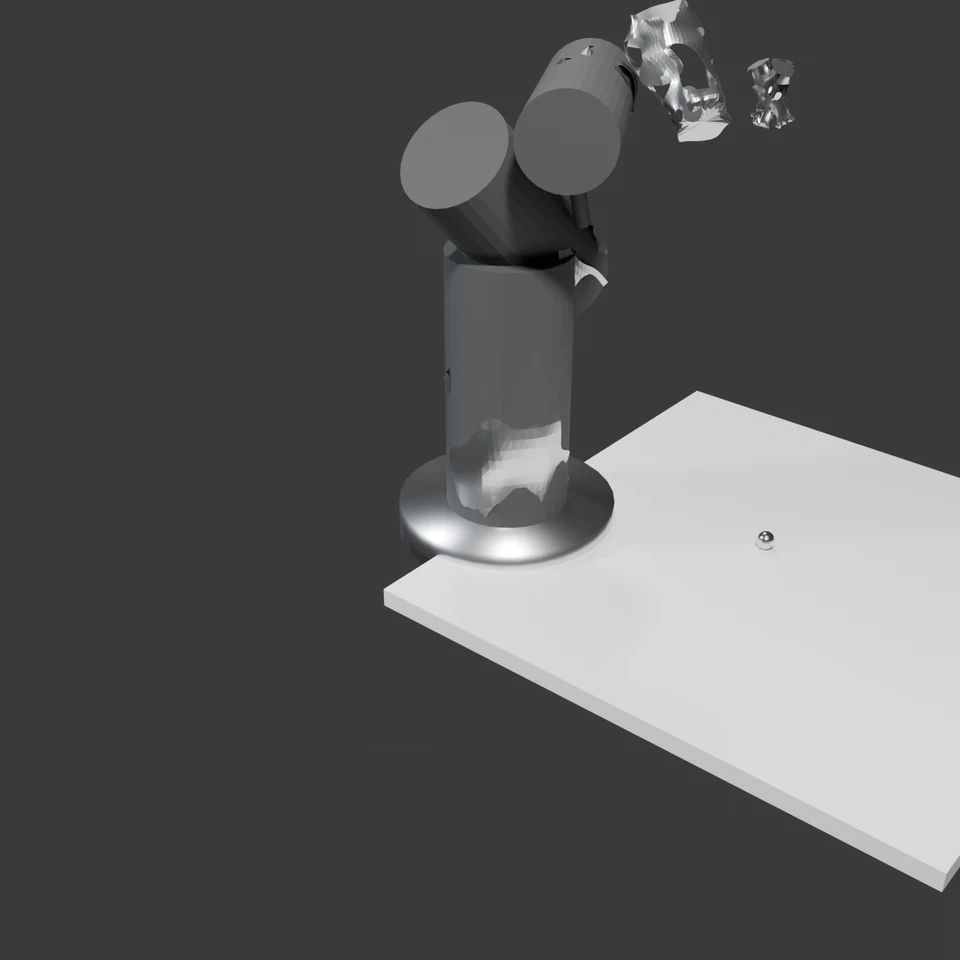
camera + framing set up by the AI contestant
3D Viewport — robotic-arm User Persp
LOADING 3D VIEW
$0.01Cost
175sDuration
6Tool calls
6Turns
Blender 5.1.0MCP 1.22026-07-15
Tokens: 52036/7419Vision: ✓Votes W-L-T: 0-0-0DONE ✓
B-BENCH — TRANSCRIPT Google / Gemma 4 31b It · r1 · 2026-07-15
RUN LOG — robotic-arm · Google / Gemma 4 31b It · r1 · ok
SYSTEM PROMPTthe control — every model on this task got these instructions
PROMPTblender-bench v7HARNESSraw-v2
SHOW FULL PROMPT · 2016 chars
You are participating in Blender-Bench, a public benchmark where AI models complete the same Blender task.

Your result will be compared head-to-head with another model. Anyone on the internet can vote, based only on the published visual outputs they can inspect: the interactive 3D scene and rendered presentation.

Complete the request as well as you can. The benchmark does not prescribe a workflow or visual style; use whichever Blender techniques you consider appropriate. Make the important requirements evident in the published result, save a complete scene, and present the work clearly in every requested output.

The final published capture is rendered by the benchmark from your saved scene using Cycles at 1536 x 1536, 64 samples, denoising enabled, and GPU acceleration when available with a CPU fallback. The saved scene is also exported to GLB with geometry, materials, the contestant camera, and supported lights for interactive inspection. Preview and validate your materials, lighting, color management, and camera composition in Cycles, and do not rely on EEVEE-only effects for the final appearance.

## Harness Instructions

You are operating Blender through the provided tools. The scene starts empty. Build what the user's prompt asks for in the current scene. Work step by step and verify your own work. Before you finish, set up a camera and lighting to frame a single, well-composed presentation image of your result — position and aim the camera, and add or adjust lights so the subject reads clearly. The final benchmark capture overrides the scene render settings and renders in Cycles at 1536x1536, 64 samples, with denoising and GPU acceleration (CPU fallback). Preview and validate materials, lighting, color management, and composition in Cycles; do not rely on EEVEE-only effects. The saved scene is also exported to GLB with geometry, materials, your camera, and supported lights for interactive inspection. When you are finished, reply with the single word DONE and no tool calls.
--TASK robotic-arm: ## Task
Complete the following Blender task:
<task>
A desk-mounted robotic arm with at least four articulated joints, posed mid-reach toward a small object on the desk — but not an industrial catalog part. This arm is generatively designed: its metal frame has the parametric, "AI-optimized" look of topology-optimized engineering — organic load-bearing branches, smooth bone-like transitions, lat…
20:01>>execute_blender_code({"code":"import bpy\nimport bmesh\nimport math\n\ndef create_topology_optimized_segment(name, length, radius, detail=5):\n \"\"\"\n Creates a segment that looks 'topology optimized'.\n It uses a distorted cylinder with holes/cutouts.\n \"\"\"\n mesh = bpy.data.meshes.new(name)\n obj = bpy.data.objects.new(name, mesh)\n bpy.context.collection.objects.link(obj)\n \n bm = b…)
20:01<<Error executing code: Communication error with Blender: Code execution error: BMeshOpsModule: operator "create_cylinder" doesn't exist
20:15>>execute_blender_code({"code":"import bpy\nimport bmesh\nimport math\nimport random\n\ndef create_topology_optimized_segment(name, length, radius):\n \"\"\"\n Creates a segment that looks 'topology optimized'.\n \"\"\"\n mesh = bpy.data.meshes.new(name)\n obj = bpy.data.objects.new(name, mesh)\n bpy.context.collection.objects.link(obj)\n \n bm = bmesh.new()\n \n # Create a cylinder manuall…)
20:15<<Code executed successfully:
21:00ai>thought
<channel|>
21:00>>execute_blender_code({"code":"import bpy\n\n# Enhance the fabric material with a bump map to simulate weave/carbon fiber\ndef enhance_fabric_material(mat_name):\n mat = bpy.data.materials.get(mat_name)\n if not mat:\n return\n \n mat.use_nodes = True\n nodes = mat.node_tree.nodes\n links = mat.node_tree.links\n \n bsdf = nodes.get(\"Principled BSDF\")\n \n # Create a Voronoi or Wav…)
21:00<<Error executing code: Communication error with Blender: Code execution error: name 'math' is not defined
21:00>>get_viewport_screenshot({"user_prompt":"Verification of the robotic arm scene."})
21:02<<
21:02imgimage delivered — get_viewport_screenshot
21:56>>execute_blender_code({"code":"import bpy\nimport bmesh\nimport math\nimport random\n\n# Clear scene\nbpy.ops.object.select_all(action='SELECT')\nbpy.ops.object.delete()\n\ndef create_topology_optimized_segment(name, length, radius, seed=None):\n if seed is not None:\n random.seed(seed)\n \n mesh = bpy.data.meshes.new(name)\n obj = bpy.data.objects.new(name, mesh)\n bpy.context.collection.objects.…)
21:56<<Code executed successfully:
22:03>>execute_blender_code({"code":"import bpy\nimport math\n\n# Update camera for a more dramatic, professional angle\ncam = bpy.data.objects.get(\"Camera\")\nif cam:\n cam.location = (4, -5, 4)\n cam.rotation_euler = (math.radians(60), 0, math.radians(40))\n\n# Add a rim light for better material separation\nbpy.ops.object.light_add(type='AREA', location=(-5, -5, 5))\nrim_light = bpy.context.active_object\nrim_light…)
22:03<<Code executed successfully:
22:04ai>DONE
22:04--status: ok · DONE declared
>
LOADING COMPLETE TRANSCRIPT…