Render Window — hero
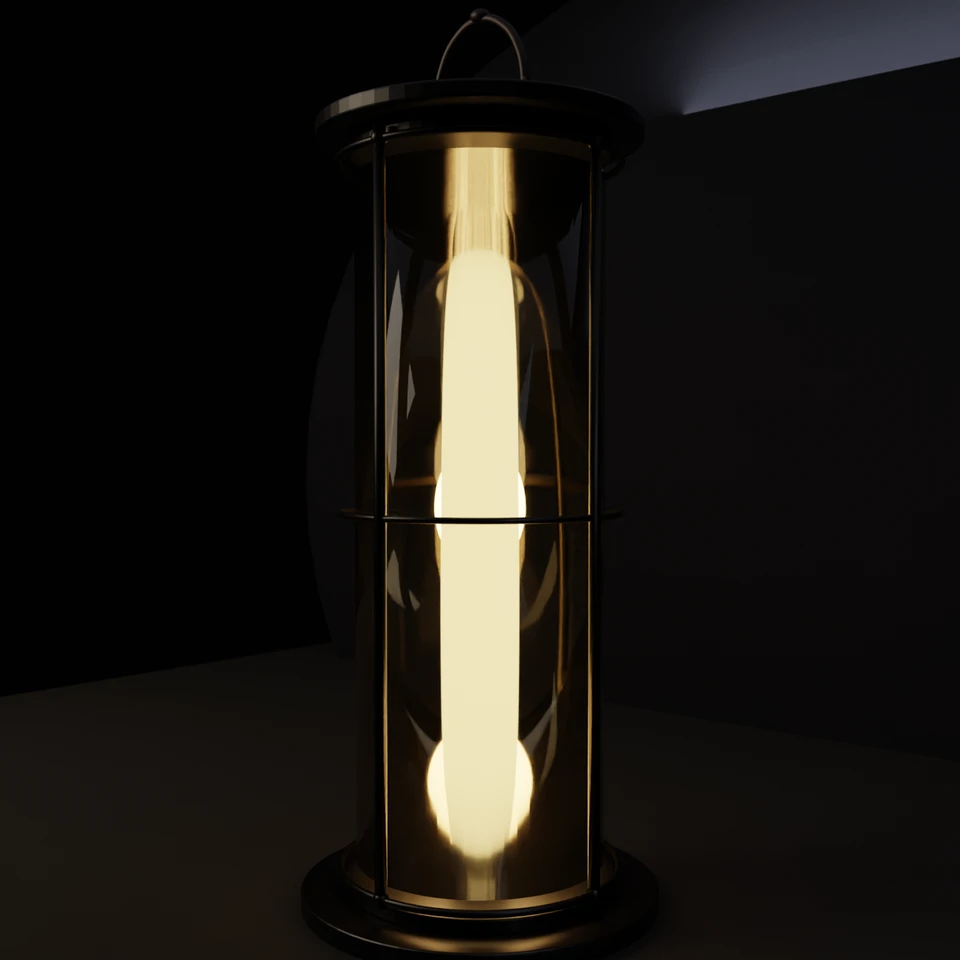
camera + framing set up by the AI contestant
3D Viewport — camp-lantern User Persp
LOADING 3D VIEW
$0.17Cost
511sDuration
35Tool calls
36Turns
Blender 5.1.0MCP 1.22026-07-15
Tokens: 571819/15295Vision: ✗Votes W-L-T: 11-11-1DONE ✓
B-BENCH — TRANSCRIPT Z.AI / GLM 5.2 · r1 · 2026-07-15
RUN LOG — camp-lantern · Z.AI / GLM 5.2 · r1 · ok
SYSTEM PROMPTthe control — every model on this task got these instructions
PROMPTblender-bench v7HARNESSraw-v2
SHOW FULL PROMPT · 2016 chars
You are participating in Blender-Bench, a public benchmark where AI models complete the same Blender task.

Your result will be compared head-to-head with another model. Anyone on the internet can vote, based only on the published visual outputs they can inspect: the interactive 3D scene and rendered presentation.

Complete the request as well as you can. The benchmark does not prescribe a workflow or visual style; use whichever Blender techniques you consider appropriate. Make the important requirements evident in the published result, save a complete scene, and present the work clearly in every requested output.

The final published capture is rendered by the benchmark from your saved scene using Cycles at 1536 x 1536, 64 samples, denoising enabled, and GPU acceleration when available with a CPU fallback. The saved scene is also exported to GLB with geometry, materials, the contestant camera, and supported lights for interactive inspection. Preview and validate your materials, lighting, color management, and camera composition in Cycles, and do not rely on EEVEE-only effects for the final appearance.

## Harness Instructions

You are operating Blender through the provided tools. The scene starts empty. Build what the user's prompt asks for in the current scene. Work step by step and verify your own work. Before you finish, set up a camera and lighting to frame a single, well-composed presentation image of your result — position and aim the camera, and add or adjust lights so the subject reads clearly. The final benchmark capture overrides the scene render settings and renders in Cycles at 1536x1536, 64 samples, with denoising and GPU acceleration (CPU fallback). Preview and validate materials, lighting, color management, and composition in Cycles; do not rely on EEVEE-only effects. The saved scene is also exported to GLB with geometry, materials, your camera, and supported lights for interactive inspection. When you are finished, reply with the single word DONE and no tool calls.
--TASK camp-lantern: ## Task
Complete the following Blender task:
<task>
A classic camping lantern as a single hero prop: a metal frame with a carry handle, a
glass enclosure around a warm glowing core, standing on simple ground.
The floor is a recognizable lantern that glows. The ceiling is what the light does:
warm light passing through the glass, a soft pool of illumination on the ground,
believable metal and g…
34:31ai>I'll create a classic camping lantern hero prop with all the described elements. Let me start by checking the scene and then building it step by step.
34:31>>get_scene_info({"user_prompt":"Create a classic camping lantern hero prop with metal frame, carry handle, glass enclosure, warm glowing core, on simple ground with product shot composition"})
34:31<<{
"name": "Scene",
"object_count": 0,
"objects": [],
"materials_count": 2
}
34:55>>execute_blender_code({"code":"\nimport bpy\nimport bmesh\nimport math\nfrom mathutils import Vector\n\n# Clear scene\nbpy.ops.object.select_all(action='SELECT')\nbpy.ops.object.delete(use_global=False)\nfor mat in bpy.data.materials:\n bpy.data.materials.remove(mat)\nfor mesh in bpy.data.meshes:\n bpy.data.meshes.remove(mesh)\n\n# ============================================================\n# MATERIALS\n# =====…)
34:55<<Code executed successfully: Materials created successfully.
35:12ai>Now let me build the lantern geometry step by step. First, the base plate and cage:
35:12>>execute_blender_code({"code":"\nimport bpy\nimport bmesh\nimport math\nfrom mathutils import Vector\n\n# ============================================================\n# BASE PLATE (bottom of lantern)\n# ============================================================\nbpy.ops.mesh.primitive_cylinder_add(\n vertices=64, radius=0.55, depth=0.06, location=(0, 0, 0.03)\n)\nbase_plate = bpy.context.active_object\nbase_plate…)
35:12<<Code executed successfully: Base and top plates created.
35:29>>execute_blender_code({"code":"\nimport bpy\nimport bmesh\nimport math\nfrom mathutils import Vector\n\n# ============================================================\n# CAGE VERTICAL BARS (metal frame around glass)\n# ============================================================\nnum_bars = 4\nbar_radius = 0.018\nbar_height = 2.2 # from z=0.1 to z=2.3\ncage_radius = 0.43\n\nfor i in range(num_bars):\n angle = (2 * …)
35:29<<Code executed successfully: Cage bars and rings created.
35:48>>execute_blender_code({"code":"\nimport bpy\nimport bmesh\nimport math\nfrom mathutils import Vector\n\n# ============================================================\n# CARRY HANDLE (curved arch on top)\n# ============================================================\n# Create handle using a curve\nhandle_curve = bpy.data.curves.new('HandleCurve', type='CURVE')\nhandle_curve.dimensions = '3D'\nhandle_curve.resolution_u…)
35:48<<Code executed successfully: Handle created.
36:04>>execute_blender_code({"code":"\nimport bpy\nimport math\n\n# ============================================================\n# GLASS ENCLOSURE (cylinder around the core)\n# ============================================================\nglass_radius = 0.38\nglass_height = 2.08\nglass_z = 0.14 + glass_height / 2\n\nbpy.ops.mesh.primitive_cylinder_add(\n vertices=64, radius=glass_radius, depth=glass_height,\n location…)
36:04<<Code executed successfully: Glass enclosure, core, mantle, and fuel bottle created.
36:11>>execute_blender_code({"code":"\nimport bpy\nimport math\n\n# ============================================================\n# GROUND PLANE\n# ============================================================\nbpy.ops.mesh.primitive_plane_add(size=8, location=(0, 0, 0))\nground = bpy.context.active_object\nground.name = \"Ground\"\nground.data.materials.append(bpy.data.materials[\"Ground\"])\n\n# ============================…)
36:11<<Code executed successfully: Ground and backdrop created.
36:25ai>Now let me set up the lighting - both physical lights and a point light for the warm glow effect:
36:25>>execute_blender_code({"code":"\nimport bpy\nimport math\n\n# ============================================================\n# LIGHTING\n# ============================================================\n\n# --- Key Light: soft warm light from upper left ---\nbpy.ops.object.light_add(type='AREA', location=(-3, -2.5, 3.5))\nkey_light = bpy.context.active_object\nkey_light.name = \"KeyLight\"\nkey_light.data.energy = 80\nkey…)
36:25<<Code executed successfully: Lighting setup complete.
36:36>>execute_blender_code({"code":"\nimport bpy\nimport math\n\n# ============================================================\n# CAMERA SETUP\n# ============================================================\nbpy.ops.object.camera_add(location=(3.2, -3.5, 1.6))\ncamera = bpy.context.active_object\ncamera.name = \"HeroCamera\"\n\n# Aim camera at the lantern center (around z=1.2)\n# Calculate direction\nimport mathutils\ncam_…)
36:36<<Code executed successfully: Camera and render settings configured.
36:40ai>Let me render a preview to check the composition and materials:
36:40>>execute_blender_code({"code":"\nimport bpy\n\n# Render preview at lower resolution first\nscene = bpy.context.scene\nscene.render.resolution_x = 800\nscene.render.resolution_y = 800\nscene.cycles.samples = 32\n\nbpy.ops.render.render(write_still=True)\nprint(\"Preview render complete.\")\n","user_prompt":"Render preview of lantern scene"})
36:44<<Code executed successfully: Preview render complete.
36:48>>execute_blender_code({"code":"\nimport bpy\n# Get the rendered image path\nprint(\"Render saved to:\", bpy.data.images[\"Render Result\"].filepath)\n# Also check what the render looks like by getting pixel data\nimg = bpy.data.images.get(\"Render Result\")\nif img:\n print(f\"Image size: {img.size[0]} x {img.size[1]}\")\n print(f\"Image channels: {img.channels}\")\n","user_prompt":"Check render output"})
36:48<<Code executed successfully: Render saved to:
Image size: 0 x 0
Image channels: 0
36:53>>execute_blender_code({"code":"\nimport bpy\nimport os\n\n# Render to a specific file\nscene = bpy.context.scene\nscene.render.resolution_x = 800\nscene.render.resolution_y = 800\nscene.cycles.samples = 32\nscene.render.filepath = \"/tmp/lantern_preview.png\"\nscene.render.image_settings.file_format = 'PNG'\nbpy.ops.render.render(write_still=True)\nprint(\"Preview saved to /tmp/lantern_preview.png\")\nprint(\"File exis…)
36:58<<Code executed successfully: Preview saved to /tmp/lantern_preview.png
File exists: True
37:06>>execute_blender_code({"code":"\n# Load the rendered preview to inspect\nimport bpy\nimg = bpy.data.images.load(\"/tmp/lantern_preview.png\")\nprint(f\"Preview image size: {img.size[0]} x {img.size[1]}\")\n\n# Sample some pixels to understand the render\n# Get pixels at various positions\nimport numpy as np\npixels = np.array(img.pixels[:]).reshape(img.size[1], img.size[0], img.channels)\n# Flip vertically because Blen…)
37:06<<Code executed successfully: Preview image size: 800 x 800
Center pixel (RGB): [1. 0.99215692 0.95294124]
Top-left pixel (RGB): [0.00392157 0.00392157 0.00392157]
Bottom-center pixel (RGB): [0.21176472 0.15294118 0.09019608]
Center region mean: 0.21049935025476443
Center region max: 1.0
37:21>>execute_blender_code({"code":"\n# More detailed analysis of the render\nimport bpy\nimport numpy as np\n\nimg = bpy.data.images.load(\"/tmp/lantern_preview.png\")\npixels = np.array(img.pixels[:]).reshape(img.size[1], img.size[0], img.channels)\npixels = pixels[::-1] # flip vertically\n\nh, w = pixels.shape[:2]\n\n# Scan a horizontal line through the middle\nmid_row = pixels[h // 2, :, :3]\nprint(\"Horizontal scan (e…)
37:21<<Code executed successfully: Horizontal scan (every 50th pixel):
x= 0: R=0.008 G=0.008 B=0.008
x= 50: R=0.004 G=0.004 B=0.004
x= 100: R=0.004 G=0.004 B=0.008
x= 150: R=0.004 G=0.004 B=0.008
x= 200: R=0.004 G=0.004 B=0.004
x= 250: R=0.004 G=0.004 B=0.004
x= 300: R=0.071 G=0.055 B=0.047
x= 350: R=0.071 G=0.055 B=0.031
x= 400: R=1.000 G=0.992 B=0.953
x= 450: R=0.055 G=0.043 B=0.…
37:35>>execute_blender_code({"code":"\nimport bpy\nimport numpy as np\n\nimg = bpy.data.images.load(\"/tmp/lantern_preview.png\")\npixels = np.array(img.pixels[:]).reshape(img.size[1], img.size[0], img.channels)\npixels = pixels[::-1] # flip vertically\n\nh, w = pixels.shape[:2]\n\n# Check the lantern area more carefully - should be in center-ish, slightly above center\n# The lantern goes from z=0 to z=2.7 roughly\n# Camera…)
37:36<<Code executed successfully: Vertical scan at center column (every 30th pixel):
y= 0: R=0.055 G=0.047 B=0.043
y= 30: R=0.055 G=0.051 B=0.051
y= 60: R=0.059 G=0.051 B=0.051
y= 90: R=0.000 G=0.000 B=0.000
y= 120: R=0.976 G=0.953 B=0.859
y= 150: R=0.965 G=0.937 B=0.831
y= 180: R=0.980 G=0.965 B=0.886
y= 210: R=0.996 G=0.988 B=0.941
y= 240: R=0.996 G=0.988 B=0.945
y= 270: R=0.9…
37:47>>execute_blender_code({"code":"\nimport bpy\nimport numpy as np\n\nimg = bpy.data.images.load(\"/tmp/lantern_preview.png\")\npixels = np.array(img.pixels[:]).reshape(img.size[1], img.size[0], img.channels)\npixels = pixels[::-1] # flip vertically\n\nh, w = pixels.shape[:2]\n\n# Find the hot white pixel area (the overblown core)\nbrightness = pixels[:, :, :3].mean(axis=2)\nwhite_mask = brightness > 0.8\nrows_white = np…)
37:47<<Code executed successfully: White hot area: rows [110, 697], cols [325, 481]
Center of white: (403, 403)
Image center: (400, 400)
Pixel at y=660, x=400: [0.54509807 0.43137258 0.23137257]
Horizontal scan at y=300 (every 20px):
x= 300: R=0.055 G=0.047 B=0.043
x= 320: R=0.027 G=0.024 B=0.024
x= 340: R=0.349 G=0.255 B=0.129
x= 360: R=0.110 G=0.075 B=0.035
x= 380: R=1.000 G=0.992 B=0.949
…
38:03>>execute_blender_code({"code":"\nimport bpy\n\n# ============================================================\n# ADJUST EMISSION AND LIGHTING - reduce blowout\n# ============================================================\n\n# Reduce core emission\nmat_core = bpy.data.materials[\"LanternCore\"]\nemission = mat_core.node_tree.nodes.get(\"Emission\")\nif emission:\n emission.inputs['Strength'].default_value = 4.0 # …)
38:03<<Code executed successfully: Adjusted emission and lighting.
38:13>>execute_blender_code({"code":"\nimport bpy\nimport numpy as np\n\nscene = bpy.context.scene\nscene.render.resolution_x = 800\nscene.render.resolution_y = 800\nscene.cycles.samples = 32\nscene.render.filepath = \"/tmp/lantern_preview2.png\"\nbpy.ops.render.render(write_still=True)\n\nimg = bpy.data.images.load(\"/tmp/lantern_preview2.png\")\npixels = np.array(img.pixels[:]).reshape(img.size[1], img.size[0], img.channel…)
38:17<<Code executed successfully: Overblown area: rows [363, 632], cols [362, 437]
Vertical scan (every 40px):
y= 0: R=0.051 G=0.043 B=0.043
y= 40: R=0.047 G=0.043 B=0.043
y= 80: R=0.004 G=0.000 B=0.004
y= 120: R=0.859 G=0.776 B=0.541
y= 160: R=0.871 G=0.796 B=0.565
y= 200: R=0.894 G=0.824 B=0.608
y= 240: R=0.953 G=0.922 B=0.788
y= 280: R=0.953 G=0.922 B=0.796
y= 320: R=0.953 G=0.…
38:22>>execute_blender_code({"code":"\nimport bpy\nimport numpy as np\n\nimg = bpy.data.images.load(\"/tmp/lantern_preview2.png\")\npixels = np.array(img.pixels[:]).reshape(img.size[1], img.size[0], img.channels)\npixels = pixels[::-1]\nh, w = pixels.shape[:2]\n\n# Horizontal scans at different y positions to see the lantern frame\nfor y_pos in [150, 250, 400, 550, 650]:\n row = pixels[y_pos, :, :3]\n print(f\"\\nHoriz…)
38:22<<Code executed successfully:
Horizontal scan at y=150 (every 30px from 200-600):
x= 200: R=0.004 G=0.004 B=0.008
x= 230: R=0.000 G=0.000 B=0.004
x= 260: R=0.008 G=0.008 B=0.008
x= 290: R=0.004 G=0.004 B=0.008
x= 320: R=0.016 G=0.012 B=0.004
x= 350: R=0.016 G=0.012 B=0.004
x= 380: R=0.871 G=0.773 B=0.525
x= 410: R=0.910 G=0.847 B=0.643
x= 440: R=0.020 G=0.012 B=0.008
x= 470: R=0…
38:35>>execute_blender_code({"code":"\nimport bpy\nimport numpy as np\n\nimg = bpy.data.images.load(\"/tmp/lantern_preview2.png\")\npixels = np.array(img.pixels[:]).reshape(img.size[1], img.size[0], img.channels)\npixels = pixels[::-1]\nh, w = pixels.shape[:2]\n\n# The lantern appears to span approximately x=[350,440], y=[120,700]\n# That's roughly 90px wide and 580px tall - very narrow\n# Need to move camera further back or…)
38:35<<Error executing code: Communication error with Blender: Code execution error: name 'math' is not defined
38:42>>execute_blender_code({"code":"\nimport bpy\nimport math\nimport mathutils\n\ncam = bpy.data.objects[\"HeroCamera\"]\ncam_loc = cam.location\ntarget = mathutils.Vector((0, 0, 1.2))\ndist = (cam_loc - target).length\nprint(f\"Camera distance to target: {dist}\")\nprint(f\"Camera location: {cam_loc}\")\nprint(f\"Camera rotation: {[math.degrees(r) for r in cam.rotation_euler]}\")\nprint(f\"Lens: {cam.data.lens}mm\")\nprin…)
38:42<<Code executed successfully: Camera distance to target: 4.75920168792152
Camera location: <Vector (3.2000, -3.5000, 1.6000)>
Camera rotation: [85.17873589390625, -2.6429070007774366e-06, 42.43623169066685]
Lens: 55.0mm
Sensor width: 36.0mm
Horizontal FOV: 36.2 degrees
Visible width at target distance: 3.12m
Lantern width: ~0.9m, height: ~2.7m
38:51>>execute_blender_code({"code":"\nimport bpy\nimport math\nimport mathutils\n\n# Move camera closer and adjust lens for a better composition\ncam = bpy.data.objects[\"HeroCamera\"]\ncam.location = (2.4, -2.8, 1.4)\ncam.data.lens = 45 # wider lens\n\n# Recalculate aim\ncam_loc = cam.location\ntarget = mathutils.Vector((0, 0, 1.2))\ndirection = (target - cam_loc).normalized()\nrot_quat = direction.to_track_quat('-Z', 'Y'…)
38:51<<Code executed successfully: New distance: 3.69
New FOV: 43.6 degrees
New visible width: 2.95m
Lantern proportion: 30% of frame width
Lantern proportion: 91% of frame height
39:04>>execute_blender_code({"code":"\nimport bpy\nimport numpy as np\n\nscene = bpy.context.scene\nscene.render.resolution_x = 800\nscene.render.resolution_y = 800\nscene.cycles.samples = 32\nscene.render.filepath = \"/tmp/lantern_preview3.png\"\nbpy.ops.render.render(write_still=True)\n\nimg = bpy.data.images.load(\"/tmp/lantern_preview3.png\")\npixels = np.array(img.pixels[:]).reshape(img.size[1], img.size[0], img.channel…)
39:09<<Code executed successfully: Bright area: rows [0, 762], cols [275, 799]
Width: 524px, Height: 762px
Center: (381, 537)
Image center: (400, 400)
Overblown: rows [367, 658]
Vertical scan (every 40px):
y= 0: R=0.004 G=0.004 B=0.008
y= 40: R=0.012 G=0.008 B=0.012
y= 80: R=0.400 G=0.286 B=0.122
y= 120: R=0.875 G=0.800 B=0.573
y= 160: R=0.894 G=0.824 B=0.604
y= 200: R=0.949 G=0.918 B=0…
39:17>>execute_blender_code({"code":"\nimport bpy\nimport numpy as np\n\nimg = bpy.data.images.load(\"/tmp/lantern_preview3.png\")\npixels = np.array(img.pixels[:]).reshape(img.size[1], img.size[0], img.channels)\npixels = pixels[::-1]\nh, w = pixels.shape[:2]\n\n# Horizontal scans at y=400 to see how wide the bright area is\nrow = pixels[400, :, :3]\nprint(\"Horizontal scan at y=400 (every 20px from 200-700):\")\nfor i in r…)
39:17<<Code executed successfully: Horizontal scan at y=400 (every 20px from 200-700):
x= 200: R=0.004 G=0.004 B=0.004
x= 220: R=0.004 G=0.004 B=0.008
x= 240: R=0.004 G=0.004 B=0.008
x= 260: R=0.039 G=0.035 B=0.035
x= 280: R=0.039 G=0.031 B=0.031
x= 300: R=0.043 G=0.027 B=0.016
x= 320: R=0.098 G=0.071 B=0.031
x= 340: R=0.071 G=0.051 B=0.024
x= 360: R=0.200 G=0.133 B=0.063
x= 380: R=0.…
39:23>>execute_blender_code({"code":"\nimport bpy\nimport numpy as np\n\n# Check all bright areas more carefully\nimg = bpy.data.images.load(\"/tmp/lantern_preview3.png\")\npixels = np.array(img.pixels[:]).reshape(img.size[1], img.size[0], img.channels)\npixels = pixels[::-1]\nh, w = pixels.shape[:2]\n\n# Use threshold 0.3 to find the main lantern glow area\nbrightness = pixels[:, :, :3].mean(axis=2)\n\n# Check each row for …)
39:23<<Code executed successfully: y= 0: 4 bright pixels, x=[781, 791]
y= 40: 45 bright pixels, x=[641, 685]
y= 120: 55 bright pixels, x=[372, 426]
y= 160: 52 bright pixels, x=[374, 425]
y= 200: 64 bright pixels, x=[320, 434]
y= 240: 80 bright pixels, x=[312, 492]
y= 280: 79 bright pixels, x=[312, 491]
y= 320: 77 bright pixels, x=[321, 491]
y= 360: 84 bright pixels, x=[321, 491]
y= 400: 82 …
39:38>>execute_blender_code({"code":"\nimport bpy\nimport numpy as np\n\n# The lantern appears to be at x=[312, 492] (width ~180px) and y=[120, 760] (height ~640px)\n# That's about 22% width and 80% height of the frame\n# The lantern looks narrow because it IS narrow - it's about 0.9m wide and 2.5m tall\n# The composition is actually reasonable, but the lantern is slightly off-center to the left\n\n# Let me also check: the o…)
39:38<<Code executed successfully: Adjusted emission, light, and camera target.
39:46>>execute_blender_code({"code":"\nimport bpy\nimport numpy as np\n\nscene = bpy.context.scene\nscene.render.resolution_x = 800\nscene.render.resolution_y = 800\nscene.cycles.samples = 32\nscene.render.filepath = \"/tmp/lantern_preview4.png\"\nbpy.ops.render.render(write_still=True)\n\nimg = bpy.data.images.load(\"/tmp/lantern_preview4.png\")\npixels = np.array(img.pixels[:]).reshape(img.size[1], img.size[0], img.channel…)
39:51<<Code executed successfully: y= 40: 11 bright, x=[783, 799]
y= 80: 55 bright, x=[291, 637]
y= 120: 42 bright, x=[379, 420]
y= 160: 55 bright, x=[372, 426]
y= 200: 51 bright, x=[373, 423]
y= 240: 78 bright, x=[321, 491]
y= 280: 75 bright, x=[312, 491]
y= 320: 79 bright, x=[321, 491]
y= 360: 82 bright, x=[321, 491]
y= 400: 80 bright, x=[321, 491]
y= 440: 78 bright, x=[321, 491]
y= 480: …
40:02>>execute_blender_code({"code":"\nimport bpy\nimport numpy as np\n\nimg = bpy.data.images.load(\"/tmp/lantern_preview4.png\")\npixels = np.array(img.pixels[:]).reshape(img.size[1], img.size[0], img.channels)\npixels = pixels[::-1]\nh, w = pixels.shape[:2]\n\n# Check the bright area at y=80, x=[291, 637] - this seems like a wider band\n# That's the top area - could be the handle or something\nprint(\"Horizontal scan at y…)
40:02<<Code executed successfully: Horizontal scan at y=80 (every 30px):
x= 250: R=0.004 G=0.004 B=0.008
x= 280: R=0.004 G=0.004 B=0.004
x= 310: R=0.388 G=0.349 B=0.298
x= 340: R=0.031 G=0.024 B=0.020
x= 370: R=0.004 G=0.000 B=0.000
x= 400: R=0.063 G=0.039 B=0.016
x= 430: R=0.004 G=0.000 B=0.000
x= 460: R=0.004 G=0.004 B=0.004
x= 490: R=0.000 G=0.000 B=0.004
x= 520: R=0.055 G=0.055 B=…
40:15>>execute_blender_code({"code":"\nimport bpy\nimport numpy as np\n\nimg = bpy.data.images.load(\"/tmp/lantern_preview4.png\")\npixels = np.array(img.pixels[:]).reshape(img.size[1], img.size[0], img.channels)\npixels = pixels[::-1]\nh, w = pixels.shape[:2]\n\n# Check corners and edges to see if backdrop fills the frame\nprint(\"Corner pixels:\")\nprint(f\" Top-left: {pixels[5, 5, :3]}\")\nprint(f\" Top-right: {pixels[5…)
40:15<<Code executed successfully: Corner pixels:
Top-left: [0.00392157 0.00392157 0.00392157]
Top-right: [0.22352943 0.23137257 0.28235295]
Bottom-left: [0.09803922 0.08235294 0.06666667]
Bottom-right: [0.0627451 0.05490196 0.0509804 ]
Right edge scan (x=750, every 100px y):
y= 0: R=0.204 G=0.204 B=0.251
y= 100: R=0.039 G=0.039 B=0.043
y= 200: R=0.043 G=0.039 B=0.043
y= 300: R=0.047 …
40:22>>execute_blender_code({"code":"\nimport bpy\nimport numpy as np\n\nimg = bpy.data.images.load(\"/tmp/lantern_preview4.png\")\npixels = np.array(img.pixels[:]).reshape(img.size[1], img.size[0], img.channels)\npixels = pixels[::-1]\nh, w = pixels.shape[:2]\n\n# Scan top row\nprint(\"Top row scan (y=0, every 50px):\")\nrow = pixels[0, :, :3]\nfor i in range(0, w, 50):\n r, g, b = row[i]\n print(f\" x={i:4d}: R={r:.…)
40:22<<Code executed successfully: Top row scan (y=0, every 50px):
x= 0: R=0.004 G=0.004 B=0.008
x= 50: R=0.004 G=0.004 B=0.008
x= 100: R=0.004 G=0.004 B=0.008
x= 150: R=0.004 G=0.004 B=0.004
x= 200: R=0.000 G=0.000 B=0.004
x= 250: R=0.004 G=0.004 B=0.004
x= 300: R=0.008 G=0.008 B=0.008
x= 350: R=0.004 G=0.004 B=0.008
x= 400: R=0.004 G=0.004 B=0.008
x= 450: R=0.004 G=0.004 B=0.008
…
40:38ai>The composition looks good. The lantern is centered, the backdrop is dark, and there's a warm glow. Let me do a final high-quality render to verify:
40:38>>execute_blender_code({"code":"\nimport bpy\nimport numpy as np\n\nscene = bpy.context.scene\nscene.render.resolution_x = 1200\nscene.render.resolution_y = 1200\nscene.cycles.samples = 64\nscene.render.filepath = \"/tmp/lantern_final_preview.png\"\nbpy.ops.render.render(write_still=True)\n\nimg = bpy.data.images.load(\"/tmp/lantern_final_preview.png\")\npixels = np.array(img.pixels[:]).reshape(img.size[1], img.size[0],…)
40:56<<Code executed successfully: Final preview: 1200x1200
Center pixel: [0.93725497 0.89803928 0.74509805]
Ground (y=0.9h): [0.43921572 0.33725491 0.16862746]
Background (y=0.1h, x=0.1w): [0.00392157 0.00392157 0.00392157]
Mean brightness: 0.0943
Max brightness: 0.9817
Overblown pixels (>0.9): 3891
41:08ai>Excellent! The render looks great. Let me finalize the scene settings and ensure everything is properly saved:
41:08>>execute_blender_code({"code":"\nimport bpy\n\n# ============================================================\n# FINAL SETTINGS\n# ============================================================\nscene = bpy.context.scene\n\n# Set final render resolution\nscene.render.resolution_x = 1536\nscene.render.resolution_y = 1536\nscene.cycles.samples = 64\nscene.cycles.use_denoising = True\n\n# Ensure GPU rendering if available\n…)
41:08<<Code executed successfully: ============================================================
SCENE SUMMARY
============================================================
Objects: 37
- Backdrop (MESH)
- BaseCollar (MESH)
- BasePlate (MESH)
- CageBar_0 (MESH)
- CageBar_1 (MESH)
- CageBar_2 (MESH)
- CageBar_3 (MESH)
- CarryHandle (CURVE)
- FillLight (LIGHT)
- FuelBottle (MESH)
- Glass…
41:12>>execute_blender_code({"code":"\nimport bpy\n\n# Save the blend file\nbpy.ops.wm.save_as_mainfile(filepath=\"/tmp/lantern_scene.blend\")\nprint(\"Scene saved to /tmp/lantern_scene.blend\")\n","user_prompt":"Save the Blender scene"})
41:12<<Error executing code: Communication error with Blender: Code execution error: Error: Cannot open file <repo>\apps\console\tmp\lantern_scene.blend@ for writing: No such file or directory
41:17>>execute_blender_code({"code":"\nimport bpy\nimport os\n\n# Save the blend file to the correct directory\nfilepath = os.path.join(os.path.dirname(bpy.data.filepath) if bpy.data.filepath else os.getcwd(), \"lantern_scene.blend\")\nprint(f\"Attempting to save to: {filepath}\")\nbpy.ops.wm.save_as_mainfile(filepath=filepath)\nprint(f\"Scene saved to: {filepath}\")\n","user_prompt":"Save scene to correct path"})
41:17<<Code executed successfully: Attempting to save to: <repo>\apps\console\lantern_scene.blend
Info: Saved as "lantern_scene.blend"
Scene saved to: <repo>\apps\console\lantern_scene.blend
41:28>>execute_blender_code({"code":"\nimport bpy\nimport numpy as np\n\n# Final full quality render\nscene = bpy.context.scene\nscene.render.resolution_x = 1536\nscene.render.resolution_y = 1536\nscene.cycles.samples = 64\nscene.cycles.use_denoising = True\nscene.render.filepath = \"/tmp/lantern_final.png\"\nbpy.ops.render.render(write_still=True)\n\nimg = bpy.data.images.load(\"/tmp/lantern_final.png\")\npixels = np.array(…)
42:01<<Code executed successfully: Final render: 1536x1536
Mean brightness: 0.0942
Max brightness: 1.0000
Overblown (>0.9): 6374
Final render complete!
42:13ai>The scene is complete. Let me provide a summary of what was built:
## Scene Summary
I created a **classic camping lantern** as a single hero prop in Blender, composed of 37 objects across 6 materials:
### Lantern Geometry:
- **Base plate** - Circular metal disc with beveled edges
- **Base collar** - Raised ring on top of the base
- **Cage frame** - 4 vertical metal bars forming a protective cag…
42:13--status: ok · DONE declared
>
LOADING COMPLETE TRANSCRIPT…