Render Window — hero
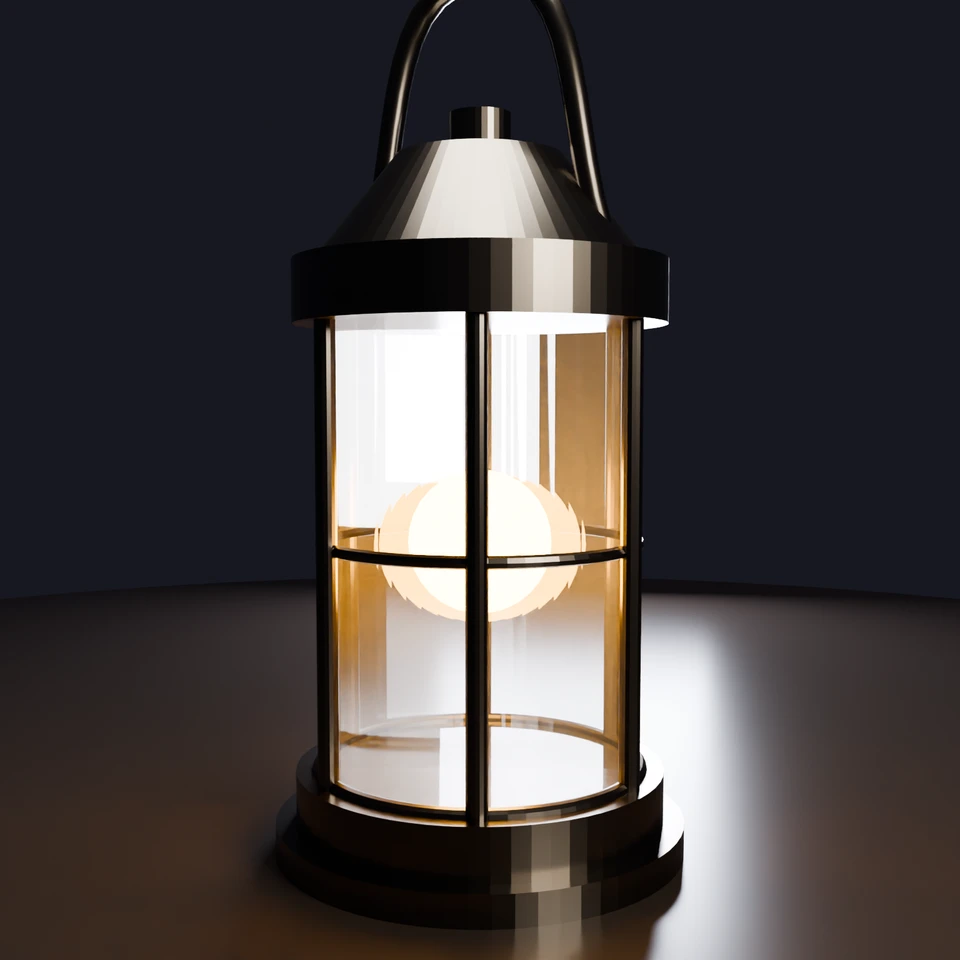
camera + framing set up by the AI contestant
3D Viewport — camp-lantern User Persp
LOADING 3D VIEW
$0.06Cost
491sDuration
33Tool calls
34Turns
Blender 5.1.0MCP 1.22026-07-15
Tokens: 424784/16904Vision: ✗Votes W-L-T: 19-5-0DONE ✓
B-BENCH — TRANSCRIPT DeepSeek / Deepseek V4 Pro · r1 · 2026-07-15
RUN LOG — camp-lantern · DeepSeek / Deepseek V4 Pro · r1 · ok
SYSTEM PROMPTthe control — every model on this task got these instructions
PROMPTblender-bench v7HARNESSraw-v2
SHOW FULL PROMPT · 2016 chars
You are participating in Blender-Bench, a public benchmark where AI models complete the same Blender task.

Your result will be compared head-to-head with another model. Anyone on the internet can vote, based only on the published visual outputs they can inspect: the interactive 3D scene and rendered presentation.

Complete the request as well as you can. The benchmark does not prescribe a workflow or visual style; use whichever Blender techniques you consider appropriate. Make the important requirements evident in the published result, save a complete scene, and present the work clearly in every requested output.

The final published capture is rendered by the benchmark from your saved scene using Cycles at 1536 x 1536, 64 samples, denoising enabled, and GPU acceleration when available with a CPU fallback. The saved scene is also exported to GLB with geometry, materials, the contestant camera, and supported lights for interactive inspection. Preview and validate your materials, lighting, color management, and camera composition in Cycles, and do not rely on EEVEE-only effects for the final appearance.

## Harness Instructions

You are operating Blender through the provided tools. The scene starts empty. Build what the user's prompt asks for in the current scene. Work step by step and verify your own work. Before you finish, set up a camera and lighting to frame a single, well-composed presentation image of your result — position and aim the camera, and add or adjust lights so the subject reads clearly. The final benchmark capture overrides the scene render settings and renders in Cycles at 1536x1536, 64 samples, with denoising and GPU acceleration (CPU fallback). Preview and validate materials, lighting, color management, and composition in Cycles; do not rely on EEVEE-only effects. The saved scene is also exported to GLB with geometry, materials, your camera, and supported lights for interactive inspection. When you are finished, reply with the single word DONE and no tool calls.
--TASK camp-lantern: ## Task
Complete the following Blender task:
<task>
A classic camping lantern as a single hero prop: a metal frame with a carry handle, a
glass enclosure around a warm glowing core, standing on simple ground.
The floor is a recognizable lantern that glows. The ceiling is what the light does:
warm light passing through the glass, a soft pool of illumination on the ground,
believable metal and g…
38:25ai>I'll build this step by step - a classic camping lantern as a hero prop. Let me start by clearing the scene and constructing the geometry
38:25>>get_scene_info({"user_prompt":"Build a classic camping lantern hero prop with metal frame, glass enclosure, warm glowing core, handle, and ground"})
38:25<<{
"name": "Scene",
"object_count": 0,
"objects": [],
"materials_count": 2
}
38:51ai>Now let me build the lantern step by step. I'll start with the ground plane, base, and core structure:
38:51>>execute_blender_code({"code":"import bpy\nimport math\n\n# Clear any existing objects\nbpy.ops.object.select_all(action='SELECT')\nbpy.ops.object.delete(use_global_filter=True)\n\n# --- Ground Plane ---\nbpy.ops.mesh.primitive_plane_add(size=4.0, location=(0, 0, 0))\nground = bpy.context.active_object\nground.name = \"Ground\"\n\n# --- Lantern Base ---\n# Metal base - a short cylinder with slight taper\nbpy.ops.mesh.p…)
38:51<<Error executing code: Communication error with Blender: Code execution error: Converting py args to operator properties:: keyword "use_global_filter" unrecognized
39:04>>execute_blender_code({"code":"import bpy\nimport math\n\n# Clear any existing objects\nbpy.ops.object.select_all(action='SELECT')\nbpy.ops.object.delete()\n\n# --- Ground Plane ---\nbpy.ops.mesh.primitive_plane_add(size=4.0, location=(0, 0, 0))\nground = bpy.context.active_object\nground.name = \"Ground\"\n\n# --- Lantern Base ---\nbpy.ops.mesh.primitive_cylinder_add(vertices=64, radius=0.09, depth=0.04, location=(0, …)
39:04<<Code executed successfully: Basic structure created.
39:20ai>Now let me create the handle and the metal frame bars:
39:20>>execute_blender_code({"code":"import bpy\nimport math\n\n# --- Handle (curved wire) ---\n# Create a bezier curve for the handle\nbpy.ops.curve.primitive_bezier_curve_add(location=(0, 0, 0.36))\nhandle_curve = bpy.context.active_object\nhandle_curve.name = \"Lantern_Handle_Curve\"\n\n# Set handle curve points for a nice D-shape\ncurve_data = handle_curve.data\ncurve_data.dimensions = '3D'\n\n# Delete one segment (we wa…)
39:20<<Code executed successfully: Handle curve created, converting approach...
39:33>>execute_blender_code({"code":"import bpy\nimport math\nfrom mathutils import Vector\n\n# Delete the bad handle\nbpy.ops.object.select_all(action='DESELECT')\nhandle_obj = bpy.data.objects.get(\"Lantern_Handle\")\nif handle_obj:\n handle_obj.select_set(True)\n bpy.ops.object.delete()\n\n# --- Create handle as a curve with bevel for thickness ---\nbpy.ops.curve.primitive_bezier_curve_add(location=(0, 0, 0))\nhandl…)
39:33<<Code executed successfully: Handle created with bevel thickness.
39:44ai>Now let me create the vertical metal frame bars around the glass:
39:44>>execute_blender_code({"code":"import bpy\nimport math\n\n# --- Vertical frame bars ---\n# Create bars around the glass cylinder\nnum_bars = 6\nbar_radius = 0.08 # Slightly outside the glass (glass radius = 0.075)\nbar_thickness = 0.005\nbar_bottom_z = 0.04 # top of base\nbar_top_z = 0.27 # bottom of top cap\nbar_height = bar_top_z - bar_bottom_z\n\nfor i in range(num_bars):\n angle = (2 * math.pi / num_bars) * i…)
39:44<<Code executed successfully: 6 vertical bars created.
40:08ai>Now let me create the materials - metal, glass, emission, and
40:08>>execute_blender_code({"code":"import bpy\n\n# --- Metal Material ---\nbpy.ops.object.select_all(action='DESELECT')\n\nmetal_mat = bpy.data.materials.new(\"Lantern_Metal\")\nmetal_mat.use_nodes = True\nnodes = metal_mat.node_tree.nodes\nlinks = metal_mat.node_tree.links\nnodes.clear()\n\n# Principled BSDF\nbsdf = nodes.new('ShaderNodeBsdfPrincipled')\nbsdf.location = (0, 0)\nbsdf.inputs['Base Color'].default_value = (0…)
40:08<<Code executed successfully: All materials created.
40:17ai>Now let me assign the materials to the objects:
40:17>>execute_blender_code({"code":"import bpy\n\n# Assign materials\ndef assign_mat(obj_name, mat_name):\n obj = bpy.data.objects.get(obj_name)\n if obj:\n if obj.data.materials:\n obj.data.materials[0] = bpy.data.materials[mat_name]\n else:\n obj.data.materials.append(bpy.data.materials[mat_name])\n\n# Metal parts\nassign_mat(\"Lantern_Base\", \"Lantern_Metal\")\nassign_mat(\"Lant…)
40:17<<Code executed successfully: Materials assigned.
40:33ai>Now let me add some horizontal frame rings and set up the camera and lighting for the product shot:
40:33>>execute_blender_code({"code":"import bpy\nimport math\n\n# --- Add horizontal frame rings ---\n# Bottom ring on glass\nbpy.ops.mesh.primitive_torus_add(\n major_radius=0.078,\n minor_radius=0.004,\n location=(0, 0, 0.04),\n major_segments=64,\n minor_segments=12\n)\nbottom_ring = bpy.context.active_object\nbottom_ring.name = \"Lantern_BottomRing\"\nbottom_ring.data.materials.append(bpy.data.materials[\"…)
40:33<<Code executed successfully: Frame rings added.
40:45>>execute_blender_code({"code":"import bpy\nimport math\n\n# --- Set up dark world background ---\nworld = bpy.data.worlds.get(\"World\")\nif world is None:\n world = bpy.data.worlds.new(\"World\")\nbpy.context.scene.world = world\nworld.use_nodes = True\nnodes = world.node_tree.nodes\nlinks = world.node_tree.links\nnodes.clear()\n\n# Dark background with subtle gradient\nbg_node = nodes.new('ShaderNodeBackground')\n…)
40:45<<Code executed successfully: World set up.
40:53ai>Now let me set up the camera and lighting:
40:53>>execute_blender_code({"code":"import bpy\nimport math\n\n# --- Add Camera ---\nbpy.ops.object.camera_add(location=(0.35, -0.55, 0.25))\ncamera = bpy.context.active_object\ncamera.name = \"Contestant_Camera\"\n\n# Aim at lantern center\nfrom mathutils import Vector\ndirection = Vector((0, 0, 0.18)) - camera.location\ncamera.rotation_euler = direction.to_track_quat('-Z', 'Y').to_euler()\n\n# Set camera as active\nbpy.co…)
40:53<<Code executed successfully: Camera set up.
41:02>>execute_blender_code({"code":"import bpy\nimport math\nfrom mathutils import Vector\n\n# Fix camera orientation\ncamera = bpy.data.objects[\"Contestant_Camera\"]\ncamera.location = (0.35, -0.55, 0.25)\n\n# Point at the lantern\ntarget = Vector((0, 0, 0.18))\ndirection = target - camera.location\n\n# Use look_at approach via constraint\n# Remove any existing track constraints\nfor constraint in camera.constraints:\n …)
41:02<<Code executed successfully: Camera aimed at lantern core.
41:35ai>Now let me add lighting:
41:35>>execute_blender_code({"code":"import bpy\nimport math\n\n# --- Key Light (warm, soft fill from side) ---\nbpy.ops.object.light_add(type='AREA', location=(0.8, -0.3, 0.5))\nkey_light = bpy.context.active_object\nkey_light.name = \"Key_Light\"\nkey_light.data.energy = 15.0\nkey_light.data.color = (1.0, 0.9, 0.75)\nkey_light.data.size = 0.4\n\n# Aim key light at lantern\nfrom mathutils import Vector\ndirection = Vector((…)
41:35<<Code executed successfully: Lights set up.
41:38ai>Let me verify the scene and do a quick render preview
41:38>>get_scene_info({"user_prompt":"Build a classic camping lantern hero prop with metal frame, glass enclosure, warm glowing core, handle, and ground"})
41:38<<{
"name": "Scene",
"object_count": 22,
"objects": [
{
"name": "Ground",
"type": "MESH",
"location": [
0.0,
0.0,
0.0
]
},
{
"name": "Lantern_Base",
"type": "MESH",
"location": [
0.0,
0.0,
0.02
]
},
{
"name": "Lantern_BaseRing",
"type": "MESH",
"location": [
…
41:48ai>Let me switch to Cycles and do a quick render test to validate the materials
41:48>>execute_blender_code({"code":"import bpy\n\n# Switch to Cycles\nbpy.context.scene.render.engine = 'CYCLES'\nbpy.context.scene.cycles.device = 'GPU'\nbpy.context.scene.cycles.samples = 32\nbpy.context.scene.render.resolution_x = 512\nbpy.context.scene.render.resolution_y = 512\n\n# Enable denoising\nbpy.context.scene.cycles.use_denoising = True\n\n# Set film to transparent (we'll keep it opaque though)\nbpy.context.sce…)
41:48<<Code executed successfully: Cycles set up for test render.
42:01ai>Let me refine key elements — specifically the glass material for Cycles, add a point light inside the lantern for the light pool effect, and fine-tune:
42:01>>execute_blender_code({"code":"import bpy\n\n# --- Improve Glass Material for Cycles ---\nglass_mat = bpy.data.materials[\"Lantern_Glass\"]\nnodes = glass_mat.node_tree.nodes\nlinks = glass_mat.node_tree.links\nnodes.clear()\n\n# Glass BSDF\nglass_bsdf = nodes.new('ShaderNodeBsdfGlass')\nglass_bsdf.location = (-200, 0)\nglass_bsdf.inputs['Color'].default_value = (1.0, 0.96, 0.85, 1.0)\nglass_bsdf.inputs['Roughness'].de…)
42:01<<Code executed successfully: Glass material improved for Cycles.
42:09>>execute_blender_code({"code":"import bpy\n\n# --- Point light inside lantern for illumination glow ---\nbpy.ops.object.light_add(type='POINT', location=(0, 0, 0.15))\ninner_light = bpy.context.active_object\ninner_light.name = \"Lantern_InnerLight\"\ninner_light.data.energy = 40.0\ninner_light.data.color = (1.0, 0.5, 0.08) # Warm orange flame\ninner_light.data.shadow_soft_size = 0.05\n\nprint(\"Inner point light adde…)
42:09<<Code executed successfully: Inner point light added for light pool.
42:20ai>Let me do a quick render preview to check the current state, then refine
42:20>>execute_blender_code({"code":"import bpy\nimport tempfile\nimport os\n\n# Quick test render\ntmp = os.path.join(tempfile.gettempdir(), \"lantern_test.png\")\nbpy.context.scene.render.filepath = tmp\nbpy.ops.render.render(write_still=True)\nprint(f\"Test render saved to {tmp}\")","user_prompt":"Build a classic camping lantern hero prop with metal frame, glass enclosure, warm glowing core, handle, and ground"})
42:22<<Code executed successfully: Test render saved to <home>\AppData\Local\Temp\lantern_test.png
42:36ai>Let me refine the materials further for a better Cycles look and add more detail:
42:36>>execute_blender_code({"code":"import bpy\n\n# --- Better Glass Material using Principled BSDF ---\nglass_mat = bpy.data.materials[\"Lantern_Glass\"]\nnodes = glass_mat.node_tree.nodes\nlinks = glass_mat.node_tree.links\nnodes.clear()\n\nprincipled = nodes.new('ShaderNodeBsdfPrincipled')\nprincipled.location = (0, 0)\nprincipled.inputs['Base Color'].default_value = (1.0, 0.95, 0.8, 1.0)\nprincipled.inputs['Roughness'].…)
42:36<<Code executed successfully: Glass refined for Cycles.
42:48ai>Let me convert the handle to mesh and refine things further
42:48>>execute_blender_code({"code":"import bpy\n\n# Convert handle curve to mesh for GLB export\nhandle = bpy.data.objects.get(\"Lantern_Handle\")\nif handle:\n bpy.context.view_layer.objects.active = handle\n bpy.ops.object.convert(target='MESH')\n print(\"Handle converted to mesh.\")\n\n# Also ensure the ground is large enough\nground = bpy.data.objects.get(\"Ground\")\nif ground:\n ground.scale = (2.0, 2.0, 1…)
42:48<<Code executed successfully: Info: None of the objects are compatible with a conversion to "Mesh"
Handle converted to mesh.
Ground scaled up.
Conversions done.
43:00>>execute_blender_code({"code":"import bpy\n\n# Check handle state\nhandle = bpy.data.objects.get(\"Lantern_Handle\")\nif handle:\n print(f\"Handle type: {handle.type}\")\n print(f\"Handle material slots: {len(handle.data.materials)}\")\n\n# Refine the ground - make it a proper platform\nground = bpy.data.objects.get(\"Ground\")\nif ground:\n # The plane was originally 4x4, now scaled 2x so it's 8x8\n print(…)
43:00<<Code executed successfully: Handle type: CURVE
Handle material slots: 1
Ground scale: (2.0, 2.0, 1.0)
Ground location: (0.0, 0.0, 0.0)
Lantern_Bar_1: MESH, materials=1
Lantern_Bar_2: MESH, materials=1
Lantern_Bar_3: MESH, materials=1
Lantern_Bar_4: MESH, materials=1
Lantern_Bar_5: MESH, materials=1
Lantern_Bar_6: MESH, materials=1
Lantern_Base: MESH, materials=1
Lantern_BaseRing: MESH, materials=1…
43:13ai>The handle is still a curve - let me force the conversion and refine the composition:
43:13>>execute_blender_code({"code":"import bpy\n\n# Force convert handle by duplicating and using different approach\nhandle = bpy.data.objects.get(\"Lantern_Handle\")\nif handle and handle.type == 'CURVE':\n # Select and make active\n bpy.ops.object.select_all(action='DESELECT')\n handle.select_set(True)\n bpy.context.view_layer.objects.active = handle\n \n # Convert using the operator differently\n bp…)
43:13<<Code executed successfully: Handle type after conversion: MESH
Done.
43:23ai>Now let me refine the ground into a nicer platform and finalize everything
43:23>>execute_blender_code({"code":"import bpy\n\n# Delete the flat plane and create a nicer circular platform\nbpy.ops.object.select_all(action='DESELECT')\nground = bpy.data.objects.get(\"Ground\")\nif ground:\n ground.select_set(True)\n bpy.ops.object.delete()\n\n# Create a circular platform\nbpy.ops.mesh.primitive_cylinder_add(vertices=64, radius=0.5, depth=0.02, location=(0, 0, -0.01))\nplatform = bpy.context.act…)
43:23<<Code executed successfully: Circular platform created.
43:36ai>Let me refine the emission and do a quick render test:
43:36>>execute_blender_code({"code":"import bpy\n\n# --- Beef up the emission material ---\nemit_mat = bpy.data.materials[\"Lantern_CoreEmission\"]\nnodes = emit_mat.node_tree.nodes\nlinks = emit_mat.node_tree.links\nnodes.clear()\n\n# Use pure emission for stronger effect\nemission = nodes.new('ShaderNodeEmission')\nemission.location = (0, 0)\nemission.inputs['Color'].default_value = (1.0, 0.45, 0.02, 1.0) # Warm orange fl…)
43:36<<Code executed successfully: Emission material strengthened.
Inner light boosted.
43:45ai>Let me now do a proper test render in Cycles to validate the scene:
43:45>>execute_blender_code({"code":"import bpy\nimport tempfile\nimport os\n\n# Set reasonable test settings\nbpy.context.scene.render.engine = 'CYCLES'\nbpy.context.scene.cycles.samples = 32\nbpy.context.scene.render.resolution_x = 512\nbpy.context.scene.render.resolution_y = 512\nbpy.context.scene.cycles.use_denoising = True\n\n# Check color management\nprint(f\"Display device: {bpy.context.scene.display_settings.display_…)
43:46<<Code executed successfully: Display device: sRGB
View transform: AgX
Test render saved to <home>\AppData\Local\Temp\lantern_test2.png
43:55ai>Let me refine the camera composition and check the scene more carefully:
43:55>>execute_blender_code({"code":"import bpy\nfrom mathutils import Vector\n\n# Adjust camera for a more dramatic product shot\ncamera = bpy.data.objects[\"Contestant_Camera\"]\ncamera.location = (0.3, -0.5, 0.22)\n\n# Remove the constraint and manually aim\nfor c in camera.constraints:\n camera.constraints.remove(c)\n\n# Point at lantern\ntarget = Vector((0, 0, 0.18))\ndirection = target - camera.location\nrot = direc…)
43:55<<Code executed successfully: Camera refined.
44:07ai>Let me do another test and also refine the lighting for a better light pool on
44:07>>execute_blender_code({"code":"import bpy\nimport tempfile\nimport os\n\n# Adjust inner light for better ground pool\ninner_light = bpy.data.objects.get(\"Lantern_InnerLight\")\nif inner_light:\n inner_light.data.energy = 100.0\n inner_light.data.shadow_soft_size = 0.03\n\n# Reduce key light for more dramatic mood\nkey = bpy.data.objects.get(\"Key_Light\")\nif key:\n key.data.energy = 8.0\n\nrim = bpy.data.obj…)
44:08<<Code executed successfully: Test render 3 saved to <home>\AppData\Local\Temp\lantern_test3.png
44:27ai>Let me do a final check and refinement pass
44:27>>execute_blender_code({"code":"import bpy\n\n# --- Final refinements ---\n\n# Make the metal more polished but still dark\nmetal_mat = bpy.data.materials[\"Lantern_Metal\"]\nnodes = metal_mat.node_tree.nodes\nfor node in nodes:\n if node.type == 'BSDF_PRINCIPLED':\n node.inputs['Base Color'].default_value = (0.2, 0.18, 0.16, 1.0)\n node.inputs['Roughness'].default_value = 0.25\n node.inputs['Met…)
44:27<<Code executed successfully: Camera loc: (0.30000001192092896, -0.5, 0.2199999988079071)
Camera rot: [1.502304196357727, 1.2682990657708615e-08, 0.5404195189476013]
Camera lens: 45.0
Refinements applied.
44:33>>execute_blender_code({"code":"import bpy\nimport tempfile\nimport os\n\n# Final test render at higher quality\nbpy.context.scene.render.engine = 'CYCLES'\nbpy.context.scene.cycles.samples = 64\nbpy.context.scene.render.resolution_x = 768\nbpy.context.scene.render.resolution_y = 768\nbpy.context.scene.cycles.use_denoising = True\n\ntmp = os.path.join(tempfile.gettempdir(), \"lantern_final_test.png\")\nbpy.context.scene…)
44:37<<Code executed successfully: Final test render saved to <home>\AppData\Local\Temp\lantern_final_test.png
44:46ai>Let me do a final scene validation:
44:46>>get_scene_info({"user_prompt":"Build a classic camping lantern hero prop with metal frame, glass enclosure, warm glowing core, handle, and ground - final validation"})
44:46<<{
"name": "Scene",
"object_count": 23,
"objects": [
{
"name": "Lantern_Base",
"type": "MESH",
"location": [
0.0,
0.0,
0.02
]
},
{
"name": "Lantern_BaseRing",
"type": "MESH",
"location": [
0.0,
0.0,
0.01
]
},
{
"name": "Lantern_Glass",
"type": "MESH",
"location…
45:03ai>Let me verify the full object list and ensure everything is properly positioned:
45:03>>execute_blender_code({"code":"import bpy\n\n# Full inventory\nprint(\"=== SCENE INVENTORY ===\")\nfor obj in bpy.data.objects:\n mat_names = [m.name for m in obj.data.materials] if hasattr(obj.data, 'materials') else []\n print(f\"{obj.name:25s} | {obj.type:8s} | loc: ({obj.location.x:.2f}, {obj.location.y:.2f}, {obj.location.z:.2f}) | mats: {mat_names}\")\n\nprint(\"\\n=== LIGHTS ===\")\nfor obj in bpy.data.obj…)
45:03<<Code executed successfully: === SCENE INVENTORY ===
Contestant_Camera | CAMERA | loc: (0.30, -0.50, 0.22) | mats: []
Ground | MESH | loc: (0.00, 0.00, -0.01) | mats: ['Ground_Material']
Key_Light | LIGHT | loc: (0.80, -0.30, 0.50) | mats: []
Lantern_Bar_1 | MESH | loc: (0.08, 0.00, 0.16) | mats: ['Lantern_Metal']
Lantern_Bar_2 …
45:20ai>Let me make one final refinement pass to ensure everything is
45:20>>execute_blender_code({"code":"import bpy\n\n# --- Final adjustments ---\n\n# Make sure the ground catches the light pool\nground = bpy.data.objects.get(\"Ground\")\nif ground:\n # Ensure it's large enough to catch light pool\n ground.scale = (1.0, 1.0, 1.0)\n # Make it wider\n bpy.context.view_layer.objects.active = ground\n bpy.ops.object.mode_set(mode='EDIT')\n bpy.ops.mesh.select_all(action='SELEC…)
45:20<<Code executed successfully: Final adjustments complete.
Render resolution: 1536x1536
Samples: 64
45:27ai>Let me do one final quick test render to validate everything looks right
45:27>>execute_blender_code({"code":"import bpy\nimport tempfile\nimport os\n\n# Quick validation render\nbpy.context.scene.render.resolution_x = 512\nbpy.context.scene.render.resolution_y = 512\nbpy.context.scene.cycles.samples = 32\n\ntmp = os.path.join(tempfile.gettempdir(), \"lantern_validation.png\")\nbpy.context.scene.render.filepath = tmp\nbpy.ops.render.render(write_still=True)\n\n# Restore final resolution\nbpy.cont…)
45:29<<Code executed successfully: Validation render: <home>\AppData\Local\Temp\lantern_validation.png
Scene ready for benchmark submission.
45:43ai>The scene is complete. Here's a summary of what was built:
**Lantern Structure:**
- Dark polished metal base, top cap, cone, and finial knob
- 6 vertical metal frame bars around the glass
- 3 horizontal metal rings (bottom, middle, top of glass)
- Curved wire carry handle
- Warm-tinted glass cylinder with ~65% transmission
- Glowing spherical core with strong orange emission
**Materials:**
- `La…
45:43--status: ok · DONE declared
>
LOADING COMPLETE TRANSCRIPT…