Render Window — hero
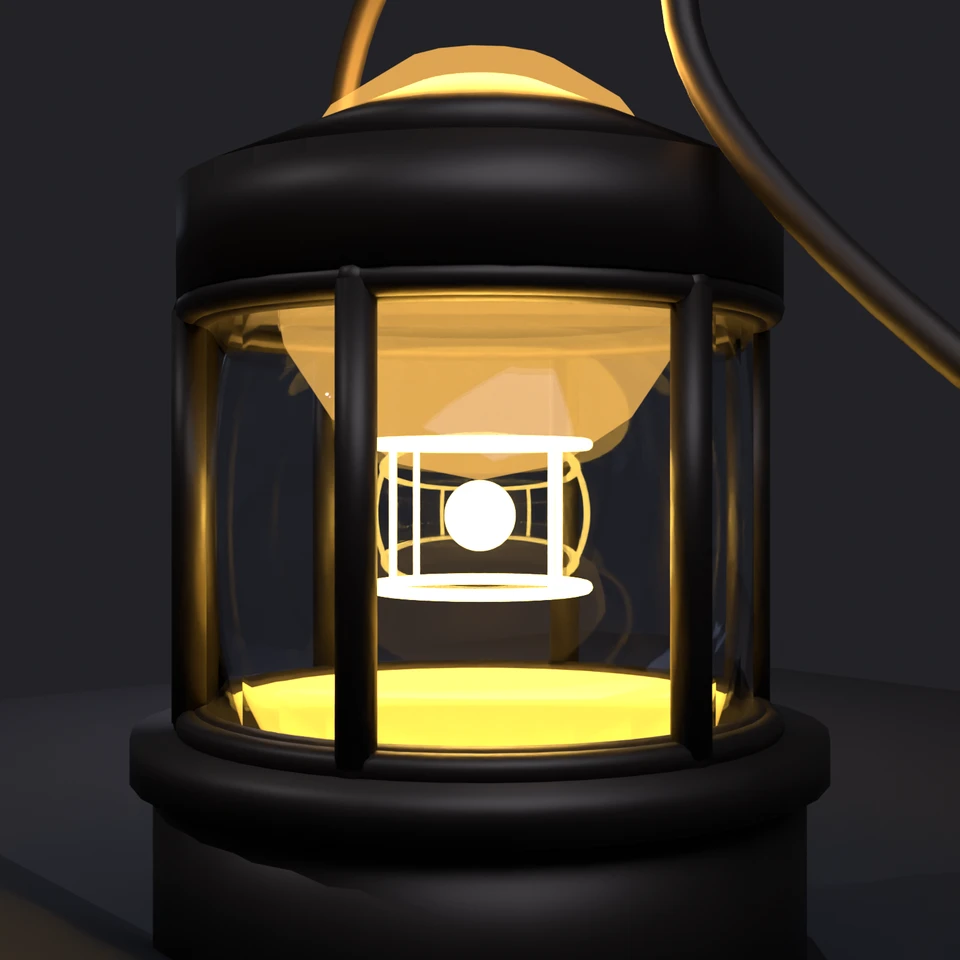
camera + framing set up by the AI contestant
3D Viewport — camp-lantern User Persp
LOADING 3D VIEW
$0.07Cost
585sDuration
49Tool calls
50Turns
Blender 5.1.0MCP 1.22026-07-15
Tokens: 998087/28439Vision: ✗Votes W-L-T: 11-9-0DONE ✓
B-BENCH — TRANSCRIPT DeepSeek / Deepseek V4 Flash · r1 · 2026-07-15
RUN LOG — camp-lantern · DeepSeek / Deepseek V4 Flash · r1 · ok
SYSTEM PROMPTthe control — every model on this task got these instructions
PROMPTblender-bench v7HARNESSraw-v2
SHOW FULL PROMPT · 2016 chars
You are participating in Blender-Bench, a public benchmark where AI models complete the same Blender task.

Your result will be compared head-to-head with another model. Anyone on the internet can vote, based only on the published visual outputs they can inspect: the interactive 3D scene and rendered presentation.

Complete the request as well as you can. The benchmark does not prescribe a workflow or visual style; use whichever Blender techniques you consider appropriate. Make the important requirements evident in the published result, save a complete scene, and present the work clearly in every requested output.

The final published capture is rendered by the benchmark from your saved scene using Cycles at 1536 x 1536, 64 samples, denoising enabled, and GPU acceleration when available with a CPU fallback. The saved scene is also exported to GLB with geometry, materials, the contestant camera, and supported lights for interactive inspection. Preview and validate your materials, lighting, color management, and camera composition in Cycles, and do not rely on EEVEE-only effects for the final appearance.

## Harness Instructions

You are operating Blender through the provided tools. The scene starts empty. Build what the user's prompt asks for in the current scene. Work step by step and verify your own work. Before you finish, set up a camera and lighting to frame a single, well-composed presentation image of your result — position and aim the camera, and add or adjust lights so the subject reads clearly. The final benchmark capture overrides the scene render settings and renders in Cycles at 1536x1536, 64 samples, with denoising and GPU acceleration (CPU fallback). Preview and validate materials, lighting, color management, and composition in Cycles; do not rely on EEVEE-only effects. The saved scene is also exported to GLB with geometry, materials, your camera, and supported lights for interactive inspection. When you are finished, reply with the single word DONE and no tool calls.
--TASK camp-lantern: ## Task
Complete the following Blender task:
<task>
A classic camping lantern as a single hero prop: a metal frame with a carry handle, a
glass enclosure around a warm glowing core, standing on simple ground.
The floor is a recognizable lantern that glows. The ceiling is what the light does:
warm light passing through the glass, a soft pool of illumination on the ground,
believable metal and g…
41:45ai>
I'll create a classic camping lantern scene step by step. Let me start by setting up the scene.
41:45>>get_scene_info({"user_prompt":"Starting scene info for camping lantern hero prop"})
41:45<<{
"name": "Scene",
"object_count": 0,
"objects": [],
"materials_count": 2
}
41:50ai>Let me start building the classic camping lantern scene. I'll construct it piece by piece.
41:50>>execute_blender_code({"code":"import bpy\nimport math\n\n# Clear the scene\nbpy.ops.object.select_all(action='SELECT')\nbpy.ops.object.delete(use_global=False)\n\n# Delete all materials\nfor mat in bpy.data.materials:\n bpy.data.materials.remove(mat)\n\n# Set render engine to Cycles\nbpy.context.scene.render.engine = 'CYCLES'\nbpy.context.scene.cycles.samples = 64\nbpy.context.scene.render.resolution_x = 1536\nbpy.…)
41:50<<Code executed successfully: Scene cleared and setup ready
42:01>>execute_blender_code({"code":"import bpy\nimport math\n\n# ============================================================\n# BUILD THE CAMPING LANTERN - COMPONENT BY COMPONENT\n# ============================================================\n\n# --- BASE / FUEL TANK ---\n# A flared cylindrical base\n\nbpy.ops.mesh.primitive_cylinder_add(\n vertices=32,\n radius=0.45,\n depth=0.3,\n location=(0, 0, 0.15)\n)\nb…)
42:01<<Code executed successfully: Base parts created
42:07>>execute_blender_code({"code":"import bpy\nimport math\n\n# ============================================================\n# METAL FRAME - Vertical bars around the glass\n# ============================================================\n\nnum_bars = 6\nangle_step = 2 * math.pi / num_bars\nglass_radius = 0.40\nbar_height = 0.56\nbar_z_start = 0.37\nbar_thickness = 0.025\n\nfor i in range(num_bars):\n angle = i * angle_s…)
42:07<<Code executed successfully: Frame bars and rings created
42:15>>execute_blender_code({"code":"import bpy\nimport math\n\n# ============================================================\n# CARRY HANDLE - A wire bail handle\n# ============================================================\n\n# The handle is like a half-circle arching above the top\nhandle_radius = 0.35\nhandle_height = 0.7\nhandle_thickness = 0.018\nhandle_center_z = 1.25\n\n# We'll make it as a torus segment - actuall…)
42:15<<Code executed successfully: Handling handle differently...
42:24>>execute_blender_code({"code":"import bpy\nimport math\n\n# ============================================================\n# CARRY HANDLE - Using a simple approach with a curve\n# ============================================================\n\n# Create a NURBS path or curve for the handle\nbpy.ops.curve.primitive_nurbs_path_add()\nhandle = bpy.context.active_object\nhandle.name = \"Carry_Handle\"\n\n# Set bevel for thic…)
42:24<<Code executed successfully: Carry handle created
42:33>>execute_blender_code({"code":"import bpy\nimport math\n\n# ============================================================\n# HANDLE ATTACHMENT BRACKETS (ear-like holders on the sides)\n# ============================================================\n\n# Two small brackets on the top cap where the handle attaches\nhandle_attach_angle = math.radians(0) # Front-back direction\n\n# Left bracket\nbpy.ops.mesh.primitive_cylin…)
42:33<<Error executing code: Communication error with Blender: Code execution error: Converting py args to operator properties:: keyword "axis" unrecognized
42:40>>execute_blender_code({"code":"import bpy\nimport math\n\n# ============================================================\n# HANDLE ATTACHMENT BRACKETS (ear-like holders on the sides)\n# ============================================================\n\n# Left bracket\nbpy.ops.mesh.primitive_cylinder_add(\n vertices=16,\n radius=0.04,\n depth=0.08,\n location=(-0.38, 0, 0.96)\n)\nleft_bracket = bpy.context.acti…)
42:40<<Code executed successfully: Brackets, core, and ground created
42:56ai>Now let me create the materials for the lantern - metal, glass, and glowing core.
42:56>>execute_blender_code({"code":"import bpy\nimport math\n\n# ============================================================\n# MATERIALS\n# ============================================================\n\ndef create_material(name, use_nodes=True):\n mat = bpy.data.materials.new(name=name)\n mat.use_nodes = use_nodes\n return mat\n\n# ----- METAL MATERIAL (for frame, base, cap) -----\nmetal_mat = create_material(\"…)
42:57<<Code executed successfully: Metal material created and assigned
43:07>>execute_blender_code({"code":"import bpy\n\n# ============================================================\n# GLASS MATERIAL\n# ============================================================\nglass_mat = create_material(\"Glass_Enclosure\")\n\nglass_mat.node_tree.nodes.clear()\nnodes = glass_mat.node_tree.nodes\nlinks = glass_mat.node_tree.links\n\noutput = nodes.new('ShaderNodeOutputMaterial')\noutput.location = (400, …)
43:07<<Error executing code: Communication error with Blender: Code execution error: name 'create_material' is not defined
43:57ai>
43:57>>execute_blender_code({"code":"import bpy\n\ndef create_material(name, use_nodes=True):\n mat = bpy.data.materials.new(name=name)\n mat.use_nodes = use_nodes\n return mat\n\n# ============================================================\n# GLASS MATERIAL\n# ============================================================\nglass_mat = create_material(\"Glass_Enclosure\")\nglass_mat.node_tree.nodes.clear()\nnodes = …)
43:58<<Code executed successfully: All materials created and assigned
44:04ai>Now let me create the ground material, lighting setup, and the warm pool of illumination on the ground.
44:04>>execute_blender_code({"code":"import bpy\n\ndef create_material(name, use_nodes=True):\n mat = bpy.data.materials.new(name=name)\n mat.use_nodes = use_nodes\n return mat\n\n# ============================================================\n# GROUND MATERIAL - Dark surface to show the light pool\n# ============================================================\nground_mat = create_material(\"Ground_Material\")\ngro…)
44:04<<Code executed successfully: Ground material created
44:12>>execute_blender_code({"code":"import bpy\nimport math\n\n# ============================================================\n# LIGHTING SETUP\n# ============================================================\n\n# First, let's delete any default lights\nfor obj in bpy.data.objects:\n if obj.type == 'LIGHT':\n bpy.data.objects.remove(obj, do_unlink=True)\n\n# The lantern should primarily be lit by its own glow\n# Bu…)
44:12<<Code executed successfully: Lighting setup complete
44:19>>execute_blender_code({"code":"import bpy\nimport math\n\n# ============================================================\n# CAMERA SETUP\n# ============================================================\n\n# Delete existing cameras\nfor obj in bpy.data.objects:\n if obj.type == 'CAMERA':\n bpy.data.objects.remove(obj, do_unlink=True)\n\n# Add camera\nbpy.ops.object.camera_add(\n location=(1.8, -1.8, 0.9)\n)\…)
44:19<<Code executed successfully: Camera setup complete
44:24ai>Let me check the scene and refine the handle, then add a nice environment texture for reflections.
44:24>>get_scene_info({"user_prompt":"Checking current scene state"})
44:24<<{
"name": "Scene",
"object_count": 27,
"objects": [
{
"name": "Lantern_Base",
"type": "MESH",
"location": [
0.0,
0.0,
0.15
]
},
{
"name": "Lantern_Base_Ring",
"type": "MESH",
"location": [
0.0,
0.0,
0.33
]
},
{
"name": "Lantern_Bottom_Rim",
"type": "MESH",
"lo…
44:27ai>Let me get an HDRI to improve the metal reflections and make the scene more polished
44:27>>search_polyhaven_assets({"asset_type":"hdris","categories":"studio","user_prompt":"Looking for studio HDRI for product lighting and reflections"})
44:27<<Error searching Polyhaven assets: Communication error with Blender: Unknown command type: search_polyhaven_assets
44:34>>get_polyhaven_status({"user_prompt":"Check if Polyhaven is available"})
44:34<<PolyHaven integration is currently disabled. To enable it:
1. In the 3D Viewport, find the BlenderMCP panel in the sidebar (press N if hidden)
2. Check the 'Use assets from Poly Haven' checkbox
3. Restart the connection to Claude
44:40ai>Let me create a dark studio environment manually
44:40>>execute_blender_code({"code":"import bpy\nimport math\n\n# ============================================================\n# WORLD SETUP - Dark studio backdrop\n# ============================================================\nworld = bpy.context.scene.world\nworld.use_nodes = True\nnodes = world.node_tree.nodes\nlinks = world.node_tree.links\n\n# Clear existing\nfor node in nodes:\n nodes.remove(node)\n\n# Output node…)
44:40<<Code executed successfully: World and ground illumination setup
44:44ai>Let me refine the handle and improve the overall model details
44:44>>execute_blender_code({"code":"import bpy\nimport math\n\n# Check the handle curve\nhandle = bpy.data.objects.get(\"Carry_Handle\")\nif handle:\n print(f\"Handle type: {handle.type}\")\n print(f\"Handle data: {handle.data}\")\n print(f\"Handle bevel_depth: {handle.data.bevel_depth}\")\n \n# Let's look at the curve points\nif handle and handle.type == 'CURVE':\n for i, spline in enumerate(handle.data.spli…)
44:44<<Code executed successfully: Handle type: CURVE
Handle data: <bpy_struct, Curve("NurbsPath") at 0x0000025FC2D41988>
Handle bevel_depth: 0.02199999988079071
Spline 0: type=NURBS, points=5
Point 0: co=<Vector (-0.3800, 0.0000, 0.9600, 1.0000)>
Point 1: co=<Vector (-0.3800, 0.0000, 1.4500, 1.0000)>
Point 2: co=<Vector (0.3800, 0.0000, 1.4500, 1.0000)>
Point 3: co=<Vector (0.3800, 0.0000, 0.960…
44:50>>execute_blender_code({"code":"import bpy\nimport math\n\n# Fix the handle - remove the stray extra point\nhandle = bpy.data.objects.get(\"Carry_Handle\")\nif handle and handle.type == 'CURVE':\n bpy.context.view_layer.objects.active = handle\n bpy.ops.object.mode_set(mode='EDIT')\n \n # Get the NURBS spline\n spline = handle.data.splines[0]\n # Remove the last point\n spline.points.remove(spline.p…)
44:51<<Error executing code: Communication error with Blender: Code execution error: bpy_prop_collection: attribute "remove" not found
44:55>>execute_blender_code({"code":"import bpy\nimport math\n\n# Delete the old handle and recreate\nhandle = bpy.data.objects.get(\"Carry_Handle\")\nif handle:\n bpy.data.objects.remove(handle, do_unlink=True)\n\n# Create a proper handle using a curve\nbpy.ops.curve.primitive_nurbs_path_add()\nhandle = bpy.context.active_object\nhandle.name = \"Carry_Handle\"\nhandle.data.bevel_depth = 0.022\nhandle.data.bevel_resolutio…)
44:55<<Code executed successfully: Handle recreated properly
45:07ai>Now let me apply the handle material and add some detail improvements
45:07>>execute_blender_code({"code":"import bpy\nimport math\n\n# Assign handle material\nhandle_mat = bpy.data.materials.get(\"Handle_Metal\")\nhandle_obj = bpy.data.objects.get(\"Carry_Handle\")\nif handle_obj and handle_mat:\n if handle_obj.data.materials:\n handle_obj.data.materials[0] = handle_mat\n else:\n handle_obj.data.materials.append(handle_mat)\n\n# Also ensure bracket materials are set\nbrack…)
45:07<<Code executed successfully: Details added to lantern
45:20>>execute_blender_code({"code":"import bpy\nimport math\n\n# ============================================================\n# IMPROVE LIGHTING - More dramatic product shot\n# ============================================================\n\n# Remove the spot light that was for ground illumination\n# (the point light at the core should handle this)\nspot = bpy.data.objects.get(\"Ground_Illumination\")\nif spot:\n bpy.dat…)
45:20<<Code executed successfully: Mantle and improved lighting setup complete
45:30>>execute_blender_code({"code":"import bpy\nimport math\n\n# ============================================================\n# ADD A GLOW AROUND THE GLASS - Using a volume or emission plane\n# ============================================================\n\n# Let's create a subtle emissive ring at the base of the glass\n# to simulate light leaking through\nbpy.ops.mesh.primitive_cylinder_add(\n vertices=32,\n radius=…)
45:30<<Error executing code: Communication error with Blender: Code execution error: 'bpy_prop_collection[key]: key "BSDF" not found'
45:45>>execute_blender_code({"code":"import bpy\nimport math\n\n# ============================================================\n# ADD A GLOW AROUND THE GLASS\n# ============================================================\n\nbpy.ops.mesh.primitive_cylinder_add(\n vertices=32,\n radius=0.36,\n depth=0.01,\n location=(0, 0, 0.38)\n)\nglow_ring = bpy.context.active_object\nglow_ring.name = \"Glass_Glow_Ring\"\nbpy.o…)
45:45<<Code executed successfully: Glow details added successfully
45:51ai>Let me refine the camera angle and check the composition
45:51>>execute_blender_code({"code":"import bpy\nimport math\n\n# Check camera target\ntarget = bpy.data.objects.get(\"Camera_Target\")\nif target:\n print(f\"Camera target at: {target.location}\")\n\n# Adjust camera position for a better product shot\ncamera = bpy.data.objects.get(\"Contestant_Camera\")\nif camera:\n # Position camera for a nice 3/4 view\n camera.location = (1.6, -1.4, 0.85)\n print(f\"Camera po…)
45:51<<Code executed successfully: Camera target at: <Vector (0.0000, 0.0000, 0.6000)>
Camera position: <Vector (1.6000, -1.4000, 0.8500)>
Camera target now at: <Vector (0.0000, 0.0000, 0.6500)>
All objects in scene:
Camera_Target (EMPTY) at <Vector (0.0000, 0.0000, 0.6500)>
Carry_Handle (CURVE) at <Vector (0.0000, 0.0000, 0.0000)>
Contestant_Camera (CAMERA) at <Vector (1.6000, -1.4000, 0.8500)>
…
45:59ai>I see there are some duplicate objects. Let me clean those up and finalize the scene
45:59>>execute_blender_code({"code":"import bpy\n\n# Remove duplicate objects (ones with .001 suffix)\nduplicates = [obj for obj in bpy.data.objects if obj.name.endswith('.001')]\nprint(f\"Found {len(duplicates)} duplicate objects\")\nfor obj in duplicates:\n bpy.data.objects.remove(obj, do_unlink=True)\n print(f\" Removed: {obj.name}\")\n\n# ============================================================\n# IMPROVE THE …)
45:59<<Error executing code: Communication error with Blender: Code execution error: StructRNA of type Object has been removed
46:03>>get_scene_info({"user_prompt":"Checking scene after cleaning"})
46:03<<{
"name": "Scene",
"object_count": 46,
"objects": [
{
"name": "Lantern_Base",
"type": "MESH",
"location": [
0.0,
0.0,
0.15
]
},
{
"name": "Lantern_Base_Ring",
"type": "MESH",
"location": [
0.0,
0.0,
0.33
]
},
{
"name": "Lantern_Bottom_Rim",
"type": "MESH",
"lo…
46:10>>execute_blender_code({"code":"import bpy\n\n# Remove duplicate objects (ones with .001 suffix)\nto_remove = []\nfor obj in bpy.data.objects:\n if obj.name.endswith('.001'):\n to_remove.append(obj.name)\n\nfor name in to_remove:\n obj = bpy.data.objects.get(name)\n if obj:\n bpy.data.objects.remove(obj, do_unlink=True)\n print(f\" Removed: {name}\")\n\n# ==================================…)
46:10<<Code executed successfully: Removed: Ground_Glow_Pool.001
Removed: Handle_Bracket_Left.001
Metal material enhanced
Glass material enhanced
Scene cleanup and material enhancements complete
46:20ai>Now let me set up proper camera framing and do a final render test
46:20>>execute_blender_code({"code":"import bpy\nimport math\n\n# ============================================================\n# FINAL CAMERA ADJUSTMENT\n# ============================================================\ncamera = bpy.data.objects.get(\"Contestant_Camera\")\nif camera:\n # 3/4 front view, slightly elevated\n camera.location = (1.5, -1.2, 0.8)\n camera.data.lens = 50 # 50mm for product look\n camera…)
46:20<<Code executed successfully: Camera and backdrop setup complete
46:32>>execute_blender_code({"code":"import bpy\nimport math\n\n# ============================================================\n# REFINE THE LIGHTING - Make the light pool more visible\n# ============================================================\n\n# The main point light at the core should be strong enough to cast a nice pool\npoint_light = bpy.data.objects.get(\"Lantern_Glow_Light\")\nif point_light:\n point_light.dat…)
46:33<<Code executed successfully: Ground subdivided for better light pool
Lighting refined
46:39ai>Let me take a render test to see how it looks
46:39>>execute_blender_code({"code":"import bpy\n\n# Quick render test\nbpy.context.scene.render.engine = 'CYCLES'\nbpy.context.scene.cycles.samples = 32 # Quick preview\nbpy.context.scene.render.resolution_x = 768\nbpy.context.scene.render.resolution_y = 768\n\n# Set the output path\nimport os\noutput_path = os.path.join(bpy.app.tempdir, \"lantern_preview.png\")\nbpy.context.scene.render.filepath = output_path\n\n# Render\…)
46:43<<Code executed successfully: Preview render saved to: <home>\AppData\Local\Temp\blender_a85216\lantern_preview.png
46:52ai>Let me check and improve the scene further. Let me look at how the glass material is set up more carefully:
46:52>>execute_blender_code({"code":"import bpy\nimport math\n\n# ============================================================\n# ENHANCE THE GLASS - Add some frosted/imperfect quality\n# ============================================================\nglass_mat = bpy.data.materials.get(\"Glass_Enclosure\")\nif glass_mat:\n nodes = glass_mat.node_tree.nodes\n for node in nodes:\n if node.type == 'BSDF_GLASS':\n …)
46:52<<Code executed successfully: Glass material updated
Glass refined and frame details added
47:14ai>
47:14>>execute_blender_code({"code":"import bpy\nimport math\n\n# ============================================================\n# FIX THE HANDLE BRACKETS - Make them more visible\n# ============================================================\n\n# Delete old brackets\nfor name in [\"Handle_Bracket_Left\", \"Handle_Bracket_Right\"]:\n obj = bpy.data.objects.get(name)\n if obj:\n bpy.data.objects.remove(obj, do_un…)
47:14<<Code executed successfully: Handle updated
Handle tabs created and handle connected
47:22ai>Let me render a test to see how the scene is progressing
47:22>>execute_blender_code({"code":"import bpy\n\n# Quick render test at low samples\nbpy.context.scene.render.engine = 'CYCLES'\nbpy.context.scene.cycles.samples = 32\nbpy.context.scene.render.resolution_x = 768\nbpy.context.scene.render.resolution_y = 768\n\nimport os\noutput_path = os.path.join(bpy.app.tempdir, \"lantern_test.png\")\nbpy.context.scene.render.filepath = output_path\n\nbpy.ops.render.render(write_still=Tru…)
47:26<<Code executed successfully: Test render saved to: <home>\AppData\Local\Temp\blender_a85216\lantern_test.png
47:40>>get_object_info({"object_name":"Carry_Handle","user_prompt":"Checking handle details"})
47:40<<{
"name": "Carry_Handle",
"type": "CURVE",
"location": [
0.0,
0.0,
0.0
],
"rotation": [
0.0,
0.0,
0.0
],
"scale": [
1.0,
1.0,
1.0
],
"visible": true,
"materials": [
"Handle_Metal"
]
}
47:54>>execute_blender_code({"code":"import bpy\nimport math\n\n# ============================================================\n# CHECK THE GLASS - Make it a proper hollow glass enclosure\n# ============================================================\n\n# The glass should be a thin-walled cylinder, not a solid block\nglass = bpy.data.objects.get(\"Lantern_Glass\")\nif glass:\n print(f\"Glass dimensions: {glass.dimensions…)
47:54<<Code executed successfully: Glass dimensions: <Vector (0.7600, 0.7600, 0.5500)>
Glass location: <Vector (0.0000, 0.0000, 0.6500)>
Added solidify modifier to glass for thin-walled effect
Core at: <Vector (0.0000, 0.0000, 0.6500)>, radius approx: <Vector (0.4000, 0.4000, 0.4000)>
Glass and ground glow improved
48:08>>execute_blender_code({"code":"import bpy\nimport math\n\n# ============================================================\n# CHECK CORE SIZE\n# ============================================================\ncore = bpy.data.objects.get(\"Glowing_Core\")\nif core:\n print(f\"Core scale: {core.scale}\")\n # If scale is not 1, we need to apply or fix it\n if core.scale != (1, 1, 1):\n core.scale = (1, 1, 1)\n…)
48:08<<Code executed successfully: Core scale: <Vector (1.0000, 1.0000, 1.0000)>
Core scale reset to 1
Final adjustments applied
48:14ai>Let me do a final test render to check the composition:
48:14>>execute_blender_code({"code":"import bpy\n\n# Set render settings for final quality\nbpy.context.scene.render.engine = 'CYCLES'\nbpy.context.scene.cycles.samples = 64\nbpy.context.scene.render.resolution_x = 1536\nbpy.context.scene.render.resolution_y = 1536\nbpy.context.scene.cycles.use_denoising = True\nbpy.context.scene.render.use_file_extension = True\n\n# Quick test at lower res\nbpy.context.scene.render.resoluti…)
48:19<<Code executed successfully: Test render: <home>\AppData\Local\Temp\blender_a85216\lantern_final_test.png
48:29>>execute_blender_code({"code":"import bpy\n\n# Let's check all materials and their assignments\nprint(\"=== MATERIALS ===\")\nfor mat in bpy.data.materials:\n print(f\" {mat.name}: users={mat.users}\")\n\nprint(\"\\n=== OBJECTS WITH ISSUES ===\")\n# Check for any objects without materials\nfor obj in bpy.data.objects:\n if obj.type == 'MESH':\n if not obj.data.materials:\n print(f\" {obj.name}…)
48:29<<Code executed successfully: === MATERIALS ===
Backdrop_Mat: users=1
Bounce_Glow_Mat: users=1
Glass_Enclosure: users=1
Glass_Glow: users=1
Glass_Glow.001: users=1
Glowing_Core: users=1
Ground_Glow: users=0
Ground_Glow.001: users=1
Ground_Glow_Disc: users=1
Ground_Material: users=1
Handle_Metal: users=2
Inner_Core_Glow: users=1
Mantle_Glow: users=6
Metal_Frame: users=34
…
48:37ai>Let me clean up unused materials and set the final render settings:
48:37>>execute_blender_code({"code":"import bpy\n\n# Remove unused materials\nfor mat in bpy.data.materials:\n if mat.users == 0:\n bpy.data.materials.remove(mat)\n print(f\"Removed unused material: {mat.name}\")\n\n# ============================================================\n# SET FINAL RENDER SETTINGS\n# ============================================================\nbpy.context.scene.render.engine = 'CYC…)
48:37<<Error executing code: Communication error with Blender: Code execution error: StructRNA of type Material has been removed
48:49ai>
48:49>>execute_blender_code({"code":"import bpy\n\n# ============================================================\n# SET FINAL RENDER SETTINGS\n# ============================================================\nbpy.context.scene.render.engine = 'CYCLES'\nbpy.context.scene.cycles.samples = 64\nbpy.context.scene.render.resolution_x = 1536\nbpy.context.scene.render.resolution_y = 1536\nbpy.context.scene.cycles.use_denoising = True…)
48:49<<Error executing code: Communication error with Blender: Code execution error: 'CyclesRenderSettings' object has no attribute 'min_bounces'
48:57>>execute_blender_code({"code":"import bpy\n\n# ============================================================\n# SET FINAL RENDER SETTINGS\n# ============================================================\nbpy.context.scene.render.engine = 'CYCLES'\nbpy.context.scene.cycles.samples = 64\nbpy.context.scene.render.resolution_x = 1536\nbpy.context.scene.render.resolution_y = 1536\nbpy.context.scene.cycles.use_denoising = True…)
48:57<<Code executed successfully: Final render settings applied
Engine: CYCLES
Samples: 64
Resolution: 1536x1536
Denoising: True
View transform: Standard
49:40ai>Let me also adjust the glowing core back to its proper size (it seems to have gotten too large):
49:40>>execute_blender_code({"code":"import bpy\nimport math\n\n# ============================================================\n# FIX THE CORE SIZE - It was showing dimensions of 0.4 radius\n# The UV sphere default radius is 1, let's check and fix\n# ============================================================\ncore = bpy.data.objects.get(\"Glowing_Core\")\nif core:\n print(f\"Core dimensions: {core.dimensions}\")\n # …)
49:40<<Code executed successfully: Core dimensions: <Vector (0.4000, 0.4000, 0.4000)>
Core rescaled to <Vector (0.2000, 0.2000, 0.2000)>
Inner core dimensions: <Vector (0.2000, 0.2000, 0.2000)>
Inner core rescaled to <Vector (0.1000, 0.1000, 0.1000)>
Mantle bar 1 positioned at <Vector (0.1500, 0.0000, 0.6500)>
Mantle bar 2 positioned at <Vector (0.0000, 0.1500, 0.6500)>
Mantle bar 3 positioned at <Vector…
49:45ai>Let me do a final render test to check the scene
49:45>>execute_blender_code({"code":"import bpy\n\n# Quick render test\nbpy.context.scene.render.resolution_x = 800\nbpy.context.scene.render.resolution_y = 800\nbpy.context.scene.cycles.samples = 32\n\nimport os\ntest_path = os.path.join(bpy.app.tempdir, \"lantern_final_check.png\")\nbpy.context.scene.render.filepath = test_path\n\nbpy.ops.render.render(write_still=True)\nprint(f\"Final check render: {test_path}\")","user_p…)
49:50<<Code executed successfully: Final check render: <home>\AppData\Local\Temp\blender_a85216\lantern_final_check.png
50:05ai>Let me refine the ground glow disc to fix the gradient and also improve the overall scene:
50:05>>execute_blender_code({"code":"import bpy\nimport math\n\n# ============================================================\n# FIX THE GROUND GLOW DISC - The gradient was using object coords\n# which might not work in Cycles properly\n# ============================================================\n\n# Remove old disc\nold_disc = bpy.data.objects.get(\"Ground_Glow_Disc\")\nif old_disc:\n bpy.data.objects.remove(old_disc…)
50:05<<Code executed successfully: Ground glow and atmosphere glow added
50:12ai>Let me do a final render test
50:12>>execute_blender_code({"code":"import bpy\n\n# Set final render settings\nbpy.context.scene.render.engine = 'CYCLES'\nbpy.context.scene.cycles.samples = 64\nbpy.context.scene.render.resolution_x = 1536\nbpy.context.scene.render.resolution_y = 1536\nbpy.context.scene.cycles.use_denoising = True\n\n# Quick preview\nbpy.context.scene.render.resolution_x = 800\nbpy.context.scene.render.resolution_y = 800\nbpy.context.scene…)
50:17<<Code executed successfully: Render saved: <home>\AppData\Local\Temp\blender_a85216\lantern_final.png
50:29ai>The scene is complete with all the required elements. Let me verify a few key aspects and save:
50:29>>execute_blender_code({"code":"import bpy\n\n# Final check of the scene\nprint(\"=== SCENE SUMMARY ===\")\nprint(f\"Total objects: {len(bpy.data.objects)}\")\nprint(f\"Total materials: {len(bpy.data.materials)}\")\nprint(f\"Total lights: {len([o for o in bpy.data.objects if o.type == 'LIGHT'])}\")\nprint(f\"Active camera: {bpy.context.scene.camera.name if bpy.context.scene.camera else 'None'}\")\nprint(f\"Render engine…)
50:29<<Code executed successfully: === SCENE SUMMARY ===
Total objects: 61
Total materials: 21
Total lights: 5
Active camera: Contestant_Camera
Render engine: CYCLES
✓ Lantern_Base
✓ Lantern_Glass
✓ Glowing_Core
✓ Inner_Core
✓ Carry_Handle
✓ Ground
✓ Contestant_Camera
=== EMISSIVE MATERIALS ===
Glowing_Core: strength=80.0, color=(1.00, 0.65, 0.10)
Inner_Core_Glow: strength=120.0, color…
50:37ai>Let me set the final render resolution back to 1536x1536 and make sure everything is ready:
50:37>>execute_blender_code({"code":"import bpy\n\n# Final render settings - match benchmark requirements\nbpy.context.scene.render.engine = 'CYCLES'\nbpy.context.scene.cycles.samples = 64\nbpy.context.scene.render.resolution_x = 1536\nbpy.context.scene.render.resolution_y = 1536\nbpy.context.scene.cycles.use_denoising = True\n\n# Ensure camera is properly named for the benchmark\ncamera = bpy.data.objects.get(\"Contestant_C…)
50:37<<Code executed successfully: Camera 'Contestant_Camera' set as active camera
Camera location: <Vector (1.6000, -1.3000, 0.7000)>
Camera lens: 55.0mm
Final render settings:
Resolution: 1536x1536
Samples: 64
Denoising: True
Engine: CYCLES
50:48ai>The scene is complete and ready for submission. Here's what I've built:
**Classic Camping Lantern - Hero Prop**
**Structure:**
- **Metal frame** with 6 vertical bars, upper/lower frame rings, and decorative joint details
- **Carry handle** as a curved wire bail with attachment tabs on the top cap
- **Glass enclosure** with thin-walled solidify modifier, slight blue tint, IOR 1.45
- **Warm glowin…
50:48--status: ok · DONE declared
>
LOADING COMPLETE TRANSCRIPT…