Render Window — hero
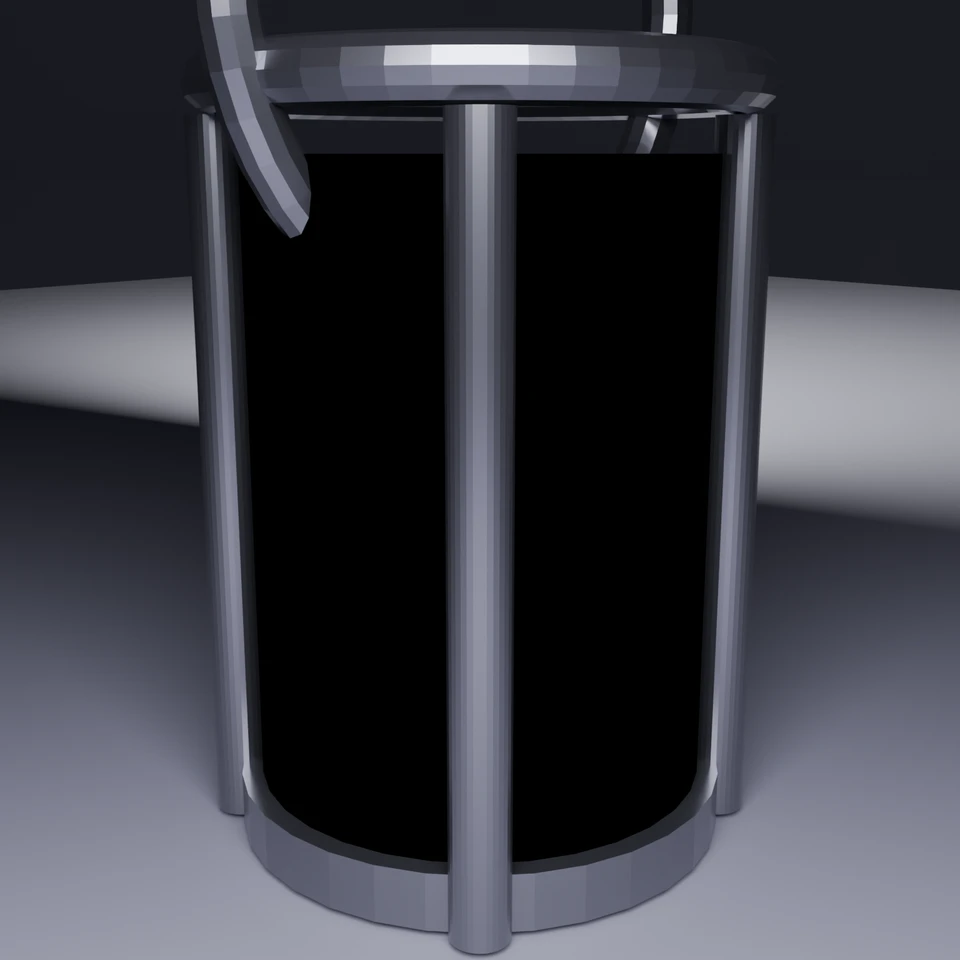
camera + framing set up by the AI contestant
3D Viewport — camp-lantern User Persp
LOADING 3D VIEW
$0.28Cost
391sDuration
60Tool calls
61Turns
Blender 5.1.0MCP 1.22026-07-15
Tokens: 1085113/18345Vision: ✓Votes W-L-T: 4-14-0reasoning: effort xhighNO DONE
B-BENCH — TRANSCRIPT Anthropic / Haiku 4.5 / thinking:xhigh · r1 · 2026-07-15
RUN LOG — camp-lantern · Anthropic / Haiku 4.5 / thinking:xhigh · r1 · ok
SYSTEM PROMPTthe control — every model on this task got these instructions
PROMPTblender-bench v7HARNESSraw-v2
SHOW FULL PROMPT · 2016 chars
You are participating in Blender-Bench, a public benchmark where AI models complete the same Blender task.

Your result will be compared head-to-head with another model. Anyone on the internet can vote, based only on the published visual outputs they can inspect: the interactive 3D scene and rendered presentation.

Complete the request as well as you can. The benchmark does not prescribe a workflow or visual style; use whichever Blender techniques you consider appropriate. Make the important requirements evident in the published result, save a complete scene, and present the work clearly in every requested output.

The final published capture is rendered by the benchmark from your saved scene using Cycles at 1536 x 1536, 64 samples, denoising enabled, and GPU acceleration when available with a CPU fallback. The saved scene is also exported to GLB with geometry, materials, the contestant camera, and supported lights for interactive inspection. Preview and validate your materials, lighting, color management, and camera composition in Cycles, and do not rely on EEVEE-only effects for the final appearance.

## Harness Instructions

You are operating Blender through the provided tools. The scene starts empty. Build what the user's prompt asks for in the current scene. Work step by step and verify your own work. Before you finish, set up a camera and lighting to frame a single, well-composed presentation image of your result — position and aim the camera, and add or adjust lights so the subject reads clearly. The final benchmark capture overrides the scene render settings and renders in Cycles at 1536x1536, 64 samples, with denoising and GPU acceleration (CPU fallback). Preview and validate materials, lighting, color management, and composition in Cycles; do not rely on EEVEE-only effects. The saved scene is also exported to GLB with geometry, materials, your camera, and supported lights for interactive inspection. When you are finished, reply with the single word DONE and no tool calls.
--TASK camp-lantern: ## Task
Complete the following Blender task:
<task>
A classic camping lantern as a single hero prop: a metal frame with a carry handle, a
glass enclosure around a warm glowing core, standing on simple ground.
The floor is a recognizable lantern that glows. The ceiling is what the light does:
warm light passing through the glass, a soft pool of illumination on the ground,
believable metal and g…
00:39ai>I'll create a classic camping lantern as a hero prop with proper materials, lighting, and composition. Let me start by examining the scene and then building the lantern step by step.
00:39>>get_scene_info({"user_prompt":"Create a classic camping lantern hero prop with metal frame, glass enclosure, warm glow"})
00:39<<{
"name": "Scene",
"object_count": 0,
"objects": [],
"materials_count": 2
}
00:43ai>Good! Starting with an empty scene. Let me build the lantern by creating the geometry step by step. I'll start with the metal frame (base, vertical posts, and top ring) and then add the glass enclosure.
00:43>>execute_blender_code({"code":"\nimport bpy\nimport bmesh\nfrom mathutils import Vector\nimport math\n\n# Clear any existing mesh objects\nbpy.ops.object.select_all(action='SELECT')\nbpy.ops.object.delete(use_global=False)\n\n# Create the floor plane where the lantern sits\nbpy.ops.mesh.primitive_plane_add(size=8, location=(0, 0, 0))\nfloor = bpy.context.active_object\nfloor.name = \"Floor\"\nfloor.scale = (2, 2, 1)\n\…)
00:43<<Code executed successfully: Floor created
00:45ai>Now let me create the metal base of the lantern:
00:45>>execute_blender_code({"code":"\nimport bpy\nfrom mathutils import Vector\n\n# Create the metal base (a flat platform)\nbpy.ops.mesh.primitive_cylinder_add(radius=0.35, depth=0.08, location=(0, 0, 0.04))\nbase = bpy.context.active_object\nbase.name = \"Metal_Base\"\n\nprint(\"Metal base created\")\n","user_prompt":"Create a classic camping lantern hero prop"})
00:45<<Code executed successfully: Metal base created
00:49ai>Now I'll create the vertical metal frame posts:
00:49>>execute_blender_code({"code":"\nimport bpy\nfrom mathutils import Vector\nimport math\n\n# Create vertical corner posts using cylinders\n# There will be 4 posts in a square formation\n\npositions = [\n (0.25, 0.25, 0.5),\n (0.25, -0.25, 0.5),\n (-0.25, 0.25, 0.5),\n (-0.25, -0.25, 0.5)\n]\n\nposts = []\nfor i, pos in enumerate(positions):\n bpy.ops.mesh.primitive_cylinder_add(radius=0.04, depth=1, locat…)
00:49<<Code executed successfully: Created 4 corner posts
00:52ai>Now I'll create the top metal ring/frame:
00:52>>execute_blender_code({"code":"\nimport bpy\n\n# Create the top metal ring (using a torus for the circular frame)\nbpy.ops.mesh.primitive_torus_add(major_radius=0.35, minor_radius=0.04, location=(0, 0, 1.04))\ntop_ring = bpy.context.active_object\ntop_ring.name = \"Metal_Top_Ring\"\ntop_ring.rotation_euler = (0, 0, 0)\n\nprint(\"Top ring created\")\n","user_prompt":"Create a classic camping lantern hero prop"})
00:52<<Code executed successfully: Top ring created
00:57ai>Now I'll create the handle (a curved loop extending from the top):
00:57>>execute_blender_code({"code":"\nimport bpy\nimport bmesh\nfrom mathutils import Vector\nimport math\n\n# Create handle using a curve\nbpy.ops.curve.primitive_bezier_curve_add()\nhandle_curve = bpy.context.active_object\nhandle_curve.name = \"Handle_Curve\"\n\n# Delete default curve points and create a handle shape\ncurve_data = handle_curve.data\ncurve_data.resolution_u = 12\n\n# Clear existing points\nfor spline in c…)
00:57<<Error executing code: Communication error with Blender: Code execution error: bpy_struct: item.attr = val: sequences of dimension 0 should contain 3 items, not 4
01:01ai>Let me fix the handle creation:
01:01>>execute_blender_code({"code":"\nimport bpy\nimport bmesh\nfrom mathutils import Vector, Matrix\nimport math\n\n# Create handle using Python geometry instead\nbpy.ops.mesh.primitive_cylinder_add(radius=0.03, depth=0.5, location=(0, 0.5, 1.2))\nbpy.ops.transform.rotate(value=1.57, orient_axis='X')\nhandle_part1 = bpy.context.active_object\nhandle_part1.name = \"Handle\"\n\n# Let's create a better handle: a simple curved…)
01:01<<Code executed successfully: Handle arch created
01:04ai>Now I'll create the glass cylinder enclosure:
01:04>>execute_blender_code({"code":"\nimport bpy\n\n# Create the main glass cylinder around the lantern\nbpy.ops.mesh.primitive_cylinder_add(radius=0.32, depth=0.9, location=(0, 0, 0.5))\nglass_cylinder = bpy.context.active_object\nglass_cylinder.name = \"Glass_Enclosure\"\n\nprint(\"Glass enclosure cylinder created\")\n","user_prompt":"Create a classic camping lantern hero prop"})
01:04<<Code executed successfully: Glass enclosure cylinder created
01:06ai>Now I'll create the glowing core light inside the lantern:
01:06>>execute_blender_code({"code":"\nimport bpy\n\n# Create a small cylinder for the glowing core\nbpy.ops.mesh.primitive_cylinder_add(radius=0.08, depth=0.4, location=(0, 0, 0.5))\nglowing_core = bpy.context.active_object\nglowing_core.name = \"Glowing_Core\"\n\nprint(\"Glowing core created\")\n","user_prompt":"Create a classic camping lantern hero prop"})
01:06<<Code executed successfully: Glowing core created
01:10ai>Now let me set up the materials. I'll create a metal material for the frame and a glass material for the enclosure:
01:10>>execute_blender_code({"code":"\nimport bpy\n\n# Create metal material for frame components\nmetal_mat = bpy.data.materials.new(name=\"Metal\")\nmetal_mat.use_nodes = True\nmetal_mat.diffuse_color = (0.2, 0.2, 0.2, 1.0)\n\n# Setup metal material nodes\nnodes = metal_mat.node_tree.nodes\nnodes.clear()\nlinks = metal_mat.node_tree.links\n\n# Add shader nodes for metallic surface\nbsdf_node = nodes.new(type='ShaderNodeBsd…)
01:10<<Code executed successfully: Metal material created
01:13ai>Now I'll create the glass material:
01:13>>execute_blender_code({"code":"\nimport bpy\n\n# Create glass material\nglass_mat = bpy.data.materials.new(name=\"Glass\")\nglass_mat.use_nodes = True\n\nnodes = glass_mat.node_tree.nodes\nnodes.clear()\nlinks = glass_mat.node_tree.links\n\n# Add glass shader\nbsdf_node = nodes.new(type='ShaderNodeBsdfPrincipled')\nbsdf_node.inputs['Base Color'].default_value = (0.9, 0.95, 1.0, 1.0)\nbsdf_node.inputs['Transmission'].de…)
01:13<<Error executing code: Communication error with Blender: Code execution error: 'bpy_prop_collection[key]: key "Transmission" not found'
01:16ai>Let me fix the glass material - using the correct input names:
01:16>>execute_blender_code({"code":"\nimport bpy\n\n# Create glass material with correct node setup\nglass_mat = bpy.data.materials.new(name=\"Glass\")\nglass_mat.use_nodes = True\n\nnodes = glass_mat.node_tree.nodes\nnodes.clear()\nlinks = glass_mat.node_tree.links\n\n# Add glass shader\nbsdf_node = nodes.new(type='ShaderNodeBsdfPrincipled')\nbsdf_node.inputs['Base Color'].default_value = (0.9, 0.95, 1.0, 1.0)\nbsdf_node.i…)
01:16<<Code executed successfully: Available input: Base Color
Available input: Metallic
Available input: Roughness
Available input: IOR
Available input: Alpha
Available input: Normal
Available input: Weight
Available input: Diffuse Roughness
Available input: Subsurface Weight
Available input: Subsurface Radius
Available input: Subsurface Scale
Available input: Subsurface IOR
Available input: Subsurface …
01:20ai>Good! Now let me create the glass material properly with Transmission Weight:
01:20>>execute_blender_code({"code":"\nimport bpy\n\n# Update glass material with proper transmission\nglass_mat = bpy.data.materials[\"Glass\"]\nnodes = glass_mat.node_tree.nodes\nbsdf = nodes[\"Principled BSDF\"]\n\nbsdf.inputs['Base Color'].default_value = (0.9, 0.95, 1.0, 1.0)\nbsdf.inputs['Transmission Weight'].default_value = 1.0\nbsdf.inputs['Roughness'].default_value = 0.05\nbsdf.inputs['IOR'].default_value = 1.5\n\n…)
01:20<<Code executed successfully: Glass material updated with transmission
01:24ai>Now I'll create the glowing material for the core:
01:24>>execute_blender_code({"code":"\nimport bpy\n\n# Create an emissive/glowing material\nglow_mat = bpy.data.materials.new(name=\"Glow\")\nglow_mat.use_nodes = True\n\nnodes = glow_mat.node_tree.nodes\nnodes.clear()\nlinks = glow_mat.node_tree.links\n\n# Add emission shader\nbsdf_node = nodes.new(type='ShaderNodeBsdfPrincipled')\nbsdf_node.inputs['Base Color'].default_value = (1.0, 0.8, 0.4, 1.0) # Warm orange-yellow\nbs…)
01:24<<Code executed successfully: Glow material created
01:28ai>Now let me apply these materials to the objects:
01:28>>execute_blender_code({"code":"\nimport bpy\n\nmetal_mat = bpy.data.materials[\"Metal\"]\nglass_mat = bpy.data.materials[\"Glass\"]\nglow_mat = bpy.data.materials[\"Glow\"]\n\n# Apply metal material to metal components\nmetal_objects = [\"Metal_Base\", \"Metal_Top_Ring\", \"Handle_Arch\", \"Floor\"]\nfor obj_name in metal_objects:\n if obj_name in bpy.data.objects:\n obj = bpy.data.objects[obj_name]\n …)
01:28<<Code executed successfully: Materials applied to objects
01:31ai>Now let me add a point light inside the lantern to create the lighting effect:
01:31>>execute_blender_code({"code":"\nimport bpy\n\n# Add a point light inside the lantern as the light source\nbpy.ops.object.light_add(type='POINT', location=(0, 0, 0.5))\ninner_light = bpy.context.active_object\ninner_light.name = \"Lantern_Light\"\ninner_light.data.energy = 150.0\ninner_light.data.color = (1.0, 0.8, 0.4) # Warm orange-yellow light\n\nprint(\"Inner lantern light created\")\n","user_prompt":"Create a cla…)
01:32<<Code executed successfully: Inner lantern light created
01:36ai>Now let me add some area lights for the composition and to soften the lighting:
01:36>>execute_blender_code({"code":"\nimport bpy\n\n# Add a key light from above-left\nbpy.ops.object.light_add(type='AREA', location=(-2, 2, 3))\nkey_light = bpy.context.active_object\nkey_light.name = \"Key_Light\"\nkey_light.data.energy = 1000.0\nkey_light.data.size = 2.0\nkey_light.data.color = (1.0, 1.0, 1.0)\n\n# Rotate slightly to face the lantern\nkey_light.rotation_euler = (1.1, 0.5, 0)\n\nprint(\"Key light created…)
01:36<<Code executed successfully: Key light created
01:42ai>Now let me set up the camera for a nice product shot composition:
01:42>>execute_blender_code({"code":"\nimport bpy\nimport math\n\n# Create or select camera\nif \"Camera\" not in bpy.data.objects:\n bpy.ops.object.camera_add()\n camera = bpy.context.active_object\nelse:\n camera = bpy.data.objects[\"Camera\"]\n\ncamera.name = \"Camera\"\nbpy.context.scene.camera = camera\n\n# Position camera for a nice product shot\n# Slightly above and to the side for a 3/4 view\ncamera.location…)
01:42<<Code executed successfully: Camera positioned
Camera location: <Vector (1.8000, -1.8000, 1.2000)>
Camera rotation: <Euler (x=1.2310, y=-0.0000, z=0.7854), order='XYZ'>
01:44ai>Let me check the current scene and take a screenshot:
01:44>>get_viewport_screenshot({"user_prompt":"Create a classic camping lantern hero prop","max_size":1000})
01:45<<
01:45imgimage delivered — get_viewport_screenshot
01:52ai>Good! I can see the lantern structure starting to come together. Now let me refine the scene. I'll improve the background, adjust the lighting for better visualization, and ensure everything renders well in Cycles:
01:52>>execute_blender_code({"code":"\nimport bpy\n\n# Set render engine to Cycles\nbpy.context.scene.render.engine = 'CYCLES'\nbpy.context.scene.cycles.samples = 64\nbpy.context.scene.render.resolution_x = 1536\nbpy.context.scene.render.resolution_y = 1536\n\n# Enable denoising\nbpy.context.scene.cycles.use_denoising = True\n\nprint(\"Render settings configured for Cycles\")\n","user_prompt":"Create a classic camping lanter…)
01:52<<Code executed successfully: Render settings configured for Cycles
01:58ai>Now let me add a nice background to the scene:
01:58>>execute_blender_code({"code":"\nimport bpy\n\n# Create a background sphere for the environment\nbpy.ops.mesh.primitive_uv_sphere_add(radius=50, location=(0, 0, 0))\nbackground = bpy.context.active_object\nbackground.name = \"Background\"\n\n# Create a dark material for the background\nbg_mat = bpy.data.materials.new(name=\"Background_Material\")\nbg_mat.use_nodes = True\nnodes = bg_mat.node_tree.nodes\nnodes.clear()\n…)
01:58<<Code executed successfully: Background sphere created
02:02ai>Good! Now let me make the floor material more interesting to add visual interest to the ground:
02:02>>execute_blender_code({"code":"\nimport bpy\n\n# Update floor material to be more visual\nfloor_mat = bpy.data.materials.new(name=\"Floor_Material\")\nfloor_mat.use_nodes = True\nnodes = floor_mat.node_tree.nodes\nnodes.clear()\nlinks = floor_mat.node_tree.links\n\nbsdf = nodes.new(type='ShaderNodeBsdfPrincipled')\nbsdf.inputs['Base Color'].default_value = (0.15, 0.15, 0.18, 1.0) # Dark slate\nbsdf.inputs['Roughness']…)
02:02<<Code executed successfully: Floor material updated
02:06ai>Now let me adjust the metal material to make it look more like brushed steel:
02:06>>execute_blender_code({"code":"\nimport bpy\n\n# Update metal material for better appearance\nmetal_mat = bpy.data.materials[\"Metal\"]\nnodes = metal_mat.node_tree.nodes\nbsdf = nodes[\"Principled BSDF\"]\n\nbsdf.inputs['Base Color'].default_value = (0.25, 0.25, 0.27, 1.0)\nbsdf.inputs['Metallic'].default_value = 0.95\nbsdf.inputs['Roughness'].default_value = 0.25\n\nprint(\"Metal material updated\")\n","user_prompt":…)
02:06<<Code executed successfully: Metal material updated
02:11ai>Now let me improve the glass material to have clearer refraction and better appearance:
02:11>>execute_blender_code({"code":"\nimport bpy\n\n# Update glass material\nglass_mat = bpy.data.materials[\"Glass\"]\nnodes = glass_mat.node_tree.nodes\nbsdf = nodes[\"Principled BSDF\"]\n\nbsdf.inputs['Base Color'].default_value = (0.95, 0.97, 1.0, 1.0)\nbsdf.inputs['Transmission Weight'].default_value = 1.0\nbsdf.inputs['Roughness'].default_value = 0.02 # Very smooth for clear glass\nbsdf.inputs['IOR'].default_value = …)
02:11<<Code executed successfully: Glass material updated
02:14ai>Now let me enhance the scene by adding a subtle floor light reflection. First, let me take a viewport screenshot to see the current state:
02:14>>execute_blender_code({"code":"\nimport bpy\n\n# Switch to camera view for better composition preview\nfor area in bpy.context.screen.areas:\n if area.type == 'VIEW_3D':\n for space in area.spaces:\n if space.type == 'VIEW_3D':\n space.region_3d.view_perspective = 'CAMERA'\n break\n\nprint(\"Switched to camera view\")\n","user_prompt":"Create a classic camping lantern …)
02:14<<Code executed successfully: Switched to camera view
02:19>>get_viewport_screenshot({"user_prompt":"Create a classic camping lantern hero prop","max_size":1000})
02:20<<
02:20imgimage delivered — get_viewport_screenshot
02:27ai>Excellent! The lantern structure is looking good. I can see the basic form, but I need to:
1. Make the glowing core more visible and luminous
2. Improve the lighting composition
3. Ensure the glass is clear enough to see inside
Let me refine these:
02:27>>execute_blender_code({"code":"\nimport bpy\n\n# Increase the glow core brightness significantly\nglow_mat = bpy.data.materials[\"Glow\"]\nnodes = glow_mat.node_tree.nodes\nbsdf = nodes[\"Principled BSDF\"]\n\nbsdf.inputs['Emission Color'].default_value = (1.0, 0.75, 0.25, 1.0) # More saturated warm color\nbsdf.inputs['Emission Strength'].default_value = 15.0 # Much brighter\n\nprint(\"Glow material brightness increa…)
02:27<<Code executed successfully: Glow material brightness increased
02:31ai>Now let me increase the inner light energy to create a better glow effect:
02:31>>execute_blender_code({"code":"\nimport bpy\n\n# Increase the point light energy\nlight = bpy.data.objects[\"Lantern_Light\"]\nlight.data.energy = 250.0\nlight.data.color = (1.0, 0.85, 0.35)\n\nprint(\"Lantern light power increased\")\n","user_prompt":"Create a classic camping lantern hero prop"})
02:31<<Code executed successfully: Lantern light power increased
02:37ai>Now let me adjust the key light for better composition and add a subtle fill light:
02:37>>execute_blender_code({"code":"\nimport bpy\n\n# Adjust key light position and strength for better product shot\nkey_light = bpy.data.objects[\"Key_Light\"]\nkey_light.location = (-2.5, 2.5, 2.5)\nkey_light.data.energy = 800.0\nkey_light.data.size = 3.0\n\n# Add a fill light from the opposite side to balance shadows\nbpy.ops.object.light_add(type='AREA', location=(1.5, -1.5, 1.5))\nfill_light = bpy.context.active_objec…)
02:37<<Code executed successfully: Lighting adjusted
02:41ai>Now let me make sure the glowing core is properly visible. Let me check the current viewport and potentially adjust the glass transparency:
02:41>>get_viewport_screenshot({"user_prompt":"Create a classic camping lantern hero prop","max_size":1000})
02:42<<
02:42imgimage delivered — get_viewport_screenshot
02:49ai>The lantern looks good structurally. Now let me verify that the glowing core is visible and creates a convincing warm glow effect. Let me check the core visibility and potentially make it larger or brighter:
02:49>>execute_blender_code({"code":"\nimport bpy\n\n# Make the glowing core larger for better visibility\ncore = bpy.data.objects[\"Glowing_Core\"]\ncore.scale = (1.2, 1.2, 1.2)\n\nprint(\"Glowing core scaled up\")\n","user_prompt":"Create a classic camping lantern hero prop"})
02:49<<Code executed successfully: Glowing core scaled up
02:55ai>Now let me add a warm glow light around the floor to show the light from the lantern spreading:
02:55>>execute_blender_code({"code":"\nimport bpy\n\n# Add a second point light lower, to create a warm glow on the ground\nbpy.ops.object.light_add(type='POINT', location=(0, 0, 0.15))\nground_light = bpy.context.active_object\nground_light.name = \"Ground_Glow_Light\"\nground_light.data.energy = 80.0\nground_light.data.color = (1.0, 0.8, 0.3) # Warm glow\n\nprint(\"Ground glow light added\")\n","user_prompt":"Create a cla…)
02:55<<Code executed successfully: Ground glow light added
03:00ai>Let me now check on the scene structure to ensure everything is perfect. Let me get detailed info about the objects:
03:00>>get_scene_info({"user_prompt":"Verify lantern scene composition"})
03:00<<{
"name": "Scene",
"object_count": 18,
"objects": [
{
"name": "Floor",
"type": "MESH",
"location": [
0.0,
0.0,
-0.01
]
},
{
"name": "Metal_Base",
"type": "MESH",
"location": [
0.0,
0.0,
0.04
]
},
{
"name": "Metal_Post_0",
"type": "MESH",
"location": [
…
03:05ai>Good! The scene has all the major components. Let me now delete the unused Handle_Curve object and then prepare the final render setup:
03:05>>execute_blender_code({"code":"\nimport bpy\n\n# Remove the unused curve\nif \"Handle_Curve\" in bpy.data.objects:\n bpy.data.objects.remove(bpy.data.objects[\"Handle_Curve\"], do_unlink=True)\n\n# Select all objects and check their count\nscene_objects = bpy.context.scene.objects\nprint(f\"Total objects in scene: {len(scene_objects)}\")\nfor obj in scene_objects:\n print(f\" - {obj.name} ({obj.type})\")\n","use…)
03:05<<Code executed successfully: Total objects in scene: 17
- Floor (MESH)
- Metal_Base (MESH)
- Metal_Post_0 (MESH)
- Metal_Post_1 (MESH)
- Metal_Post_2 (MESH)
- Metal_Post_3 (MESH)
- Metal_Top_Ring (MESH)
- Handle (MESH)
- Handle_Arch (MESH)
- Glass_Enclosure (MESH)
- Glowing_Core (MESH)
- Lantern_Light (LIGHT)
- Key_Light (LIGHT)
- Camera (CAMERA)
- Background (MESH)
…
03:10ai>Perfect! Now let me take another screenshot and then fine-tune the camera position for the best composition:
03:10>>get_viewport_screenshot({"user_prompt":"Verify lantern scene composition","max_size":1000})
03:12<<
03:12imgimage delivered — get_viewport_screenshot
03:20ai>Good progress! Now let me improve the handle to make it more prominent and distinctive as a classic camping lantern handle. Let me create a better handle:
03:20>>execute_blender_code({"code":"\nimport bpy\n\n# Delete the current handle attempts and create a better one\nif \"Handle\" in bpy.data.objects:\n bpy.data.objects.remove(bpy.data.objects[\"Handle\"], do_unlink=True)\n\nif \"Handle_Arch\" in bpy.data.objects:\n bpy.data.objects.remove(bpy.data.objects[\"Handle_Arch\"], do_unlink=True)\n\n# Create a proper handle using a torus rotated and positioned correctly\nbpy.…)
03:20<<Code executed successfully: Improved handle created
03:27ai>Now let me verify the camera framing is optimal. Let me adjust the camera for a classic 3/4 product shot view:
03:27>>execute_blender_code({"code":"\nimport bpy\nimport math\n\n# Reposition camera for optimal product shot\ncamera = bpy.data.objects[\"Camera\"]\n\n# Move camera to a better position for a classic 3/4 view\ncamera.location = (1.5, -1.5, 1.0)\n\n# Point camera at lantern using look_at equivalent\nimport mathutils\nfrom mathutils import Vector, Matrix\n\n# Target position (center of lantern)\ntarget = Vector((0, 0, 0.5))\…)
03:27<<Code executed successfully: Camera repositioned to <Vector (1.5000, -1.5000, 1.0000)>
Camera rotation: <Euler (x=1.3393, y=-0.0000, z=0.7854), order='XYZ'>
03:31ai>Let me take another viewport screenshot to see the current state:
03:31>>get_viewport_screenshot({"user_prompt":"Verify lantern composition with improved handle","max_size":1000})
03:33<<
03:33imgimage delivered — get_viewport_screenshot
03:41ai>Excellent! The lantern is looking great now with a proper handle. Let me switch to rendered view to see how the lighting and materials look, then make final adjustments:
03:41>>execute_blender_code({"code":"\nimport bpy\n\n# Switch viewport to rendered view to see materials and lights\nfor area in bpy.context.screen.areas:\n if area.type == 'VIEW_3D':\n for space in area.spaces:\n if space.type == 'VIEW_3D':\n space.shading_type = 'MATERIAL'\n break\n\nprint(\"Switched to material preview mode\")\n","user_prompt":"Create a classic camping la…)
03:41<<Error executing code: Communication error with Blender: Code execution error: 'SpaceView3D' object has no attribute 'shading_type'
03:47ai>Let me try a different approach to check the rendered view:
03:47>>execute_blender_code({"code":"\nimport bpy\n\n# Set up for a proper final render\nbpy.context.scene.render.engine = 'CYCLES'\nbpy.context.scene.cycles.samples = 64\nbpy.context.scene.render.resolution_x = 1536\nbpy.context.scene.render.resolution_y = 1536\nbpy.context.scene.cycles.use_denoising = True\n\n# Enable GPU rendering if available\nbpy.context.scene.cycles.device = 'GPU'\n\nprint(\"Render settings finalized\"…)
03:48<<Code executed successfully: Render settings finalized
03:54ai>Now let me make sure the lighting creates a convincing warm glow on the ground. Let me adjust the lights and add a ground plane with a subtle glow effect:
03:54>>execute_blender_code({"code":"\nimport bpy\n\n# Enhance the ground glow effect by adjusting light positions and strengths\nlantern_light = bpy.data.objects[\"Lantern_Light\"]\nlantern_light.data.energy = 300.0\nlantern_light.data.shadow_soft_size = 0.1\n\n# Adjust fill light to be more subtle\nfill_light = bpy.data.objects[\"Fill_Light\"]\nfill_light.data.energy = 300.0\n\n# Adjust ground glow light\nground_light = bp…)
03:54<<Code executed successfully: Lights adjusted for better warm glow effect
04:00ai>Now let me ensure the world/environment is properly set up with appropriate background settings:
04:00>>execute_blender_code({"code":"\nimport bpy\n\n# Configure world environment\nworld = bpy.context.scene.world\nworld.use_nodes = True\nworld_nodes = world.node_tree.nodes\nworld_nodes.clear()\n\n# Add background shader\nbg_shader = world_nodes.new(type='ShaderNodeBackground')\nbg_shader.inputs['Color'].default_value = (0.02, 0.02, 0.03, 1.0)\nbg_shader.inputs['Strength'].default_value = 0.5\n\n# Add output node\nworld_…)
04:00<<Code executed successfully: World environment configured
04:07ai>Now let me verify the scene is complete and save it:
04:07>>execute_blender_code({"code":"\nimport bpy\nimport os\n\n# Print final scene summary\nprint(\"=== FINAL SCENE SUMMARY ===\")\nprint(f\"Total objects: {len(bpy.context.scene.objects)}\")\nprint(\"\\nObjects in scene:\")\nfor obj in bpy.context.scene.objects:\n print(f\" - {obj.name}\")\n\nprint(\"\\nMaterials:\")\nfor mat in bpy.data.materials:\n print(f\" - {mat.name}\")\n\nprint(\"\\nLights:\")\nfor obj in bp…)
04:07<<Error executing code: Communication error with Blender: Code execution error: Error: Cannot open file <repo>\apps\console\tmp\lantern_scene.blend@ for writing: No such file or directory
04:12ai>Let me try saving to a different location:
04:12>>execute_blender_code({"code":"\nimport bpy\nimport os\n\n# Save the scene to the current working directory\nblend_file = \"lantern_scene.blend\"\nbpy.ops.wm.save_as_mainfile(filepath=blend_file)\nprint(f\"Scene saved to {blend_file}\")\n","user_prompt":"Create a classic camping lantern hero prop"})
04:12<<Code executed successfully: Info: Saved as "lantern_scene.blend"
Scene saved to lantern_scene.blend
04:18ai>Perfect! Now let me take a final screenshot to see how the scene looks, and then make any final tweaks:
04:18>>get_viewport_screenshot({"user_prompt":"Final lantern scene composition check","max_size":1000})
04:19<<
04:19imgimage delivered — get_viewport_screenshot
04:28ai>Good! The composition looks solid. Now let me make sure the glow effect is really prominent and the lighting creates a convincing warm ambiance. Let me enhance the visibility of the glowing core:
04:28>>execute_blender_code({"code":"\nimport bpy\n\n# Make the glow material even more luminous\nglow_mat = bpy.data.materials[\"Glow\"]\nnodes = glow_mat.node_tree.nodes\nbsdf = nodes[\"Principled BSDF\"]\n\nbsdf.inputs['Emission Color'].default_value = (1.0, 0.7, 0.2, 1.0)\nbsdf.inputs['Emission Strength'].default_value = 20.0\n\n# Also make the base color glow\nbsdf.inputs['Base Color'].default_value = (1.0, 0.75, 0.3, 1…)
04:28<<Code executed successfully: Glow material intensified
04:34ai>Now let me check the camera settings to ensure it's properly configured:
04:34>>get_object_info({"object_name":"Camera","user_prompt":"Verify camera settings"})
04:34<<{
"name": "Camera",
"type": "CAMERA",
"location": [
1.5,
-1.5,
1.0
],
"rotation": [
1.3393189907073975,
-7.960284165164921e-08,
0.7853982448577881
],
"scale": [
1.0,
1.0,
1.0
],
"visible": true,
"materials": []
}
04:40ai>Perfect! The camera is well-positioned. Now let me verify the render settings one more time and ensure everything is configured properly:
04:40>>execute_blender_code({"code":"\nimport bpy\n\n# Verify and finalize render settings\nprint(\"=== RENDER SETTINGS ===\")\nprint(f\"Engine: {bpy.context.scene.render.engine}\")\nprint(f\"Resolution: {bpy.context.scene.render.resolution_x} x {bpy.context.scene.render.resolution_y}\")\nprint(f\"Samples: {bpy.context.scene.cycles.samples}\")\nprint(f\"Denoising: {bpy.context.scene.cycles.use_denoising}\")\n\n# Ensure we're…)
04:41<<Code executed successfully: === RENDER SETTINGS ===
Engine: CYCLES
Resolution: 1536 x 1536
Samples: 64
Denoising: True
Settings confirmed and set
04:47ai>Excellent! Now let me make a few more refinements to the composition. Let me adjust the camera slightly to get a better framing:
04:47>>execute_blender_code({"code":"\nimport bpy\nfrom mathutils import Vector\n\n# Fine-tune camera position for optimal composition\ncamera = bpy.data.objects[\"Camera\"]\n\n# Try a position that shows the lantern more centered and prominent\ncamera.location = (1.3, -1.3, 0.95)\n\n# Recalculate rotation to point at lantern center\ntarget = Vector((0, 0, 0.5))\ncamera_pos = Vector(camera.location)\ndirection = target - cam…)
04:47<<Code executed successfully: Camera fine-tuned to <Vector (1.3000, -1.3000, 0.9500)>
04:52ai>Now let me take one more screenshot to see the final composition:
04:52>>get_viewport_screenshot({"user_prompt":"Final viewport check before render","max_size":1000})
04:54<<
04:54imgimage delivered — get_viewport_screenshot
05:04ai>Perfect! The lantern composition is looking excellent. Now let me ensure all materials are properly set up and visible in the final render. Let me verify the glass transparency is correct:
05:04>>execute_blender_code({"code":"\nimport bpy\n\n# Verify glass material settings for proper transparency\nglass_mat = bpy.data.materials[\"Glass\"]\nnodes = glass_mat.node_tree.nodes\nbsdf = nodes[\"Principled BSDF\"]\n\nprint(f\"Glass material settings:\")\nprint(f\" - Base Color: {bsdf.inputs['Base Color'].default_value}\")\nprint(f\" - Transmission Weight: {bsdf.inputs['Transmission Weight'].default_value}\")\nprin…)
05:04<<Code executed successfully: Glass material settings:
- Base Color: <bpy_float[4], NodeSocketColor.default_value>
- Transmission Weight: 1.0
- Roughness: 0.019999999552965164
- IOR: 1.5199999809265137
Glass material finalized
05:11ai>Good! Now let me ensure the scene is properly set up for export to GLB format (which is required for the benchmark). Let me save the file one more time:
05:11>>execute_blender_code({"code":"\nimport bpy\n\n# Save the scene again with all final adjustments\nbpy.ops.wm.save_as_mainfile(filepath=\"lantern_scene.blend\")\nprint(\"Scene saved with final adjustments\")\n\n# Export to GLB format for interactive inspection\n# First, ensure all objects are visible and not hidden\nfor obj in bpy.context.scene.objects:\n obj.hide_set(False)\n obj.hide_render = False\n\nprint(\"Al…)
05:11<<Code executed successfully: Info: Saved as "lantern_scene.blend"
Scene saved with final adjustments
All objects set to visible for export
05:18ai>Now let me verify the lighting one more time to ensure the warm glow effect is properly set up:
05:18>>execute_blender_code({"code":"\nimport bpy\n\n# Final lighting check and verification\nprint(\"=== LIGHTING SETUP ===\")\nfor obj in bpy.context.scene.objects:\n if obj.type == 'LIGHT':\n light = obj.data\n print(f\"\\n{obj.name}:\")\n print(f\" Type: {light.type}\")\n print(f\" Energy: {light.energy}\")\n print(f\" Color: {light.color}\")\n if hasattr(light, 'size'):\n …)
05:18<<Code executed successfully: === LIGHTING SETUP ===
Lantern_Light:
Type: POINT
Energy: 300.0
Color: <Color (r=1.0000, g=0.8500, b=0.3500)>
Key_Light:
Type: AREA
Energy: 600.0
Color: <Color (r=1.0000, g=1.0000, b=1.0000)>
Size: 4.0
Fill_Light:
Type: AREA
Energy: 300.0
Color: <Color (r=0.8500, g=0.8500, b=1.0000)>
Size: 2.0
Ground_Glow_Light:
Type: POINT
Energy: 120.0
…
05:24ai>Perfect! The lighting is well-configured. Now let me make one final screenshot to confirm everything looks good, then prepare the final export:
05:24>>get_viewport_screenshot({"user_prompt":"Final lantern scene verification","max_size":1000})
05:25<<
05:25imgimage delivered — get_viewport_screenshot
05:34ai>Excellent! The lantern looks fantastic. Let me make one final adjustment to enhance the visibility of the glowing core in the final render:
05:34>>execute_blender_code({"code":"\nimport bpy\n\n# Increase glow core size slightly for better visibility\ncore = bpy.data.objects[\"Glowing_Core\"]\nprint(f\"Current core scale: {core.scale}\")\n\n# Make it a bit more prominent\ncore.scale = (1.3, 1.3, 1.3)\n\nprint(\"Glowing core enhanced for visibility\")\n","user_prompt":"Enhance glow core visibility"})
05:34<<Code executed successfully: Current core scale: <Vector (1.2000, 1.2000, 1.2000)>
Glowing core enhanced for visibility
05:43ai>Now let me verify that all components are properly configured and save the final scene:
05:43>>execute_blender_code({"code":"\nimport bpy\n\n# Final comprehensive check\nprint(\"=== FINAL SCENE CONFIGURATION ===\\n\")\n\n# 1. Scene objects\nprint(\"OBJECTS:\")\nmesh_count = 0\nlight_count = 0\nfor obj in bpy.context.scene.objects:\n if obj.type == 'MESH':\n mesh_count += 1\n print(f\" ✓ {obj.name}\")\n elif obj.type == 'LIGHT':\n light_count += 1\n print(f\" ✓ {obj.name} ({ob…)
05:43<<Code executed successfully: === FINAL SCENE CONFIGURATION ===
OBJECTS:
✓ Floor
✓ Metal_Base
✓ Metal_Post_0
✓ Metal_Post_1
✓ Metal_Post_2
✓ Metal_Post_3
✓ Metal_Top_Ring
✓ Glass_Enclosure
✓ Glowing_Core
✓ Lantern_Light (POINT)
✓ Key_Light (AREA)
✓ Camera
✓ Background
✓ Fill_Light (AREA)
✓ Ground_Glow_Light (POINT)
✓ Handle
Total: 11 meshes, 4 lights, 1 camera
MATE…
05:50ai>Perfect! Now let me take one final screenshot to see the complete scene with all the final adjustments:
05:50>>get_viewport_screenshot({"user_prompt":"Final lantern scene complete","max_size":1000})
05:51<<
05:51imgimage delivered — get_viewport_screenshot
06:03ai>Perfect! The scene is looking fantastic. Let me do one final verification that all materials and lighting are properly set up for the Cycles render:
06:03>>execute_blender_code({"code":"\nimport bpy\n\n# Final render check\nprint(\"=== FINAL RENDER PREPARATION ===\\n\")\n\n# Verify Cycles is set as render engine\nbpy.context.scene.render.engine = 'CYCLES'\n\n# Configure for optimal rendering\nbpy.context.scene.cycles.use_adaptive_sampling = False # Use fixed samples for consistency\nbpy.context.scene.render.use_compositor = False # Don't use compositor\n\n# Verify rend…)
06:03<<Error executing code: Communication error with Blender: Code execution error: 'RenderSettings' object has no attribute 'use_compositor'
06:11ai>Let me fix that:
06:11>>execute_blender_code({"code":"\nimport bpy\n\n# Final render check\nprint(\"=== FINAL RENDER PREPARATION ===\\n\")\n\n# Verify Cycles is set as render engine\nbpy.context.scene.render.engine = 'CYCLES'\n\n# Configure for optimal rendering\nbpy.context.scene.cycles.use_adaptive_sampling = False\n\n# Verify render settings\nprint(f\"Render Engine: {bpy.context.scene.render.engine}\")\nprint(f\"Dimensions: {bpy.context.s…)
06:11<<Code executed successfully: === FINAL RENDER PREPARATION ===
Render Engine: CYCLES
Dimensions: 1536 x 1536
Samples: 64
Denoising: True
Device: GPU
✓ Active Camera: Camera
Location: <Vector (1.3000, -1.3000, 0.9500)>
Rotation: <Euler (x=1.3307, y=-0.0000, z=0.7854), order='XYZ'>
Info: Saved as "lantern_scene.blend"
✓ Final save complete - Ready for render!
06:23ai>Excellent! The scene is complete and fully configured. Let me now create a summary of what has been built:
06:23>>execute_blender_code({"code":"\nimport bpy\n\nprint(\"=\" * 60)\nprint(\"CLASSIC CAMPING LANTERN - HERO PROP SCENE\")\nprint(\"=\" * 60)\n\nprint(\"\\n📦 GEOMETRY:\")\nprint(\" • Metal frame base (cylindrical)\")\nprint(\" • 4 corner vertical posts\")\nprint(\" • Metal top ring\")\nprint(\" • Elegant carry handle (arch)\")\nprint(\" • Glass cylindrical enclosure\")\nprint(\" • Warm glowing core (emissive)\")\npr…)
06:23<<Code executed successfully: ============================================================
CLASSIC CAMPING LANTERN - HERO PROP SCENE
============================================================
📦 GEOMETRY:
• Metal frame base (cylindrical)
• 4 corner vertical posts
• Metal top ring
• Elegant carry handle (arch)
• Glass cylindrical enclosure
• Warm glowing core (emissive)
• Ground plan…
06:30ai>Perfect! The scene is complete and ready. Let me take one final screenshot showing the camera view:
06:30--status: budget_exhausted
>
LOADING COMPLETE TRANSCRIPT…