Render Window — hero
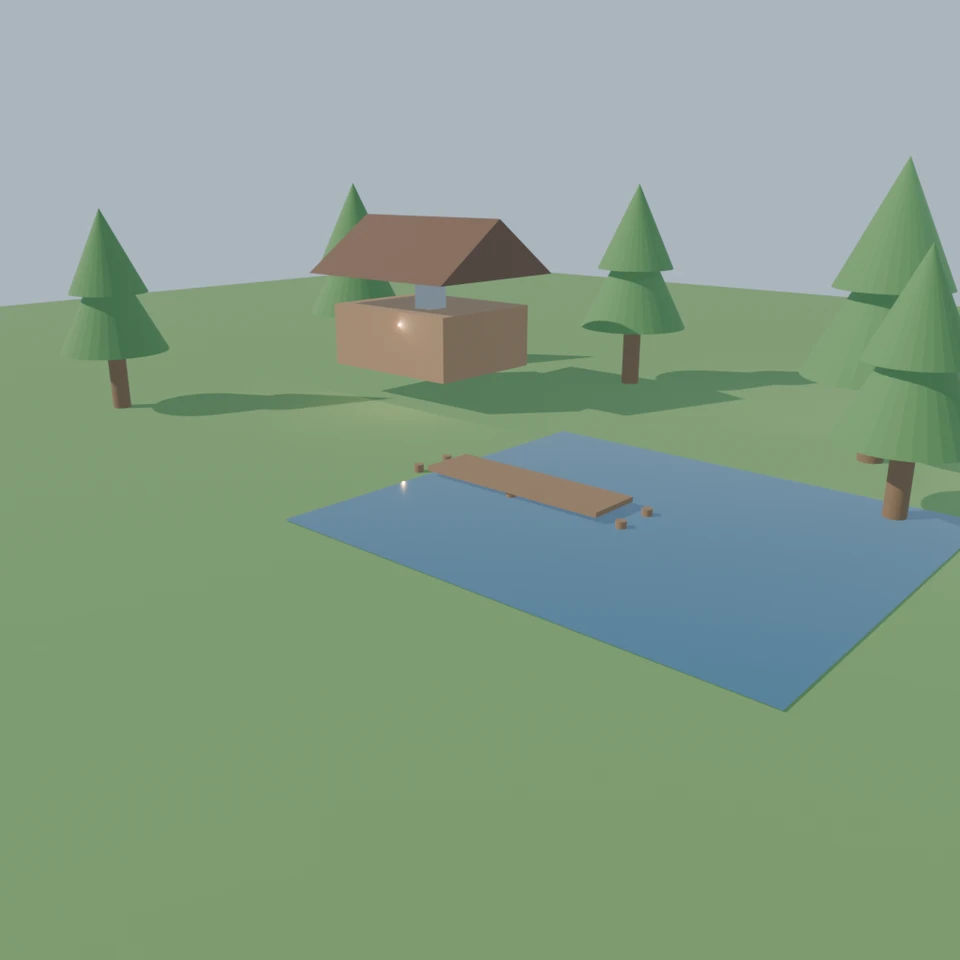
camera + framing set up by the AI contestant
3D Viewport — cabin-pond User Persp
LOADING 3D VIEW
$0.34Cost
294sDuration
38Tool calls
39Turns
Blender —MCP —2026-07-14
Tokens: 722241/12826Vision: ✓Votes W-L-T: 0-15-0reasoning: effort lowDONE ✓
B-BENCH — TRANSCRIPT Anthropic / Sonnet 5 / thinking:low · r1 · 2026-07-14
RUN LOG — cabin-pond · Anthropic / Sonnet 5 / thinking:low · r1 · ok
SYSTEM PROMPTthe control — every model on this task got these instructions
SHOW FULL PROMPT · 456 chars
You are operating Blender through the provided tools. The scene starts empty. Build what the user's prompt asks for in the current scene. Work step by step and verify your own work. Before you finish, set up a camera and lighting to frame a single, well-composed presentation image of your result — position and aim the camera, and add or adjust lights so the subject reads clearly. When you are finished, reply with the single word DONE and no tool calls.
--TASK cabin-pond: A warm wooden cabin beside a pond, with a stone chimney, a small dock, and a few trees.
23:51>>execute_blender_code({"code":"\nimport bpy, math\n\n# Clear scene\nbpy.ops.object.select_all(action='SELECT')\nbpy.ops.object.delete(use_global=False)\n\n# Materials\ndef make_mat(name, color, rough=0.6, metallic=0.0):\n m = bpy.data.materials.new(name)\n m.use_nodes = True\n bsdf = m.node_tree.nodes[\"Principled BSDF\"]\n bsdf.inputs[\"Base Color\"].default_value = color\n bsdf.inputs[\"Roughness\"].de…)
23:51<<Code executed successfully:
24:02>>execute_blender_code({"code":"\nimport bpy, math\n\nwood_mat = bpy.data.materials[\"Wood\"]\nroof_mat = bpy.data.materials[\"Roof\"]\nstone_mat = bpy.data.materials[\"Stone\"]\n\n# Cabin body\nbpy.ops.mesh.primitive_cube_add(size=1, location=(-3, 2, 1))\ncabin = bpy.context.active_object\ncabin.name = \"CabinBody\"\ncabin.scale = (2.5, 2, 1)\nbpy.ops.object.transform_apply(scale=True)\ncabin.data.materials.append(wood…)
24:02<<Code executed successfully: cabin done
24:05>>get_viewport_screenshot({"max_size":800,"user_prompt":"A warm wooden cabin beside a pond, with a stone chimney, a small dock, and a few trees."})
24:06<<
24:06imgimage delivered — get_viewport_screenshot
24:19>>execute_blender_code({"code":"\nimport bpy, bmesh\n\n# fix roof size to properly match cabin footprint (cabin half extents: x=1.25, y=1.0)\nold = bpy.data.objects.get(\"Roof\")\nif old:\n bpy.data.objects.remove(old, do_unlink=True)\n\nmesh = bpy.data.meshes.new(\"RoofMesh\")\nbm = bmesh.new()\nw, d, h = 1.5, 1.3, 0.9 # half width in x, half depth in y, peak height\nx0,x1 = -w, w\ny0,y1 = -d, d\nz0, z1 = 0, h\nver…)
24:19<<Code executed successfully:
24:23>>get_viewport_screenshot({"max_size":800,"user_prompt":"A warm wooden cabin beside a pond, with a stone chimney, a small dock, and a few trees."})
24:25<<
24:25imgimage delivered — get_viewport_screenshot
24:30ai>Cabin shape looks good. Chimney needs repositioning - it appears far off to the side/top. Let me fix that and add the pond, dock, and trees.
24:30>>execute_blender_code({"code":"\nimport bpy\n\nchimney = bpy.data.objects[\"Chimney\"]\nchimney.location = (-2.7, 1.7, 2.6)\nchimney.scale = (0.3, 0.3, 1.4)\n","user_prompt":"A warm wooden cabin beside a pond, with a stone chimney, a small dock, and a few trees."})
24:30<<Code executed successfully:
24:34>>get_viewport_screenshot({"max_size":800,"user_prompt":"A warm wooden cabin beside a pond, with a stone chimney, a small dock, and a few trees."})
24:35<<
24:35imgimage delivered — get_viewport_screenshot
24:44>>execute_blender_code({"code":"\nimport bpy\n\nold = bpy.data.objects.get(\"Chimney\")\nif old:\n bpy.data.objects.remove(old, do_unlink=True)\n\nbpy.ops.mesh.primitive_cube_add(size=1, location=(-2.7, 1.7, 1.6))\nchimney = bpy.context.active_object\nchimney.name = \"Chimney\"\nchimney.scale = (0.35, 0.35, 1.6)\nbpy.ops.object.transform_apply(scale=True)\nchimney.data.materials.append(bpy.data.materials[\"Stone\"])\…)
24:44<<Code executed successfully:
24:48>>get_viewport_screenshot({"max_size":800,"user_prompt":"A warm wooden cabin beside a pond, with a stone chimney, a small dock, and a few trees."})
24:49<<
24:49imgimage delivered — get_viewport_screenshot
24:59ai>Cabin with chimney looks good now. Let's add the pond, dock, and trees.
24:59>>execute_blender_code({"code":"\nimport bpy\n\nwater_mat = bpy.data.materials[\"Water\"]\ndock_mat = bpy.data.materials[\"Dock\"]\n\n# reposition pond in front-right of cabin\npond = bpy.data.objects[\"Pond\"]\npond.location = (2, -1, -0.05)\npond.scale = (1.2, 0.9, 1)\nbpy.ops.object.select_all(action='DESELECT')\n\n# Dock: a walkway of planks extending from shore into pond\nbpy.ops.mesh.primitive_cube_add(size=1, loc…)
24:59<<Code executed successfully: dock done
25:10>>execute_blender_code({"code":"\nimport bpy, random\n\ntrunk_mat = bpy.data.materials[\"Trunk\"]\nleaf_mat = bpy.data.materials[\"Leaves\"]\n\ndef make_tree(x, y, scale=1.0):\n bpy.ops.mesh.primitive_cylinder_add(radius=0.15*scale, depth=1.6*scale, location=(x, y, 0.8*scale))\n trunk = bpy.context.active_object\n trunk.data.materials.append(trunk_mat)\n trunk.name = f\"TreeTrunk_{x}_{y}\"\n\n bpy.ops.mes…)
25:10<<Code executed successfully: trees done
25:15>>get_viewport_screenshot({"max_size":900,"user_prompt":"A warm wooden cabin beside a pond, with a stone chimney, a small dock, and a few trees."})
25:16<<
25:16imgimage delivered — get_viewport_screenshot
25:23>>execute_blender_code({"code":"\nimport bpy\npond = bpy.data.objects[\"Pond\"]\nprint(pond.location, pond.scale, pond.dimensions)\ndock = bpy.data.objects[\"Dock\"]\nprint(dock.location, dock.scale, dock.dimensions)\n","user_prompt":"check pond and dock position"})
25:23<<Code executed successfully: <Vector (2.0000, -1.0000, -0.0500)> <Vector (1.2000, 0.9000, 1.0000)> <Vector (16.8000, 12.6000, 0.0000)>
<Vector (0.0000, 0.0000, 0.0000)> <Vector (1.0000, 1.0000, 1.0000)> <Vector (0.6000, 3.0000, 0.0800)>
25:33>>execute_blender_code({"code":"\nimport bpy\n\n# Fix pond size - way too big, scale down\npond = bpy.data.objects[\"Pond\"]\npond.scale = (0.4, 0.35, 1)\npond.location = (2.5, -2, -0.05)\n\n# Fix dock position and rotation - it printed location 0,0,0 but visually appeared near cabin, let's reset properly\ndock = bpy.data.objects[\"Dock\"]\ndock.location = (1.0, -1.5, 0.15)\n\n# check posts locations\nfor name in [\"Doc…)
25:33<<Code executed successfully: DockPost_0_L <Vector (0.7000, -3.5000, -0.1500)>
DockPost_0_R <Vector (1.3000, -3.5000, -0.1500)>
DockPost_1_L <Vector (0.7000, -2.0000, -0.1500)>
DockPost_1_R <Vector (1.3000, -2.0000, -0.1500)>
DockPost_2_L <Vector (0.7000, -0.5000, -0.1500)>
DockPost_2_R <Vector (1.3000, -0.5000, -0.1500)>
25:46ai>Good, dock parts are correctly positioned relative to origin. Now let's reposition dock and pond together to align near the cabin, and adjust tree layout.
25:46>>execute_blender_code({"code":"\nimport bpy\n\n# Move whole dock group together to be adjacent to cabin (cabin front is around y=1 area, facing +y towards pond)\n# Cabin location (-3,2,1) roughly, front side likely -y or +y. Let's place pond to the right/front of cabin ~ (3, -1)\npond = bpy.data.objects[\"Pond\"]\npond.location = (3.0, -1.0, -0.05)\npond.scale = (0.35, 0.3, 1)\n\ndock = bpy.data.objects[\"Dock\"]\ndock…)
25:46<<Code executed successfully: dock rebuilt
25:50>>get_viewport_screenshot({"max_size":900,"user_prompt":"check pond and dock layout"})
25:52<<
25:52imgimage delivered — get_viewport_screenshot
25:57>>execute_blender_code({"code":"\nimport bpy\npond = bpy.data.objects[\"Pond\"]\nprint(pond.location, pond.scale, pond.dimensions)\nprint(pond.data.materials[:])\n","user_prompt":"debug pond visibility"})
25:57<<Code executed successfully: <Vector (3.0000, -1.0000, -0.0500)> <Vector (0.3500, 0.3000, 1.0000)> <Vector (4.9000, 4.2000, 0.0000)>
[bpy.data.materials['Water']]
26:05>>execute_blender_code({"code":"\nimport bpy\n# Move pond up slightly above ground to avoid z-fighting, and enlarge it a bit\npond = bpy.data.objects[\"Pond\"]\npond.location = (3.0, -1.0, 0.02)\npond.scale = (0.4, 0.35, 1)\n","user_prompt":"fix pond z-fighting"})
26:05<<Code executed successfully:
26:09>>get_viewport_screenshot({"max_size":900,"user_prompt":"check pond visibility now"})
26:11<<
26:11imgimage delivered — get_viewport_screenshot
26:21ai>Now everything is visible. Let's set up lighting and camera for a warm, well-composed presentation shot.
26:21>>execute_blender_code({"code":"\nimport bpy, math\n\n# Add sun for warm daylight\nbpy.ops.object.light_add(type='SUN', location=(-5, -8, 10))\nsun = bpy.context.active_object\nsun.name = \"SunLight\"\nsun.data.energy = 3.5\nsun.data.color = (1.0, 0.9, 0.75)\nsun.rotation_euler = (math.radians(55), 0, math.radians(-40))\n\n# Add fill light (soft, cooler, from opposite side)\nbpy.ops.object.light_add(type='AREA', locatio…)
26:21<<Code executed successfully: lights added
26:28>>execute_blender_code({"code":"\nimport bpy, math\n\n# Add camera positioned to frame cabin, pond, dock, and trees nicely\nbpy.ops.object.camera_add(location=(9, -10, 5.5))\ncam = bpy.context.active_object\ncam.name = \"MainCamera\"\n\n# Point camera at the scene center (roughly between cabin and pond)\ntarget = (0, 0, 1)\ndirection = (target[0]-cam.location.x, target[1]-cam.location.y, target[2]-cam.location.z)\nimpor…)
26:29<<Code executed successfully: camera set <Vector (9.0000, -10.0000, 5.5000)> <Euler (x=1.2480, y=0.0000, z=0.7328), order='XYZ'>
26:33>>get_viewport_screenshot({"max_size":900,"user_prompt":"check camera framing"})
26:34<<
26:34imgimage delivered — get_viewport_screenshot
26:39ai>Let's switch to camera view to check the actual render framing.
26:39>>execute_blender_code({"code":"\nimport bpy\nfor area in bpy.context.screen.areas:\n if area.type == 'VIEW_3D':\n for space in area.spaces:\n if space.type == 'VIEW_3D':\n space.region_3d.view_perspective = 'CAMERA'\n","user_prompt":"switch to camera view"})
26:39<<Code executed successfully:
26:44>>get_viewport_screenshot({"max_size":900,"user_prompt":"check camera view framing"})
26:45<<
26:45imgimage delivered — get_viewport_screenshot
26:50ai>Camera is pointing at the ground, not the scene. Let me fix camera positioning/orientation properly.
26:50>>execute_blender_code({"code":"\nimport bpy, mathutils\n\ncam = bpy.data.objects[\"MainCamera\"]\ncam.location = (11, -13, 6)\n\ntarget_point = mathutils.Vector((0, -0.5, 1.2))\ndirection = target_point - cam.location\nrot_quat = direction.to_track_quat('-Z', 'Y')\ncam.rotation_euler = rot_quat.to_euler()\ncam.data.lens = 32\n\nprint(cam.location, cam.rotation_euler)\n","user_prompt":"fix camera aim"})
26:50<<Code executed successfully: <Vector (11.0000, -13.0000, 6.0000)> <Euler (x=1.2901, y=0.0000, z=0.7217), order='XYZ'>
26:55>>get_viewport_screenshot({"max_size":900,"user_prompt":"check camera view again"})
26:56<<
26:56imgimage delivered — get_viewport_screenshot
27:04>>execute_blender_code({"code":"\nimport bpy\n\n# Try forcing view via operator with context override\nfor window in bpy.context.window_manager.windows:\n screen = window.screen\n for area in screen.areas:\n if area.type == 'VIEW_3D':\n for region in area.regions:\n if region.type == 'WINDOW':\n override = {'window': window, 'screen': screen, 'area': area, 'regio…)
27:04<<Code executed successfully: done
27:08>>get_viewport_screenshot({"max_size":900,"user_prompt":"check camera framing"})
27:09<<
27:09imgimage delivered — get_viewport_screenshot
27:15>>execute_blender_code({"code":"\nimport bpy\nprint(bpy.context.scene.camera)\nfor area in bpy.context.screen.areas:\n if area.type == 'VIEW_3D':\n for space in area.spaces:\n if space.type == 'VIEW_3D':\n print(space.region_3d.view_perspective)\n","user_prompt":"debug camera state"})
27:15<<Code executed successfully: <bpy_struct, Object("MainCamera") at 0x00000197C143C808>
PERSP
27:21>>execute_blender_code({"code":"\nimport bpy\nfor area in bpy.context.screen.areas:\n if area.type == 'VIEW_3D':\n for space in area.spaces:\n if space.type == 'VIEW_3D':\n space.region_3d.view_perspective = 'CAMERA'\n print(space.region_3d.view_perspective)\n","user_prompt":"set camera view directly"})
27:21<<Code executed successfully: CAMERA
27:25>>get_viewport_screenshot({"max_size":900,"user_prompt":"verify camera view"})
27:27<<
27:27imgimage delivered — get_viewport_screenshot
27:37>>execute_blender_code({"code":"\nimport bpy, math\n\ncam = bpy.data.objects[\"MainCamera\"]\ncam.location = (10, -12, 5)\ncam.rotation_mode = 'XYZ'\n# manual angles: pitch down, yaw towards scene\ncam.rotation_euler = (math.radians(65), 0, math.radians(40))\ncam.data.lens = 30\n\nbpy.context.scene.camera = cam\n","user_prompt":"manual camera rotation"})
27:37<<Code executed successfully:
27:42>>get_viewport_screenshot({"max_size":900,"user_prompt":"verify camera view manual"})
27:44<<
27:44imgimage delivered — get_viewport_screenshot
27:52ai>Now I can see the camera framing. It's decent but a bit high showing too much sky/ground. Let me lower the camera slightly and zoom in for better composition.
27:52>>execute_blender_code({"code":"\nimport bpy, math\n\ncam = bpy.data.objects[\"MainCamera\"]\ncam.location = (8, -9, 3.5)\ncam.rotation_euler = (math.radians(72), 0, math.radians(42))\ncam.data.lens = 35\n","user_prompt":"improve camera composition"})
27:53<<Code executed successfully:
27:57>>get_viewport_screenshot({"max_size":900,"user_prompt":"check improved composition"})
27:59<<
27:59imgimage delivered — get_viewport_screenshot
28:04ai>This composition nicely captures the cabin, chimney, pond, dock, and trees together. Let's do a final render preview to check lighting quality.
28:04>>execute_blender_code({"code":"\nimport bpy\nbpy.context.scene.render.engine = 'BLENDER_EEVEE'\nbpy.context.scene.eevee.use_bloom = True\nfor area in bpy.context.screen.areas:\n if area.type == 'VIEW_3D':\n for space in area.spaces:\n if space.type == 'VIEW_3D':\n space.shading.type = 'RENDERED'\n","user_prompt":"switch to rendered view"})
28:05<<Error executing code: Communication error with Blender: Code execution error: 'SceneEEVEE' object has no attribute 'use_bloom'
28:10>>execute_blender_code({"code":"\nimport bpy\nfor area in bpy.context.screen.areas:\n if area.type == 'VIEW_3D':\n for space in area.spaces:\n if space.type == 'VIEW_3D':\n space.shading.type = 'RENDERED'\n","user_prompt":"switch to rendered view"})
28:10<<Code executed successfully:
28:13>>get_viewport_screenshot({"max_size":900,"user_prompt":"final render check"})
28:15<<
28:15imgimage delivered — get_viewport_screenshot
28:20ai>This looks great! The scene has a warm wooden cabin with visible stone chimney, a peaked roof, a small dock extending into the pond with support posts, and several pine trees surrounding the scene, all well-lit and composed nicely in the camera frame.
DONE
28:20--status: ok · DONE declared
>
LOADING COMPLETE TRANSCRIPT…