Render Window — hero
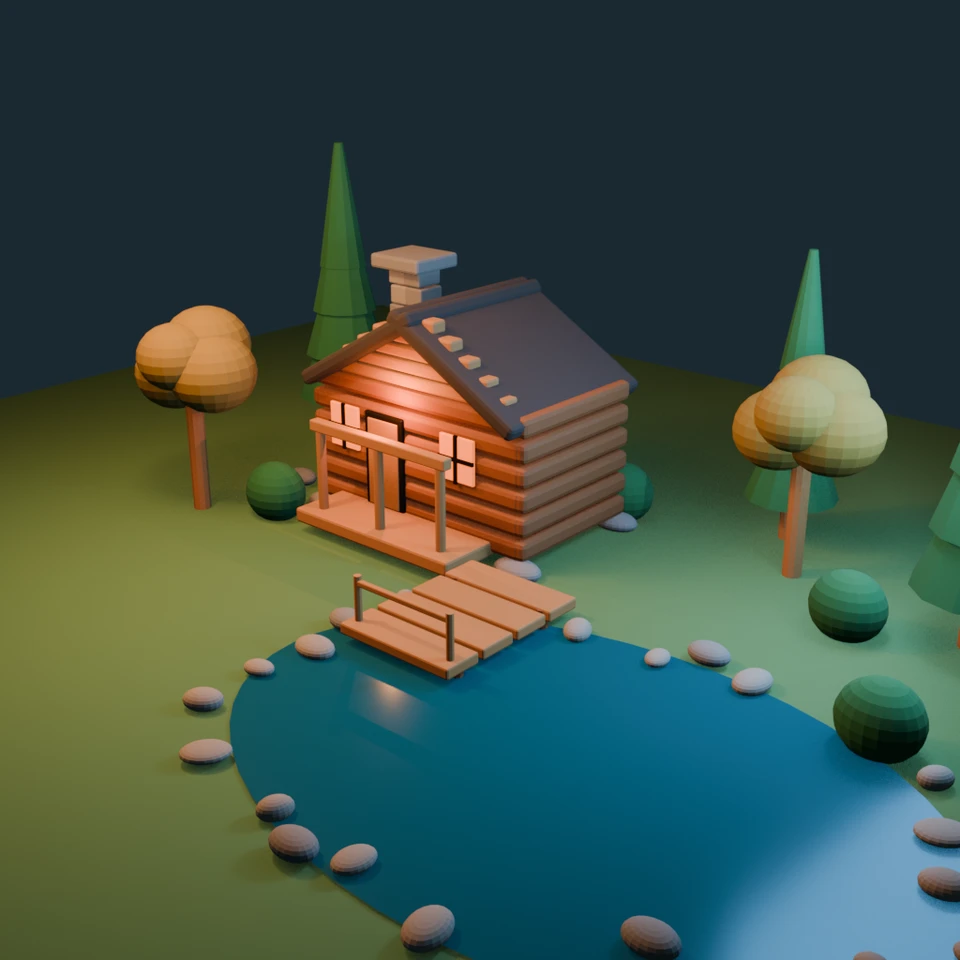
camera + framing set up by the AI contestant
3D Viewport — cabin-pond User Persp
LOADING 3D VIEW
$0.11Cost
62sDuration
5Tool calls
6Turns
Blender —MCP —2026-07-14
Tokens: 37645/4006Vision: ✓Votes W-L-T: 14-12-0DONE ✓
B-BENCH — TRANSCRIPT OpenAI / GPT 5.6 Terra · r1 · 2026-07-14
RUN LOG — cabin-pond · OpenAI / GPT 5.6 Terra · r1 · ok
SYSTEM PROMPTthe control — every model on this task got these instructions
SHOW FULL PROMPT · 432 chars
You are operating Blender through the provided tools. Build what the user's prompt asks for in the current scene. Work step by step and verify your own work. Before you finish, set up a camera and lighting to frame a single, well-composed presentation image of your result — position and aim the camera, and add or adjust lights so the subject reads clearly. When you are finished, reply with the single word DONE and no tool calls.
--TASK cabin-pond: A warm wooden cabin beside a pond, with a stone chimney, a small dock, and a few trees.
11:20>>execute_blender_code({"code":"import bpy, math\nfrom mathutils import Vector\n# Clear scene\nbpy.ops.object.select_all(action='SELECT')\nbpy.ops.object.delete(use_global=False)\nfor d in (bpy.data.materials, bpy.data.curves, bpy.data.meshes, bpy.data.cameras, bpy.data.lights):\n pass\n# World\nworld=bpy.context.scene.world or bpy.data.worlds.new('World')\nbpy.context.scene.world=world\nworld.use_nodes=True\nworld.n…)
11:21<<Error executing code: Communication error with Blender: Code execution error: bpy_struct: item.attr = val: enum "BLENDER_EEVEE_NEXT" not found in ('BLENDER_EEVEE', 'BLENDER_WORKBENCH', 'CYCLES')
11:25>>execute_blender_code({"code":"import bpy\nsc=bpy.context.scene\nsc.render.engine='BLENDER_EEVEE'\nsc.render.resolution_x=900; sc.render.resolution_y=700; sc.render.resolution_percentage=100\nsc.render.image_settings.file_format='PNG'; sc.render.filepath='/tmp/cabin_pond.png'; sc.render.film_transparent=False\ntry: sc.view_settings.look='Medium High Contrast'\nexcept: pass\nbpy.ops.wm.save_as_mainfile(filepath='/tmp/wa…)
11:25<<Error executing code: Communication error with Blender: Code execution error: Error: Cannot open file <repo>\harness\tmp\warm_cabin_pond.blend@ for writing: No such file or directory
11:28>>execute_blender_code({"code":"import bpy\nsc=bpy.context.scene\nsc.render.engine='BLENDER_EEVEE'; sc.render.resolution_x=900; sc.render.resolution_y=700; sc.render.resolution_percentage=100\nsc.render.image_settings.file_format='PNG'; sc.render.filepath='//cabin_pond.png'; sc.render.film_transparent=False\nbpy.ops.render.render(write_still=True)\nprint('Rendered successfully. Objects:',len(sc.objects))","user_prompt":…)
11:29<<Error executing code: Communication error with Blender: Code execution error: Error: Render error (No such file or directory) cannot save: 'cabin_pond.png'
11:32>>get_viewport_screenshot({"max_size":1000,"user_prompt":"A warm wooden cabin beside a pond, with a stone chimney, a small dock, and a few trees."})
11:33<<
11:33imgimage delivered — get_viewport_screenshot
11:37>>execute_blender_code({"code":"import bpy\n# Verify key presentation elements and render in memory without writing a file\nsc=bpy.context.scene\nassert sc.camera and sc.camera.name=='Presentation Camera'\nassert any(o.type=='LIGHT' for o in sc.objects)\nassert any('Still blue pond' in o.name for o in sc.objects)\nassert any('Chimney' in o.name for o in sc.objects)\nsc.render.engine='BLENDER_EEVEE'\nsc.render.resolution…)
11:37<<Code executed successfully: Verified camera, lighting, cabin, pond, chimney, dock and trees; render completed in memory.
11:39ai>DONE
11:39--status: ok · DONE declared
>
LOADING COMPLETE TRANSCRIPT…