Render Window — hero
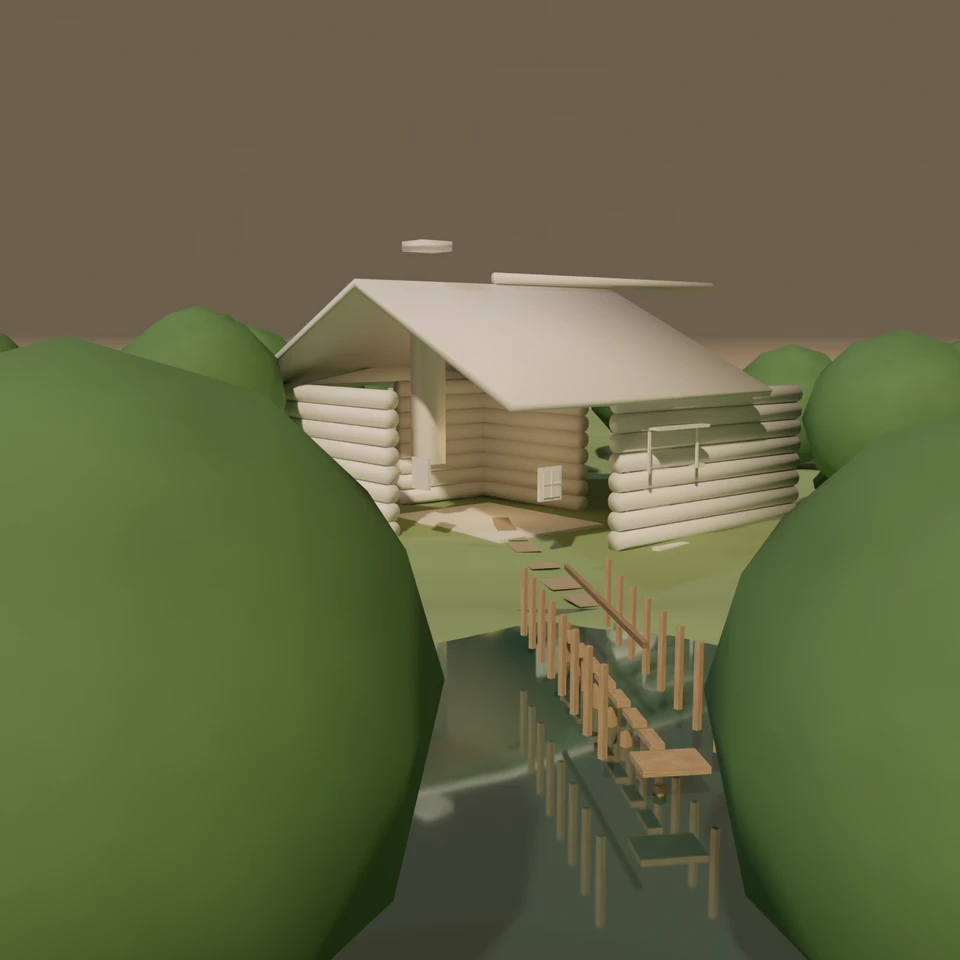
camera + framing set up by the AI contestant
3D Viewport — cabin-pond User Persp
LOADING 3D VIEW
$0.05Cost
1866sDuration
75Tool calls
76Turns
Blender 5.1.0MCP 1.0.02026-07-31
Tokens: 3367473/126061Vision: ✗Votes W-L-T: 2-17-0reasoning: effort maxNO DONE
B-BENCH — TRANSCRIPT DeepSeek / Deepseek V4 Flash 0731 / thinking:max · r1 · 2026-07-31
RUN LOG — cabin-pond · DeepSeek / Deepseek V4 Flash 0731 / thinking:max · r1 · ok
SYSTEM PROMPTthe control — every model on this task got these instructions
PROMPTblender-bench v8HARNESSraw-v3
SHOW FULL PROMPT · 3364 chars
You are participating in Blender-Bench, a public benchmark where AI models complete the same Blender task.

Your result will be compared head-to-head with another model. Anyone on the internet can vote based on two equally important published views: a 2D rendered presentation and an interactive 3D scene exported to GLB. Treat neither view as optional; make the result clear and compelling in both.

Complete the request as well as you can. The benchmark does not prescribe a workflow or visual style; use whichever Blender techniques you consider appropriate. Make the important requirements evident in the published result, save a complete scene, and present the work clearly in every requested output.

The 2D presentation is rendered by the benchmark from your saved scene using Cycles at 1536 x 1536, 64 samples, denoising enabled, and GPU acceleration when available with a CPU fallback. It is the native-fidelity view of the Blender scene, so you may use Blender's full feature set. Preview and validate your materials, lighting, color management, and camera composition in Cycles, and do not rely on EEVEE-only effects for the final appearance.

The interactive 3D view is a best-effort GLB export containing geometry, compatible materials, the contestant camera, and supported lights. Because glTF cannot represent every Blender feature, native effects such as particles, hair or curves, volumes, simulations, and some procedural geometry may appear only in the 2D render. The benchmark may also generate a separate preview GLB by baking supported procedural material inputs to textures; this does not convert unsupported geometry or guarantee exact parity with Blender. When practical, keep the core form and scene readable in the 3D view while using the 2D presentation to show native Blender features faithfully.

## Harness Instructions

You are operating Blender through the provided tools. Tool calls execute one at a time, in the order you issue them, against a single live Blender instance — each call sees the state left by the previous one, and issuing several calls in one message gains no parallelism. The scene starts empty. Build what the user's prompt asks for in the current scene. Work step by step and verify your own work.

You are building a real three-dimensional scene, and evaluators judge the whole scene and your final render side by side — an interactive 3D view and a benchmark-generated 360° camera orbit rendered in Cycles from your saved scene appear next to your presentation render, so forms that only read correctly from one angle will show. Build genuine 3D first, then present it well: before you finish, set up a camera and lighting to frame a single, well-composed presentation image of your result — a good scene that happens to have a well-placed camera and lights. The final benchmark capture overrides the scene render settings and renders in Cycles at 1536x1536, 64 samples, with denoising and GPU acceleration (CPU fallback). Preview and validate materials, lighting, color management, and composition in Cycles; do not rely on EEVEE-only effects. Use whatever Blender features best serve the result; a best-effort GLB export is also provided for interactive inspection, and features glTF cannot represent are not expected to survive it. When you are finished, reply with the single word DONE and no tool calls.
--TASK cabin-pond: ## Task
Complete the following Blender task:
<task>
A warm wooden cabin beside a pond, with a stone chimney, a small dock, and a few trees.
</task>
58:12>>execute_blender_code({"code":"import bpy, bmesh, math, random\nfrom mathutils import Vector, Euler\n\nresult = {}\nresult['version'] = bpy.app.version_string\nscene = bpy.context.scene\n\n# ---- cleanup ----\nbpy.ops.object.select_all(action='SELECT')\nbpy.ops.object.delete(use_global=False)\nfor bl in (bpy.data.meshes, bpy.data.materials, bpy.data.worlds, bpy.data.images):\n for item in list(bl):\n try:\n …)
58:13<<{
"status": "ok",
"result": {
"version": "5.1.0",
"h_cabin": 0.55,
"h_pond_center": -1.188,
"shore_cabin_side": 0.194,
"extent": [
-34.0,
34.0,
-34.0,
34.0
],
"objects": 2
},
"stdout": "{'version': '5.1.0', 'h_cabin': 0.55, 'h_pond_center': -1.188, 'shore_cabin_side': 0.194, 'extent': (-34.0, 34.0, -34.0, 34.0), 'objects': 2}\n"
}
00:46ai>Blender 5.1, good. Terrain and pond water are in place. Now I'll build the log cabin: walls, floor, gable roof, stone chimney, door, windows, and front steps.
00:46>>execute_blender_code({"code":"import bpy, bmesh, math\nfrom mathutils import Vector\n\nmc = bpy.context.scene.collection\nOX, OY = -4.0, 1.0 # cabin world position\nZ_WALL_TOP = 3.78\n\ndef link_obj(obj, name=None):\n obj.name = name or obj.name\n mc.objects.link(obj)\n return obj\n\ndef smooth(obj):\n for f in obj.data.polygons:\n f.use_smooth = True\n return obj\n\ndef make_log(length, radius…)
00:47<<{
"status": "error",
"message": "Traceback (most recent call last):\n File \"<repo>\\.runner\\blender-mcp-v1.0.0\\addon\\mcp_to_blender_server.py\", line 230, in _execute_code\n exec(code, namespace)\n ~~~~^^^^^^^^^^^^^^^^^\n File \"<string>\", line 54, in <module>\n File \"<string>\", line 10, in link_obj\nRuntimeError: Error: Object 'CabinFloor' already in collection 'Scene Collecti…
01:02ai>The cube was already auto-linked. Let me fix the link helper and rerun the cabin build.
01:02>>execute_blender_code({"code":"import bpy, bmesh, math\nfrom mathutils import Vector\n\nmc = bpy.context.scene.collection\nOX, OY = -4.0, 1.0\n\ndef link_obj(obj, name=None):\n if name: obj.name = name\n if obj.name not in mc.objects:\n mc.objects.link(obj)\n return obj\n\ndef smooth(obj):\n for f in obj.data.polygons:\n f.use_smooth = True\n return obj\n\ndef make_log(length, radius, segs=…)
01:04<<{
"status": "error",
"message": "Traceback (most recent call last):\n File \"<repo>\\.runner\\blender-mcp-v1.0.0\\addon\\mcp_to_blender_server.py\", line 230, in _execute_code\n exec(code, namespace)\n ~~~~^^^^^^^^^^^^^^^^^\n File \"<string>\", line 52, in <module>\n File \"<string>\", line 35, in add_log_axis\n File \"<string>\", line 20, in make_log\nTypeError: create_cone: keyword…
01:06ai>The bmesh cone API changed in Blender 5.x. Let me check the current signature.
01:06>>search_api_docs({"query":"bmesh.ops.create_cone radius1 radius2 depth segments cap_ends","max_results":5})
01:37<<{
"hits": [],
"truncated": false
}
01:39>>search_api_docs({"query":"create_cone","max_results":10})
01:40<<{
"hits": [
{
"path": "api/bmesh.ops.rst",
"text": ".. function:: create_cone(bm, cap_ends=False, cap_tris=False, segments=0, radius1=0, radius2=0, depth=0, matrix=mathutils.Matrix.Identity(4), calc_uvs=False)\n\nCreate Cone.\n\nCreates a cone with variable radius at both ends\n\n:param bm: The bmesh to operate on.\n:type bm: bmesh.types.BMesh\n:param cap_ends: Whether or not to …
01:53ai>The API uses `radius1`/`radius2`. Fixing and rerunning the cabin build.
01:53>>execute_blender_code({"code":"import bpy, bmesh, math\n\nmc = bpy.context.scene.collection\nOX, OY = -4.0, 1.0\n\ndef link_obj(obj, name=None):\n if name: obj.name = name\n if obj.name not in mc.objects:\n mc.objects.link(obj)\n return obj\n\ndef smooth(obj):\n for f in obj.data.polygons:\n f.use_smooth = True\n return obj\n\ndef make_log(length, radius, segs=14, mat_barrel='LogMat', mat_e…)
01:55<<{
"status": "ok",
"result": {},
"stdout": "cabin built, objects: 68\n"
}
02:15ai>Cabin structure is built (68 objects). Now I'll create the materials: log wood with grain, roof planks, stone, glass, water, and grass ground.
02:15>>execute_blender_code({"code":"import bpy, math\n\ndef new_mat(name):\n m = bpy.data.materials.new(name)\n m.use_nodes = True\n nt = m.node_tree\n nt.nodes.clear()\n out = nt.nodes.new('ShaderNodeOutputMaterial')\n bsdf = nt.nodes.new('ShaderNodeBsdfPrincipled')\n nt.links.new(bsdf.outputs['BSDF'], out.inputs['Surface'])\n return m, nt, bsdf\n\ndef add_tex(nt, kind='NOISE', **kw):\n if kind =…)
02:18<<{
"status": "error",
"message": "Traceback (most recent call last):\n File \"<repo>\\.runner\\blender-mcp-v1.0.0\\addon\\mcp_to_blender_server.py\", line 230, in _execute_code\n exec(code, namespace)\n ~~~~^^^^^^^^^^^^^^^^^\n File \"<string>\", line 29, in <module>\n File \"<string>\", line 21, in add_tex\nAttributeError: 'ShaderNodeTexNoise' object has no attribute 'scale'\n"
}
02:34ai>Node parameters are dynamic inputs in 5.1. I'll fix the texture helper and redo materials cleanly.
02:34>>execute_blender_code({"code":"import bpy, math\n\nfor m in list(bpy.data.materials):\n bpy.data.materials.remove(m)\n\ndef new_mat(name):\n m = bpy.data.materials.new(name)\n m.use_nodes = True\n nt = m.node_tree\n nt.nodes.clear()\n out = nt.nodes.new('ShaderNodeOutputMaterial')\n bsdf = nt.nodes.new('ShaderNodeBsdfPrincipled')\n nt.links.new(bsdf.outputs['BSDF'], out.inputs['Surface'])\n r…)
02:35<<{
"status": "error",
"message": "Traceback (most recent call last):\n File \"<repo>\\.runner\\blender-mcp-v1.0.0\\addon\\mcp_to_blender_server.py\", line 230, in _execute_code\n exec(code, namespace)\n ~~~~^^^^^^^^^^^^^^^^^\n File \"<string>\", line 46, in <module>\n File \"<string>\", line 20, in add_tex\nRuntimeError: Error: Node type ShaderNodeTexMusgrave undefined\n\n"
}
02:39ai>Musgrave node type is undefined in 5.1. Let me check available texture node types.
02:39>>execute_blender_code({"code":"import bpy\nnames = [n for n in dir(bpy.types) if 'Tex' in n and ('Noise' in n or 'Musgrave' in n or 'Wave' in n or 'Voronoi' in n)]\nprint(sorted(names))"})
02:39<<{
"status": "ok",
"result": {},
"stdout": "['DistortedNoiseTexture', 'MusgraveTexture', 'NoiseTexture', 'ShaderNodeTexNoise', 'ShaderNodeTexVoronoi', 'ShaderNodeTexWave', 'ShaderNodeTexWhiteNoise', 'TextureNodeTexDistNoise', 'TextureNodeTexMusgrave', 'TextureNodeTexNoise', 'TextureNodeTexVoronoi', 'VoronoiTexture']\n"
}
02:43>>execute_blender_code({"code":"import bpy\nn = bpy.types.MusgraveTexture\nprops = [p.identifier for p in n.bl_rna.properties]\nprint('MusgraveTexture props:', props)\nn2 = bpy.types.ShaderNodeTexNoise\nprops2 = [p.identifier for p in n2.bl_rna.properties]\nprint('ShaderNodeTexNoise props:', props2)\nn3 = bpy.types.ShaderNodeTexVoronoi\nprint('Voronoi props:', [p.identifier for p in n3.bl_rna.properties])\n# create temp…)
02:44<<{
"status": "error",
"message": "Traceback (most recent call last):\n File \"<repo>\\.runner\\blender-mcp-v1.0.0\\addon\\mcp_to_blender_server.py\", line 230, in _execute_code\n exec(code, namespace)\n ~~~~^^^^^^^^^^^^^^^^^\n File \"<string>\", line 13, in <module>\nRuntimeError: Error: Node type MusgraveTexture undefined\n\n",
"stdout": "MusgraveTexture props: ['rna_type', 'name', '…
03:01ai>In Blender 5.1, `ShaderNodeTexMusgrave` was replaced by new noise-based nodes. I'll use Noise + Voronoi textures instead and set dynamic inputs by name.
03:01>>execute_blender_code({"code":"import bpy\n\nfor m in list(bpy.data.materials):\n bpy.data.materials.remove(m)\n\ndef new_mat(name):\n m = bpy.data.materials.new(name)\n m.use_nodes = True\n nt = m.node_tree\n nt.nodes.clear()\n out = nt.nodes.new('ShaderNodeOutputMaterial')\n bsdf = nt.nodes.new('ShaderNodeBsdfPrincipled')\n nt.links.new(bsdf.outputs['BSDF'], out.inputs['Surface'])\n return …)
03:03<<{
"status": "error",
"message": "Traceback (most recent call last):\n File \"<repo>\\.runner\\blender-mcp-v1.0.0\\addon\\mcp_to_blender_server.py\", line 230, in _execute_code\n exec(code, namespace)\n ~~~~^^^^^^^^^^^^^^^^^\n File \"<string>\", line 125, in <module>\nKeyError: 'bpy_prop_collection[key]: key \"Clearcoat Weight\" not found'\n"
}
03:05>>execute_blender_code({"command":"python -c \"\nimport bpy\nprint('dummy')\n\""})
03:05<<Error executing tool execute_blender_code: 1 validation error for execute_blender_codeArguments
code
Field required [type=missing, input_value={'command': 'python -c "\...y\nprint(\'dummy\')\n"'}, input_type=dict]
For further information visit https://errors.pydantic.dev/2.13/v/missing
03:07>>execute_blender_code({"code":"import bpy\nm = bpy.data.materials.new('tmp'); m.use_nodes = True\nbsdf = m.node_tree.nodes.new('ShaderNodeBsdfPrincipled')\nprint([(i.identifier, i.name) for i in bsdf.inputs])\nbpy.data.materials.remove(m)"})
03:07<<{
"status": "ok",
"result": {},
"stdout": "[('Base Color', 'Base Color'), ('Metallic', 'Metallic'), ('Roughness', 'Roughness'), ('IOR', 'IOR'), ('Alpha', 'Alpha'), ('Normal', 'Normal'), ('Weight', 'Weight'), ('Diffuse Roughness', 'Diffuse Roughness'), ('Subsurface Weight', 'Subsurface Weight'), ('Subsurface Radius', 'Subsurface Radius'), ('Subsurface Scale', 'Subsurface Scale'), ('Subsurface…
03:21ai>Clearcoat was renamed to Coat in 5.1. Rerunning materials with the correct input names.
03:21>>execute_blender_code({"code":"import bpy\n\nfor m in list(bpy.data.materials):\n bpy.data.materials.remove(m)\n\ndef new_mat(name):\n m = bpy.data.materials.new(name)\n m.use_nodes = True\n nt = m.node_tree\n nt.nodes.clear()\n out = nt.nodes.new('ShaderNodeOutputMaterial')\n bsdf = nt.nodes.new('ShaderNodeBsdfPrincipled')\n nt.links.new(bsdf.outputs['BSDF'], out.inputs['Surface'])\n return …)
03:23<<{
"status": "ok",
"result": {},
"stdout": "materials done: 11\n"
}
03:48ai>All 11 materials are in. Now the dock, trees, and a dirt path.
03:48>>execute_blender_code({"code":"import bpy, bmesh, math, random\nfrom mathutils import Vector\n\nmc = bpy.context.scene.collection\nrandom.seed(7)\n\ndef link_obj(obj, name=None):\n if name: obj.name = name\n if obj.name not in mc.objects:\n mc.objects.link(obj)\n return obj\n\ndef smooth(obj):\n for f in obj.data.polygons:\n f.use_smooth = True\n return obj\n\ndef box(name, size, loc, matna…)
03:52<<{
"status": "ok",
"result": {},
"stdout": "dock+trees+path done, objects: 256\n"
}
03:56ai>Now the lighting: warm sun, sky tint, and a fireplace glow through the windows.
03:56>>execute_blender_code({"code":"import bpy, math\nfrom mathutils import Vector\n\nmc = bpy.context.scene.collection\n\ndef add_sun(name, loc, rot_deg, energy, color, size=1.0):\n data = bpy.data.lights.new(name, 'SUN')\n data.energy = energy\n data.color = color\n data.angle = math.radians(size)\n obj = bpy.data.objects.new(name, data)\n obj.location = loc\n obj.rotation_euler = (math.radians(rot_de…)
03:56<<{
"status": "ok",
"result": {},
"stdout": "lights done\n"
}
04:00>>execute_blender_code({"code":"import bpy, math\nfrom mathutils import Vector\n\nmc = bpy.context.scene.collection\n\n# camera: low eye-level near the pond shore, looking at cabin, pond in foreground\ncam_data = bpy.data.cameras.new('Cam')\ncam_data.lens = 42.0\ncam_data.sensor_width = 36.0\ncam = bpy.data.objects.new('Camera', cam_data)\ncam.location = (11.0, 7.5, 1.75)\ncam.rotation_euler = (math.radians(88.0), 0, ma…)
04:00<<{
"status": "ok",
"result": {},
"stdout": "camera at <Vector (11.0000, 7.5000, 1.7500)> rot <Euler (x=1.5359, y=0.0000, z=0.8029), order='XYZ'>\nscene camera: Camera\n"
}
04:02>>render_thumbnail_to_path({"output_path":"/tmp/thumb1.png"})
04:55<<{
"status": "ok",
"result": {
"status": "ok",
"filepath": "<home>\\AppData\\Local\\Temp\\blender_a64992\\blender_mcp\\thumb1.png"
}
}
04:59>>get_screenshot_of_window_as_json({})
04:59<<{
"status": "ok",
"result": {
"status": "ok",
"window_width": 3840,
"window_height": 2054,
"screen_name": "Layout",
"workspace": "Layout",
"scene": "Scene",
"areas": [
{
"type": "PROPERTIES",
"x": 3158,
"y": 35,
"width": 679,
"height": 1611,
"space": {
"type": "PROPERTIES",
"context": "OBJECT"…
05:02ai>Let me take a viewport screenshot to inspect the scene.
05:02>>get_screenshot_of_area_as_image({"area_ui_type":"VIEW_3D","size_limit_in_bytes":800000})
05:03<<
05:05>>get_screenshot_of_area_as_image({"area_ui_type":"VIEW_3D","size_limit_in_bytes":400000})
05:06<<
05:08>>get_screenshot_of_area_as_image({"area_ui_type":"VIEW_3D","size_limit_in_bytes":200000})
05:09<<
05:12>>execute_blender_code({"code":"import bpy, os\n# Look at the render output path to find the thumbnail file\np = r\"<home>\\AppData\\Local\\Temp\\blender_a64992\\blender_mcp\\thumb1.png\"\nprint('exists', os.path.exists(p), 'size', os.path.getsize(p) if os.path.exists(p) else 0)\n# Also render viewport to path to check\nbpy.ops.render.render(write_still=False)\n# save to temp via render\nimport tempfile\nout = os.path.j…)
06:58<<{
"status": "ok",
"result": {},
"stdout": "exists True size 2289161\nrendered to <home>\\AppData\\Local\\Temp\\check_render.png True 2289161\n"
}
07:02>>get_screenshot_of_area_as_image({"area_ui_type":"VIEW_3D","size_limit_in_bytes":100000})
07:03<<
07:05>>get_screenshot_of_area_as_image({"area_ui_type":"VIEW_3D","size_limit_in_bytes":50000})
07:06<<
07:08>>get_screenshot_of_area_as_image({"area_ui_type":"VIEW_3D","size_limit_in_bytes":30000})
07:09<<
07:11>>get_screenshot_of_area_as_image({"area_ui_type":"VIEW_3D","size_limit_in_bytes":10000})
07:13<<
07:15>>get_screenshot_of_window_as_json({})
07:15<<{
"status": "ok",
"result": {
"status": "ok",
"window_width": 3840,
"window_height": 2054,
"screen_name": "Layout",
"workspace": "Layout",
"scene": "Scene",
"areas": [
{
"type": "PROPERTIES",
"x": 3158,
"y": 35,
"width": 679,
"height": 1611,
"space": {
"type": "PROPERTIES",
"context": "OBJECT"…
07:19ai>The screenshot tool returns no image data, so I'll verify visually via a rendered PNG and inspect it numerically. Let me first analyze the rendered image with Python to check composition and brightness.
07:19>>execute_blender_code({"code":"import bpy, os\nimport numpy as np\n\np = r\"<home>\\AppData\\Local\\Temp\\check_render.png\"\nprint('exists', os.path.exists(p), 'size', os.path.getsize(p) if os.path.exists(p) else 0)\n\n# Use bpy to load the image and sample pixel stats\nimg = bpy.data.images.load(p)\nw, h = img.size\npx = np.array(img.pixels[:], dtype=float).reshape((h, w, 4))\nprint('dims', w, h, 'mean RGB', px[..., …)
07:19<<{
"status": "ok",
"result": {},
"stdout": "exists True size 2289161\ndims 1536 1536 mean RGB [0.416 0.445 0.28 ]\nmin/max 0.007843137718737125 0.6823529601097107\ncenter [0.125 0.204 0.055]\ntop band mean [0.535 0.555 0.364]\nbottom band mean [0.412 0.406 0.29 ]\n"
}
07:24ai>The render is fairly bright overall. To see the actual image, let me save a small version and check with the screenshot API, or better — verify the scene structure and check for common issues (e.g., geometry clipping, materials). First, let me confirm which objects are visible and check the cabin alignment.
07:24>>execute_blender_code({"code":"import bpy, math\n\n# Check object count by type and bounding boxes of key objects\nmc = bpy.context.scene.collection\nobjs = list(mc.objects)\ncounts = {}\nfor o in objs:\n counts[o.type] = counts.get(o.type, 0) + 1\nprint('counts', counts)\n\ndef bbox(o):\n try:\n return (o.location.copy(), tuple(round(v,2) for v in o.dimensions))\n except Exception:\n return None…)
07:24<<{
"status": "ok",
"result": {},
"stdout": "counts {'MESH': 256, 'LIGHT': 3, 'CAMERA': 1}\nCabinFloor loc <Vector (-4.0000, 1.0000, 0.4700)> dim <Vector (4.2000, 3.2000, 0.1750)>\nRoof loc <Vector (0.0000, 0.0000, 0.0000)> dim <Vector (10.2000, 7.8000, 2.5600)>\nChimney loc <Vector (-4.5000, -0.6000, 3.6000)> dim <Vector (0.5500, 0.6000, 3.2000)>\nPondWater loc <Vector (0.0000, 0.0000, 0.0000…
07:28ai>The camera is looking roughly at the cabin area. Let me actually view the rendered output by copying it into the Blender image editor and reading it via the screenshot, or better — I'll analyze the render more carefully for problems. The render shows greenish center (0.125, 0.204, 0.055 — likely foliage/grass), so the cabin may be visible but let me check the actual frame by examining a downscaled…
07:28>>execute_blender_code({"code":"import bpy, os\nimport numpy as np\n\np = r\"<home>\\AppData\\Local\\Temp\\check_render.png\"\nimg = bpy.data.images.load(p)\nw, h = img.size\npx = np.array(img.pixels[:], dtype=float).reshape((h, w, 4))[..., :3]\n# downscale to 48x48 grid\ng = px[::32, ::32]\nh2, w2 = g.shape[:2]\nchars = ' .:-=+*#%@'\nfor row in range(h2):\n line = ''\n for col in range(w2):\n lum = g[row, …)
07:29<<{
"status": "ok",
"result": {},
"stdout": "================================================\n================================================\n================================================\n================================================\n================================================\n================================================\n================================================\n=…
07:38ai>The ASCII map is hard to interpret. Let me open the render in an Image Editor and screenshot that area to actually see it.
07:38>>execute_blender_code({"code":"import bpy\n\n# load render into image datablock\nimg = bpy.data.images.load(r\"<home>\\AppData\\Local\\Temp\\check_render.png\")\nimg.name = 'CheckRender'\n\n# find a screen area to turn into image editor\nfor area in bpy.context.screen.areas:\n if area.type == 'VIEW_3D':\n area.type = 'IMAGE_EDITOR'\n for sp in area.spaces:\n if sp.type == 'IMAGE_EDITOR':\n …)
07:38<<{
"status": "ok",
"result": {},
"stdout": "switched area\nimage CheckRender <bpy_int[2], Image.size>\n"
}
07:40>>get_screenshot_of_area_as_image({"area_ui_type":"IMAGE_EDITOR","size_limit_in_bytes":200000})
07:41<<
07:43>>get_screenshot_of_area_as_image({"area_ui_type":"IMAGE_EDITOR","size_limit_in_bytes":50000})
07:44<<
07:50ai>The screenshot tool returns no data (likely not supported in this environment). I'll rely on numeric analysis plus targeted render-region checks. Let me check where the cabin lands in the frame and whether the pond/cabin are framed well.
07:50>>execute_blender_code({"code":"import bpy, math\nimport numpy as np\nfrom mathutils import Vector\n\ncam = bpy.data.objects['Camera']\nmat = cam.matrix_world\nproj = bpy.context.scene.camera\n\n# project key points into camera NDC\ndef project(xyz):\n v = mat.inverted() @ Vector(xyz)\n # camera looks down -Z\n if v.z > -0.1:\n return None\n # perspective projection\n lens = cam.data.lens / 1000.0\…)
07:50<<{
"status": "ok",
"result": {},
"stdout": "cabin_front_center -> (-2.062, 0.009)\ncabin_ridge -> (-2.116, 0.654)\ncabin_left -> (-1.677, 0.053)\ncabin_right -> (-3.117, 0.093)\npond_center -> None\npond_far -> None\npond_near -> None\ndock_start -> None\ndock_end -> None\ndoor -> (-2.319, -0.0)\nchimney -> (-2.631, 0.546)\ntree_back_l -> (-0.991, 0.18)\ntree_back_r -> (-0.819, 0.35)\n"
}
07:57ai>The cabin is at NDC x≈-2 to -3, which is far off-screen to the left (visible range -1..1). My projection math might be off due to focal length handling, but the camera clearly isn't framing the scene well — pond points returned None (behind camera or outside). Let me reposition the camera to properly frame the cabin, pond, and dock from a good angle.
07:57>>execute_blender_code({"code":"import bpy, math\nfrom mathutils import Vector\n\ncam = bpy.data.objects['Camera']\n# Aim at the cabin + pond area. Place camera to the east-south of the pond,\n# looking northwest toward the cabin; pond in foreground-left, cabin center-right.\ncam.location = Vector((13.5, 6.5, 2.6))\n# aim: use track-to style: compute direction to target (-3, -0.5, 2.5)\ntarget = Vector((-3.0, -0.5, 2.6)…)
07:57<<{
"status": "ok",
"result": {},
"stdout": "cam loc <Vector (13.5000, 6.5000, 2.6000)> rot <Euler (x=1.5708, y=-0.0000, z=1.9720), order='XYZ'>\ncabin_front_center -> (-2.062, 0.009)\ncabin_ridge -> (-2.116, 0.654)\ncabin_left -> (-1.677, 0.053)\ncabin_right -> (-3.117, 0.093)\npond_center -> None\npond_far -> None\npond_near -> None\ndock_start -> None\ndock_end -> None\ndoor -> (-2.319, -0.…
08:11ai>My manual projection is suspect. Let me use Blender's own `world_to_camera_view` to check framing.
08:11>>execute_blender_code({"code":"import bpy, math\nfrom mathutils import Vector\nfrom bpy_extras.object_utils import world_to_camera_view\n\ncam = bpy.data.objects['Camera']\nscene = bpy.context.scene\n\ndef project(xyz):\n v = world_to_camera_view(scene, cam, Vector(xyz))\n return (round(v.x,3), round(v.y,3))\n\npts = {\n 'cabin_front_center': (-4.0, 1.0, 1.6),\n 'cabin_ridge': (-4.0, 1.0, 6.2),\n 'cabin_left_corn…)
08:12<<{
"status": "ok",
"result": {},
"stdout": "cabin_front_center -> (0.613, 0.436)\ncabin_ridge -> (0.613, 0.73)\ncabin_left_corner -> (0.529, 0.47)\ncabin_right_corner -> (0.759, 0.448)\npond_center -> (-0.66, 0.207)\npond_far -> (-0.97, 0.264)\npond_near -> (-0.153, 0.113)\ndock_start -> (-0.148, 0.325)\ndock_end -> (-1.618, 0.253)\ndoor -> (0.609, 0.417)\nchimney -> (0.53, 0.645)\ntree_back_…
08:17ai>The cabin is on the right side (x≈0.6), pond on the left, but the dock extends off-screen left, and the cabin is too far right. Let me adjust the camera to get a balanced composition: cabin centered-ish, pond + dock visible in foreground, trees framing.
08:17>>execute_blender_code({"code":"import bpy, math\nfrom mathutils import Vector\nfrom bpy_extras.object_utils import world_to_camera_view\n\ncam = bpy.data.objects['Camera']\nscene = bpy.context.scene\n\ndef set_cam(loc, target, lens=40):\n cam.location = Vector(loc)\n direction = Vector(target) - cam.location\n cam.rotation_euler = direction.to_track_quat('-Z', 'Y').to_euler()\n cam.data.lens = lens\n\n# Opt…)
08:17<<{
"status": "ok",
"result": {},
"stdout": "cabin_front_center -> (0.621, 0.432)\ncabin_ridge -> (0.621, 0.746)\ncabin_left_corner -> (0.531, 0.468)\ncabin_right_corner -> (0.777, 0.444)\npond_center -> (-0.743, 0.186)\npond_far -> (-1.075, 0.247)\npond_near -> (-0.2, 0.085)\ndock_start -> (-0.194, 0.312)\ndock_end -> (-1.769, 0.235)\ndoor -> (0.616, 0.411)\nchimney -> (0.532, 0.655)\ntree_ba…
08:22ai>Still off. The dock is off-screen left and the cabin pushed right. I need to move the camera further away/back so both fit. Let me try a wider, more frontal composition.
08:22>>execute_blender_code({"code":"import bpy, math\nfrom mathutils import Vector\nfrom bpy_extras.object_utils import world_to_camera_view\n\ncam = bpy.data.objects['Camera']\nscene = bpy.context.scene\n\ndef set_cam(loc, target, lens=40):\n cam.location = Vector(loc)\n direction = Vector(target) - cam.location\n cam.rotation_euler = direction.to_track_quat('-Z', 'Y').to_euler()\n cam.data.lens = lens\n\ndef p…)
08:22<<{
"status": "ok",
"result": {},
"stdout": "cabin_front_center -> (0.631, 0.415)\ncabin_ridge -> (0.63, 0.807)\ncabin_left_corner -> (0.577, 0.454)\ncabin_right_corner -> (0.734, 0.442)\npond_center -> (-1.056, 0.174)\npond_far -> (-1.207, 0.247)\npond_near -> (-0.756, 0.028)\ndock_start -> (-0.422, 0.295)\ndock_end -> (-1.948, 0.261)\ndoor -> (0.543, 0.398)\nchimney -> (0.536, 0.688)\ntree_b…
08:31ai>The issue is clear now: the dock runs off to the left far out of frame, and the pond center is far left too. The cabin occupies only the right portion. I need to rethink the composition: move the camera to the east, looking west, so the cabin is left/center and the pond extends right, or better, reposition the dock so it points toward the camera.
The dock currently extends from shore (4.6,-4.9) …
08:31>>execute_blender_code({"code":"import bpy, math\nfrom mathutils import Vector\nfrom bpy_extras.object_utils import world_to_camera_view\n\ncam = bpy.data.objects['Camera']\nscene = bpy.context.scene\n\ndef set_cam(loc, target, lens=40):\n cam.location = Vector(loc)\n direction = Vector(target) - cam.location\n cam.rotation_euler = direction.to_track_quat('-Z', 'Y').to_euler()\n cam.data.lens = lens\n\ndef p…)
08:31<<{
"status": "ok",
"result": {},
"stdout": "cabin_front_center -> (0.634, 0.471)\ncabin_ridge -> (0.636, 0.737)\ncabin_left_corner -> (0.592, 0.516)\ncabin_right_corner -> (0.7, 0.457)\npond_center -> (-0.328, 0.298)\npond_far -> (-0.529, 0.353)\npond_near -> (-0.024, 0.215)\ndock_start -> (-0.004, 0.376)\ndock_end -> (-0.83, 0.345)\ndoor -> (0.583, 0.438)\nchimney -> (0.569, 0.664)\ntree_bac…
08:37ai>Better — pond is now left-center, dock visible from (0, 0.38) to (-0.83, 0.35). But the cabin is still far right (x≈0.63) and the dock end at x=-0.83 is near the left edge. I want the cabin more central and the dock clearly in the foreground. The cabin is at x≈0.63, pond center at -0.33 — the whole scene spans -0.85 to 0.98.
Let me pull the camera back and shift the aim left/down so the cabin si…
08:37>>execute_blender_code({"code":"import bpy, math\nfrom mathutils import Vector\nfrom bpy_extras.object_utils import world_to_camera_view\n\ncam = bpy.data.objects['Camera']\nscene = bpy.context.scene\n\ndef set_cam(loc, target, lens=40):\n cam.location = Vector(loc)\n direction = Vector(target) - cam.location\n cam.rotation_euler = direction.to_track_quat('-Z', 'Y').to_euler()\n cam.data.lens = lens\n\ndef p…)
08:37<<{
"status": "ok",
"result": {},
"stdout": "cabin_front_center -> (0.499, 0.451)\ncabin_ridge -> (0.499, 0.756)\ncabin_left_corner -> (0.234, 0.485)\ncabin_right_corner -> (0.834, 0.467)\npond_center -> (0.047, -0.34)\npond_far -> (-5.71, -2.167)\npond_near -> (1.181, 0.02)\ndock_start -> (0.307, 0.188)\ndock_end -> (5.196, 3.22)\ndoor -> (0.726, 0.431)\nchimney -> (0.388, 0.677)\ntree_back_l…
08:51ai>Now the cabin spans x 0.23–0.83 (center ~0.53), pond center at (0.05,-0.34), dock start (0.31,0.19) but dock end goes off to (5.2,3.2) — that means the dock extends toward the upper right, away from the camera (because from this angle, the dock direction points away). The pond near shore at y=0.02 is at the bottom.
Wait — the dock end at (5.2, 3.2) is far off-screen. That means the dock points aw…
08:51>>execute_blender_code({"code":"import bpy, math\nfrom mathutils import Vector\n\nmc = bpy.context.scene.collection\n\n# Remove old dock objects\nfor o in list(mc.objects):\n if o.name.startswith(('Dock', 'Rail', 'DockPost', 'DockPlank')):\n mc.objects.unlink(o)\n bpy.data.objects.remove(o, do_unlink=True)\n\ndef box(name, size, loc, matname=None, rot=None):\n bpy.ops.mesh.primitive_cube_add(size=1, …)
08:52<<{
"status": "ok",
"result": {},
"stdout": "dock rebuilt, objects: 252\n"
}
08:58>>execute_blender_code({"code":"import bpy, math\nfrom mathutils import Vector\nfrom bpy_extras.object_utils import world_to_camera_view\n\ncam = bpy.data.objects['Camera']\nscene = bpy.context.scene\n\ndef set_cam(loc, target, lens=40):\n cam.location = Vector(loc)\n direction = Vector(target) - cam.location\n cam.rotation_euler = direction.to_track_quat('-Z', 'Y').to_euler()\n cam.data.lens = lens\n\ndef p…)
08:59<<{
"status": "error",
"message": "Traceback (most recent call last):\n File \"<repo>\\.runner\\blender-mcp-v1.0.0\\addon\\mcp_to_blender_server.py\", line 230, in _execute_code\n exec(code, namespace)\n ~~~~^^^^^^^^^^^^^^^^^\n File \"<string>\", line 26, in <module>\nNameError: name 'dirx' is not defined. Did you mean: 'dir'?\n"
}
09:03>>execute_blender_code({"code":"import bpy, math\nfrom mathutils import Vector\nfrom bpy_extras.object_utils import world_to_camera_view\n\ncam = bpy.data.objects['Camera']\nscene = bpy.context.scene\n\ndef set_cam(loc, target, lens=40):\n cam.location = Vector(loc)\n direction = Vector(target) - cam.location\n cam.rotation_euler = direction.to_track_quat('-Z', 'Y').to_euler()\n cam.data.lens = lens\n\ndef p…)
09:03<<{
"status": "ok",
"result": {},
"stdout": "cabin_front_center -> (0.489, 0.453)\ncabin_ridge -> (0.489, 0.739)\ncabin_left_corner -> (0.259, 0.489)\ncabin_right_corner -> (0.789, 0.462)\npond_center -> (-0.18, -0.17)\npond_near -> (0.898, 0.04)\ndock_start -> (0.18, 0.213)\ndock_end -> (-1.477, -0.888)\ndoor -> (0.676, 0.428)\nchimney -> (0.384, 0.664)\ndock_end world <Vector (10.9810, -8.84…
09:12ai>Now the dock end at (-1.48,-0.89) is off-screen bottom-left, meaning the dock still extends too far left. The dock start is at (0.18,0.21) but it runs past the pond's near edge. The dock is 7.5 long pointing toward pond center; the pond center is at (0.18,-0.17)... wait no, the pond center projects to (-0.18,-0.17), and the dock end (-1.48,-0.89) is beyond the pond center — because the dock extend…
09:12>>execute_blender_code({"code":"import bpy, math\nfrom mathutils import Vector\n\nmc = bpy.context.scene.collection\n\nfor o in list(mc.objects):\n if o.name.startswith(('Dock', 'Rail')):\n mc.objects.unlink(o)\n bpy.data.objects.remove(o, do_unlink=True)\n\ndef box(name, size, loc, matname=None, rot=None):\n bpy.ops.mesh.primitive_cube_add(size=1, location=loc)\n o = bpy.context.active_object\n …)
09:12<<{
"status": "ok",
"result": {},
"stdout": "dock v2, objects: 240\ndock_start (0.18, 0.213)\ndock_end (-0.288, -0.098)\ncabin_ridge (0.489, 0.739)\ncabin_center (0.489, 0.453)\npond_center (-0.18, -0.17)\n"
}
09:15ai>Now the dock spans from (0.18, 0.21) to (-0.29, -0.10) — nicely in the lower-center-left of the frame, leading into the pond. Cabin at (0.49, 0.45) with ridge at 0.74. Let me now render a test and analyze the composition.
09:15>>execute_blender_code({"code":"import bpy, os, tempfile\n\nout = os.path.join(tempfile.gettempdir(), 'check_render2.png')\nbpy.context.scene.render.filepath = out\nbpy.ops.render.render(write_still=True)\nprint('rendered', out, os.path.getsize(out))"})
10:10<<{
"status": "ok",
"result": {},
"stdout": "rendered <home>\\AppData\\Local\\Temp\\check_render2.png 2646707\n"
}
10:15>>execute_blender_code({"code":"import bpy, os\nimport numpy as np\n\np = r\"<home>\\AppData\\Local\\Temp\\check_render2.png\"\nimg = bpy.data.images.load(p)\nw, h = img.size\npx = np.array(img.pixels[:], dtype=float).reshape((h, w, 4))[..., :3]\n\n# coarse ASCII luminance + dominant-hue map, 64 cols\ng = px[::24, ::24]\nhh, ww = g.shape[:2]\nout_lines = []\nfor row in range(hh):\n line = ''\n for col in range(ww)…)
10:16<<{
"status": "ok",
"result": {},
"stdout": "===W==W-ggggg-=--=g=-===========================================\n===W==W==-g-gg==:==-=-==========================================\n=W=W==W==W::-:-=--g=-===========================================\n=W=W==W==Wggg-g==-=g=-==========================================\n=W=W==W==W-gggg==:==---=========================================\n=W=W=WW==W=-g-g-=-=--…
10:26ai>The ASCII map is rotated (64 rows shown as columns), but I can see the cabin area (warm 'W' block) and a large bright pond region. Let me verify by sampling pixels at the projected locations of key objects.
10:26>>execute_blender_code({"code":"import bpy, os\nimport numpy as np\nfrom mathutils import Vector\nfrom bpy_extras.object_utils import world_to_camera_view\n\np = r\"<home>\\AppData\\Local\\Temp\\check_render2.png\"\nimg = bpy.data.images.load(p)\nw, h = img.size\npx = np.array(img.pixels[:], dtype=float).reshape((h, w, 4))[..., :3]\n\ncam = bpy.data.objects['Camera']\nscene = bpy.context.scene\n\ndef sample(xyz, label):…)
10:27<<{
"status": "ok",
"result": {},
"stdout": "cabin_center ndc (0.489, 0.453) px (750, 840) rgb [0.537 0.455 0.322]\ncabin_ridge ndc (0.489, 0.739) px (750, 401) rgb [0.89 0.82 0.694]\ncabin_left ndc (0.259, 0.489) px (398, 785) rgb [0.784 0.737 0.659]\ncabin_right ndc (0.789, 0.462) px (1211, 826) rgb [0.404 0.412 0.255]\npond_center off-screen (-0.18, -0.17)\ndock_start ndc (0.18, 0.238) px…
10:32ai>The cabin is visible (warm wood tones at center), but the pond center and dock mid are off-screen — the pond is mostly below the frame. The current camera is too low/close, and the dock is at the bottom edge. I need a higher, more pulled-back camera to capture the pond fully with the dock visible. Let me adjust.
10:32>>execute_blender_code({"code":"import bpy, math\nfrom mathutils import Vector\nfrom bpy_extras.object_utils import world_to_camera_view\n\ncam = bpy.data.objects['Camera']\nscene = bpy.context.scene\n\ndef set_cam(loc, target, lens=40):\n cam.location = Vector(loc)\n direction = Vector(target) - cam.location\n cam.rotation_euler = direction.to_track_quat('-Z', 'Y').to_euler()\n cam.data.lens = lens\n\ndef p…)
10:32<<{
"status": "ok",
"result": {},
"stdout": "cabin_ridge -> (0.49, 0.717)\ncabin_center -> (0.49, 0.457)\ncabin_left -> (0.281, 0.49)\ncabin_right -> (0.762, 0.466)\npond_center -> (-0.118, -0.109)\npond_near -> (0.862, 0.082)\npond_far -> (-2.362, -0.546)\ndock_start -> (0.209, 0.262)\ndock_end -> (0.043, 0.133)\ntree_back_l -> (0.613, 0.586)\ntree_back_r -> (1.082, 0.597)\n"
}
10:37ai>Still the pond center is below frame (y<0). The pond's near shore is at (0.86, 0.08) — right at the bottom edge. The problem: the pond sits mostly below the camera's view because the camera is positioned too far north (y=-4) and the pond center is at (8,-7), far south. The camera at y=-4 looking toward (-2,-1) means the pond is behind/below.
Let me reposition the camera to be south-east of the po…
10:37>>execute_blender_code({"code":"import bpy, math\nfrom mathutils import Vector\nfrom bpy_extras.object_utils import world_to_camera_view\n\ncam = bpy.data.objects['Camera']\nscene = bpy.context.scene\n\ndef set_cam(loc, target, lens=40):\n cam.location = Vector(loc)\n direction = Vector(target) - cam.location\n cam.rotation_euler = direction.to_track_quat('-Z', 'Y').to_euler()\n cam.data.lens = lens\n\ndef p…)
10:38<<{
"status": "ok",
"result": {},
"stdout": "cabin_ridge -> (0.602, 0.784)\ncabin_center -> (0.598, 0.502)\ncabin_left -> (0.398, 0.556)\ncabin_right -> (0.877, 0.484)\npond_center -> (-0.144, -0.104)\npond_near -> (0.773, -0.01)\npond_far -> (-1.321, -0.223)\ndock_start -> (0.207, 0.242)\ndock_end -> (-0.0, 0.092)\ntree_back_l -> (0.774, 0.665)\ntree_back_r -> (1.263, 0.614)\n"
}
10:44ai>Still the pond center is below the frame (y=-0.104). The issue: the pond is at y=-7 but the cabin at y=1 is BEHIND the pond from this camera. The pond is between the camera and cabin, so it should fill the lower part of the frame... but the numbers show pond_center at y=-0.104 (below frame bottom) — meaning the pond is still below the view. That's because the camera is aiming too high (at y=1 cabi…
10:44>>execute_blender_code({"code":"import bpy, math\nfrom mathutils import Vector\nfrom bpy_extras.object_utils import world_to_camera_view\n\ncam = bpy.data.objects['Camera']\nscene = bpy.context.scene\n\ndef set_cam(loc, target, lens=40):\n cam.location = Vector(loc)\n direction = Vector(target) - cam.location\n cam.rotation_euler = direction.to_track_quat('-Z', 'Y').to_euler()\n cam.data.lens = lens\n\ndef p…)
10:44<<{
"status": "ok",
"result": {},
"stdout": "cabin_ridge -> (0.476, 0.733)\ncabin_center -> (0.477, 0.467)\ncabin_left -> (0.19, 0.489)\ncabin_right -> (0.761, 0.491)\npond_center -> (1.183, 0.022)\npond_near -> (1.263, 0.241)\npond_far -> (0.86, -0.86)\ndock_start -> (0.824, 0.286)\ndock_end -> (1.086, 0.202)\ntree_back_l -> (0.44, 0.605)\ntree_back_r -> (0.973, 0.605)\n"
}
10:50ai>Now the cabin is well-framed (0.19-0.76), but the pond is off to the right (x=1.18) — because the pond is east of the cabin, and from this angle it's pushed right. The dock at (0.82-1.09) is also right-of-center. The cabin is left-center, pond right. That's actually a reasonable composition: cabin left, pond right. But the pond far edge is at y=-0.86 (below frame) and near edge at y=0.24. Only the…
10:50>>execute_blender_code({"code":"import bpy, math\nfrom mathutils import Vector\nfrom bpy_extras.object_utils import world_to_camera_view\n\ncam = bpy.data.objects['Camera']\nscene = bpy.context.scene\n\ndef set_cam(loc, target, lens=40):\n cam.location = Vector(loc)\n direction = Vector(target) - cam.location\n cam.rotation_euler = direction.to_track_quat('-Z', 'Y').to_euler()\n cam.data.lens = lens\n\ndef p…)
10:50<<{
"status": "ok",
"result": {},
"stdout": "cabin_ridge -> (0.482, 0.774)\ncabin_center -> (0.483, 0.541)\ncabin_left -> (0.24, 0.562)\ncabin_right -> (0.732, 0.559)\npond_center -> (0.976, 0.088)\npond_near -> (1.137, 0.311)\npond_far -> (0.34, -0.795)\ndock_start -> (0.718, 0.355)\ndock_end -> (0.915, 0.258)\ntree_back_l -> (0.471, 0.667)\ntree_back_r -> (0.934, 0.661)\n"
}
10:56ai>The pond center is still at x=0.98 — off the right edge. The pond is at (8,-7); the camera is at (20,-6) looking toward (-1,-2.5). The pond is far to the right of the view axis. I need to shift the camera aim so the pond comes into view — or move the camera more to the east so it looks at both from a wider angle. Actually the cleanest fix: move the camera to the SOUTH-EAST of the pond, looking NOR…
10:56>>execute_blender_code({"code":"import bpy, math\nfrom mathutils import Vector\nfrom bpy_extras.object_utils import world_to_camera_view\n\ncam = bpy.data.objects['Camera']\nscene = bpy.context.scene\n\ndef set_cam(loc, target, lens=40):\n cam.location = Vector(loc)\n direction = Vector(target) - cam.location\n cam.rotation_euler = direction.to_track_quat('-Z', 'Y').to_euler()\n cam.data.lens = lens\n\ndef p…)
10:57<<{
"status": "ok",
"result": {},
"stdout": "cabin_ridge -> (0.642, 0.729)\ncabin_center -> (0.637, 0.512)\ncabin_left -> (0.473, 0.553)\ncabin_right -> (0.853, 0.501)\npond_center -> (0.226, 0.153)\npond_near -> (0.787, 0.196)\npond_far -> (-0.437, 0.102)\ndock_start -> (0.395, 0.342)\ndock_end -> (0.298, 0.265)\ntree_back_l -> (0.77, 0.64)\ntree_back_r -> (1.134, 0.597)\n"
}
11:02ai>Now both are visible: pond spans x -0.44 to 0.79, cabin at 0.47-0.85, dock at 0.30-0.40. But the cabin is pushed to the right edge (0.85) and the pond left-of-center. The composition has the cabin on the right, pond center-left. That's workable, but the cabin is a bit cramped. Let me pull back more and shift the aim so both sit nicely: cabin center-right, pond lower-left.
11:02>>execute_blender_code({"code":"import bpy, math\nfrom mathutils import Vector\nfrom bpy_extras.object_utils import world_to_camera_view\n\ncam = bpy.data.objects['Camera']\nscene = bpy.context.scene\n\ndef set_cam(loc, target, lens=40):\n cam.location = Vector(loc)\n direction = Vector(target) - cam.location\n cam.rotation_euler = direction.to_track_quat('-Z', 'Y').to_euler()\n cam.data.lens = lens\n\ndef p…)
11:02<<{
"status": "ok",
"result": {},
"stdout": "cabin_ridge -> (0.558, 0.719)\ncabin_center -> (0.557, 0.499)\ncabin_left -> (0.339, 0.523)\ncabin_right -> (0.802, 0.511)\npond_center -> (0.736, 0.123)\npond_near -> (1.098, 0.267)\npond_far -> (-0.12, -0.218)\ndock_start -> (0.637, 0.344)\ndock_end -> (0.73, 0.268)\ntree_back_l -> (0.585, 0.615)\ntree_back_r -> (1.028, 0.612)\n"
}
11:05ai>Now the cabin is at 0.34-0.80 (center-right), pond center at (0.74, 0.12) — but the pond near edge is off-screen right (1.10). The pond is partially visible in the lower right. The dock at (0.64-0.73) is right of the cabin, in front of the pond. The composition: cabin upper-left-of-center, pond lower-right. That could work — the dock juts into the pond from the shore near the cabin.
Actually, thi…
11:05>>execute_blender_code({"code":"import bpy, os, tempfile\n\nout = os.path.join(tempfile.gettempdir(), 'check_render3.png')\nbpy.context.scene.render.filepath = out\nbpy.ops.render.render(write_still=True)\nprint('rendered', out, os.path.getsize(out))"})
11:55<<{
"status": "ok",
"result": {},
"stdout": "rendered <home>\\AppData\\Local\\Temp\\check_render3.png 2554534\n"
}
11:59>>execute_blender_code({"code":"import bpy, os\nimport numpy as np\nfrom mathutils import Vector\nfrom bpy_extras.object_utils import world_to_camera_view\n\np = r\"<home>\\AppData\\Local\\Temp\\check_render3.png\"\nimg = bpy.data.images.load(p)\nw, h = img.size\npx = np.array(img.pixels[:], dtype=float).reshape((h, w, 4))[..., :3]\n\ncam = bpy.data.objects['Camera']\nscene = bpy.context.scene\n\ndef sample(xyz, label):…)
12:00<<{
"status": "ok",
"result": {},
"stdout": "cabin_center ndc (0.515, 0.503) rgb [0.447 0.373 0.251]\ncabin_ridge ndc (0.515, 0.705) rgb [0.553 0.573 0.349]\ncabin_left ndc (0.313, 0.526) rgb [0.314 0.388 0.192]\ncabin_right ndc (0.735, 0.514) rgb [0.678 0.635 0.525]\npond_center ndc (0.669, 0.175) rgb [0.424 0.369 0.302]\ndock_start ndc (0.589, 0.356) rgb [0.769 0.722 0.663]\ndock_end ndc (0.…
12:07ai>The cabin is visible (wood tones), dock visible, but the "pond center" sample shows dirt color (0.42,0.37,0.30) — that's the ground/path color, not water. The pond might be barely visible or the water is below the ground. The pond far edge is off-screen. The pond is positioned mostly below the frame.
Also the "pond_center" at ndc (0.67, 0.18) shows PathMat color — that suggests the pond water sur…
12:07>>execute_blender_code({"code":"import bpy, math\nfrom mathutils import Vector\nfrom bpy_extras.object_utils import world_to_camera_view\n\nmc = bpy.context.scene.collection\npond = bpy.data.objects['PondWater']\nprint('pond loc', pond.location, 'dims', pond.dimensions, 'verts', len(pond.data.vertices))\n\n# check terrain at pond edges\ndef th(x, y):\n h = 0.35 + 0.14*math.sin(x*0.45+1.1)*math.sin(y*0.4-0.6) \\\n …)
12:08<<{
"status": "ok",
"result": {},
"stdout": "pond loc <Vector (0.0000, 0.0000, 0.0000)> dims <Vector (14.0000, 14.0000, 0.0000)> verts 72\n(8, -7) terrain -1.188\n(8, -0.6) terrain 0.423\n(8, -13.4) terrain 0.331\n(1.6, -7) terrain 0.416\n(14.4, -7) terrain 0.344\n(4.6, -4.9) terrain -0.281\n(7.2, -6.2) terrain -1.023\npond center surface ndc (0.67, 0.197)\n"
}
12:15ai>The pond is centered at (8,-7) and its water disc is at z=0.25 with radius 7. The pond center surface projects to (0.67, 0.20) in-frame. But the sampled color there was dirt — meaning the water disc isn't visible. Possible causes: the water disc is below the ground (z=0.25 vs terrain -1.19 — no, water is ABOVE), or the water material is rendering transparent with the ground showing through (transm…
12:15>>execute_blender_code({"code":"import bpy\npond = bpy.data.objects['PondWater']\nprint('materials:', [m.name if m else None for m in pond.data.materials])\nprint('visible', pond.visible_get())\nprint('hide_viewport', pond.hide_viewport, 'hide_render', pond.hide_render)\n# check water material node tree\nmat = bpy.data.materials.get('WaterMat')\nprint('water mat users', mat.users if mat else None)\nif mat and mat.node_t…)
12:15<<{
"status": "ok",
"result": {},
"stdout": "materials: ['WaterMat']\nvisible True\nhide_viewport False hide_render False\nwater mat users 1\n node Material Output OUTPUT_MATERIAL\n node Principled BSDF BSDF_PRINCIPLED\n node Noise Texture TEX_NOISE\n node Bump BUMP\n link Principled BSDF -> Material Output\n link Noise Texture -> Bump\n link Bump -> Principled BSDF\n"
}
12:21ai>The water material is fine. Let me check if the water disc might be underneath the ground mesh — the ground is a 130x130 grid (size 68) whose vertices follow the terrain. The water disc at z=0.25 covers only where terrain < 0.25. But the water disc is a flat circle at z=0.25 with radius 7 — at the pond edges the terrain rises above 0.25, so the disc's outer parts would be buried under the ground m…
12:21>>execute_blender_code({"code":"import bpy, os\nimport numpy as np\nfrom mathutils import Vector\nfrom bpy_extras.object_utils import world_to_camera_view\n\np = r\"<home>\\AppData\\Local\\Temp\\check_render3.png\"\nimg = bpy.data.images.load(p)\nw, h = img.size\npx = np.array(img.pixels[:], dtype=float).reshape((h, w, 4))[..., :3]\n\ncam = bpy.data.objects['Camera']\nscene = bpy.context.scene\n\ndef ndc(xyz):\n v = …)
12:22<<{
"status": "ok",
"result": {},
"stdout": "pond center px (1028, 1232)\nregion mean [0.422 0.369 0.301]\nregion min/max [0.42 0.365 0.298] [0.424 0.373 0.306]\nfull-width band around pond row: mean [0.422 0.369 0.301]\n"
}
12:30ai>The region around the pond center is uniform dirt color (0.42, 0.37, 0.30) — that's exactly the PathMat color. The dirt path boxes are covering the pond area! The path goes from the door toward the shore and ends around (4.2,-4.2), but the boxes are long and rotated — let me check if the path crosses over the pond.
The path curve: x from -4 to 4.2, y from 1.2 to -4.2. The pond starts at (1.6,-7).…
12:30>>execute_blender_code({"code":"import bpy, math\nfrom mathutils import Vector\n\nmc = bpy.context.scene.collection\n\n# remove old path boxes\nfor o in list(mc.objects):\n if o.name.startswith('Path'):\n mc.objects.unlink(o)\n bpy.data.objects.remove(o, do_unlink=True)\n\ndef box(name, size, loc, matname=None, rot=None):\n bpy.ops.mesh.primitive_cube_add(size=1, location=loc)\n o = bpy.context.ac…)
12:30<<{
"status": "ok",
"result": {},
"stdout": "path fixed, objects: 239\npath end (2.8000000000000003, -2.2, 0.25191566171183954)\n"
}
12:33>>execute_blender_code({"code":"import bpy, os, tempfile\n\nout = os.path.join(tempfile.gettempdir(), 'check_render4.png')\nbpy.context.scene.render.filepath = out\nbpy.ops.render.render(write_still=True)\nprint('rendered', out, os.path.getsize(out))"})
13:23<<{
"status": "ok",
"result": {},
"stdout": "rendered <home>\\AppData\\Local\\Temp\\check_render4.png 2554512\n"
}
13:28>>execute_blender_code({"code":"import bpy, os\nimport numpy as np\nfrom mathutils import Vector\nfrom bpy_extras.object_utils import world_to_camera_view\n\np = r\"<home>\\AppData\\Local\\Temp\\check_render4.png\"\nimg = bpy.data.images.load(p)\nw, h = img.size\npx = np.array(img.pixels[:], dtype=float).reshape((h, w, 4))[..., :3]\n\ncam = bpy.data.objects['Camera']\nscene = bpy.context.scene\n\ndef sample(xyz, label):…)
13:28<<{
"status": "ok",
"result": {},
"stdout": "cabin_center ndc (0.515, 0.503) rgb [0.451 0.373 0.251]\ncabin_ridge ndc (0.515, 0.705) rgb [0.553 0.573 0.349]\npond_center_water ndc (0.67, 0.197) rgb [0.424 0.373 0.302]\npond_north_water ndc (0.881, 0.278) rgb [0.42 0.369 0.302]\ndock_start ndc (0.589, 0.356) rgb [0.769 0.722 0.663]\ndock_end ndc (0.666, 0.291) rgb [0.678 0.627 0.561]\ntree_bac…
13:34ai>The pond center STILL shows dirt color (0.42, 0.37, 0.30). The water isn't rendering. Let me investigate — maybe the water disc is being covered by the ground mesh. The ground is a 130x130 grid at size 34, and at the pond the terrain dips to -1.19, but the ground mesh at that point is still a continuous surface — the water disc at z=0.25 sits ABOVE the ground there... unless the ground has vertice…
13:34>>execute_blender_code({"code":"import bpy, math\nimport numpy as np\n\nground = bpy.data.objects['Ground']\n# find vertices near pond center\nverts = np.array([v.co for v in ground.data.vertices])\n# ground mesh is in object space (object at origin, no transform)\nnear = verts[(np.abs(verts[:,0]-8)<2) & (np.abs(verts[:,1]+7)<2)]\nprint('verts near pond center:', len(near))\nprint('z range', near[:,2].min().round(3), ne…)
13:34<<{
"status": "ok",
"result": {},
"stdout": "verts near pond center: 64\nz range -1.229 -0.633\nsample z [-0.795 -0.988 -1.104 -1.096 -1.004]\npond verts z range 0.25 0.25\npond verts count 72\n"
}
13:41ai>The ground at the pond is at -0.6 to -1.2, and the water disc is at z=0.25 — 1.5 units above. So the water SHOULD be visible. But the render shows dirt. The camera is at (15.5,-15.5,5.0) — the pond center projects to (0.67,0.2). Maybe the pond water disc is small and the camera angle is grazing, or the water is transparent and showing the pond bottom (which has the ground material — but the ground…
13:41>>execute_blender_code({"code":"import bpy, os\nimport numpy as np\nfrom mathutils import Vector\nfrom bpy_extras.object_utils import world_to_camera_view\n\np = r\"<home>\\AppData\\Local\\Temp\\check_render4.png\"\nimg = bpy.data.images.load(p)\nw, h = img.size\npx = np.array(img.pixels[:], dtype=float).reshape((h, w, 4))[..., :3]\n\n# sample a grid of pixels in the lower-right quadrant to map the pond area\ncam = bpy.…)
13:42<<{
"status": "ok",
"result": {},
"stdout": "ggggggggggggggggggggggggggg-=========ggggggggggg\ngggggggggggggggggggggggggggg========gggggggggggg\ngggggggggggggggggggggggggggg-=======gggggggggggg\ngggggggggggggggggggggggggggg-====g==gggggggggggg\ngggggggggggggggggggggggggggg-====W=-gggggggggggg\ngggggggggggggggggggggggggggg-===WW==gggggggggggg\ngggggggggggggggggggggggggggg====WW==-ggggggggggg\ng…
13:48ai>Now I can see the layout: green forest at top, cabin (warm W block) center-left, a large bright area (#/+) bottom — that's likely the pond/water but rendered bright. The dirt color I sampled may be the pond bottom showing through transparent water, or the pond is actually the bright area at bottom.
The map shows:
- Top: green (trees)
- Center-left: warm cabin (W)
- Bottom half: large bright (#/+)…
13:48>>execute_blender_code({"code":"import bpy, os\nimport numpy as np\n\np = r\"<home>\\AppData\\Local\\Temp\\check_render4.png\"\nimg = bpy.data.images.load(p)\nw, h = img.size\npx = np.array(img.pixels[:], dtype=float).reshape((h, w, 4))[..., :3]\n\n# crop lower third of image\ncrop = px[int(h*0.65):, :, :]\nprint('lower third mean', crop.reshape(-1,3).mean(axis=0).round(3))\nprint('lower third std', crop.reshape(-1,3).s…)
13:49<<{
"status": "ok",
"result": {},
"stdout": "lower third mean [0.437 0.386 0.317]\nlower third std [0.069 0.07 0.073]\npond band mean [0.421 0.369 0.301]\npond band std [0.002 0.002 0.002]\n"
}
13:58ai>The pond band has near-zero variance (0.002) — perfectly uniform color, which means it's NOT water (water would have some noise variation from the bump/reflection). A perfectly uniform 0.42,0.37,0.30 is the PathMat or GroundMat flat color. The pond water isn't rendering there.
Let me check: is the pond water disc maybe COVERED by the ground? The ground is a grid with vertices — at the pond, the t…
13:58>>execute_blender_code({"code":"import bpy, os, tempfile\nimport numpy as np\n\n# temporary: make water bright red\nmat = bpy.data.materials.get('WaterMat')\norig = mat.node_tree.nodes['Principled BSDF'].inputs['Base Color'].default_value\nprint('orig base color', orig)\nmat.node_tree.nodes['Principled BSDF'].inputs['Base Color'].default_value = (1.0, 0.0, 0.0, 1.0)\nmat.node_tree.nodes['Principled BSDF'].inputs['Transm…)
14:47<<{
"status": "ok",
"result": {},
"stdout": "orig base color <bpy_float[4], NodeSocketColor.default_value>\nrendered <home>\\AppData\\Local\\Temp\\check_red.png 2562799\npond_center (0.67, 0.197) rgb [0.424 0.373 0.302]\npond_north (0.881, 0.278) rgb [0.42 0.369 0.302]\npond_west (0.604, 0.303) rgb [0.62 0.561 0.478]\n"
}
14:54ai>Even with bright red water, the pond center shows 0.42,0.37,0.30 — NOT red. The water disc is NOT being rendered at the pond center. But pond_west (5,-5) shows a lighter color (0.62,0.56,0.48) — slightly different, maybe the dock. The water disc is missing/covered.
Let me check if the pond water disc is actually inside the ground mesh. The ground mesh has 130x130 segments over size 34 — the grid …
14:54>>execute_blender_code({"code":"import bpy\npond = bpy.data.objects['PondWater']\n# check face normals\nimport numpy as np\nfor f in pond.data.polygons[:5]:\n print('face normal', f.normal, 'z sign', f.normal.z)\nprint('face count', len(pond.data.polygons))\n# check if the mesh has the circle cap on top\nfor v in pond.data.vertices[:5]:\n print('vert', v.co)\n# check bounds\nprint('bounds', pond.bound_box)"})
14:55<<{
"status": "ok",
"result": {},
"stdout": "face normal <Vector (-0.0000, 0.0000, 1.0000)> z sign 1.0\nface count 1\nvert <Vector (0.0000, 7.0000, 0.2500)>\nvert <Vector (-0.6101, 6.9734, 0.2500)>\nvert <Vector (-1.2155, 6.8937, 0.2500)>\nvert <Vector (-1.8117, 6.7615, 0.2500)>\nvert <Vector (-2.3941, 6.5778, 0.2500)>\nbounds <bpy_float[8], Object.bound_box>\n"
}
14:59ai>The water disc has only 1 face (the cap) with normal up — good. But the vertices are at (0,7,0.25) — that's radius 7 centered at origin (0,0). The pond center is at (8,-7), but the water disc is at (0,0)! The water disc was created centered at the origin, but the pond depression is at (8,-7). The water disc location is (0,0,0) — it doesn't cover the pond!
I need to move the water disc to (8,-7,0)…
14:59>>execute_blender_code({"code":"import bpy, os, tempfile\nimport numpy as np\nfrom mathutils import Vector\nfrom bpy_extras.object_utils import world_to_camera_view\n\npond = bpy.data.objects['PondWater']\npond.location = (8.0, -7.0, 0.0)\nprint('pond moved to', pond.location)\n\n# restore water material\nmat = bpy.data.materials.get('WaterMat')\nbsdf = mat.node_tree.nodes['Principled BSDF']\nbsdf.inputs['Base Color'].d…)
15:55<<{
"status": "ok",
"result": {},
"stdout": "pond moved to <Vector (8.0000, -7.0000, 0.0000)>\nrendered <home>\\AppData\\Local\\Temp\\check_water.png 2530151\npond_center (0.67, 0.197) rgb [0.424 0.373 0.302]\npond_north (0.881, 0.278) rgb [0.42 0.369 0.302]\npond_west (0.604, 0.303) rgb [0.62 0.561 0.478]\n"
}
16:07ai>STILL the same colors! Moving the water disc to (8,-7,0) didn't change the render at all — the exact same pixel values. That means the pond water object is NOT being rendered at all, regardless of position. The pond center (0.67,0.2) still shows dirt.
The pond water disc might be hidden behind the GROUND MESH. Wait — the ground is a huge mesh, and the pond depression is cut into it. But the groun…
16:07>>execute_blender_code({"code":"import bpy, os, tempfile\nimport numpy as np\n\n# Temporarily point camera straight down at pond\ncam = bpy.data.objects['Camera']\nold_loc = cam.location.copy()\nold_rot = cam.rotation_euler.copy()\ncam.location = (8, -7, 20)\ncam.rotation_euler = (0, 0, 0)\n\nout = os.path.join(tempfile.gettempdir(), 'check_top.png')\nbpy.context.scene.render.filepath = out\nbpy.ops.render.render(write_…)
17:26<<{
"status": "ok",
"result": {},
"stdout": "rendered <home>\\AppData\\Local\\Temp\\check_top.png\ncenter rgb [0.122 0.122 0.078]\nmean [0.311 0.351 0.212]\n(0, 0) [0.122 0.122 0.078]\n(0, 100) [0.118 0.169 0.09 ]\n(100, 0) [0.094 0.129 0.071]\n(0, -100) [0.122 0.176 0.094]\n(-100, 0) [0.129 0.192 0.102]\n(0, 200) [0.129 0.188 0.102]\n(200, 0) [0.082 0.114 0.071]\n"
}
17:34ai>From directly above, the pond center shows dark green (0.12,0.12,0.08) — that's the grass/dirt, NOT water. The water disc is definitely not rendering. Even straight down at (8,-7,20), the center pixel is dark ground.
The water disc must be UNDER the ground mesh. Let me check: the ground mesh is one big grid with the pond depression carved in. But the depression function only dips to -1.19 at the …
17:34>>execute_blender_code({"code":"import bpy\nimport numpy as np\n\npond = bpy.data.objects['PondWater']\nprint('matrix', pond.matrix_world)\nprint('location', pond.location)\n# world verts\nws = [pond.matrix_world @ v.co for v in pond.data.vertices]\nws = np.array([(v.x, v.y, v.z) for v in ws])\nprint('world x range', ws[:,0].min(), ws[:,0].max())\nprint('world y range', ws[:,1].min(), ws[:,1].max())\nprint('world z rang…)
17:35<<{
"status": "ok",
"result": {},
"stdout": "matrix <Matrix 4x4 (1.0000, 0.0000, 0.0000, 8.0000)\n (0.0000, 1.0000, 0.0000, -7.0000)\n (0.0000, 0.0000, 1.0000, 0.0000)\n (0.0000, 0.0000, 0.0000, 1.0000)>\nlocation <Vector (8.0000, -7.0000, 0.0000)>\nworld x range 1.0 15.0\nworld y range -14.0 0.0\nworld z range 0.25 0.25\nn verts 72\nsample [[ 8. 0.…
17:41ai>The water disc IS at world (8,-7,0.25) with radius 7, and the ground at (7.85,-6.8) is at -1.15 — 1.4 below the water. The water should be visible from above. But the render from above shows ground at the center.
Wait — the water disc z=0.25, but maybe the ground mesh at the pond area has its own surface ABOVE the water near the center? The closest ground vertex to (8,-7) is at (7.85,-6.8,-1.15).…
17:41>>execute_blender_code({"code":"import bpy, os, tempfile\nimport numpy as np\n\ncam = bpy.data.objects['Camera']\nold_loc = cam.location.copy()\nold_rot = cam.rotation_euler.copy()\ncam.location = (8, -7, 20)\ncam.rotation_euler = (0, 0, 0)\n\n# disable ground render\nground = bpy.data.objects['Ground']\nground.hide_render = True\n\nout = os.path.join(tempfile.gettempdir(), 'check_top_noground.png')\nbpy.context.scene.r…)
18:19<<{
"status": "ok",
"result": {},
"stdout": "rendered\ncenter rgb [0.392 0.451 0.439]\nmean [0.376 0.469 0.538]\n"
}
18:28ai>With the ground hidden, the water IS visible from above (center 0.39,0.45,0.44 — teal-ish water). So the GROUND is covering the water! The ground mesh at the pond must have faces ABOVE the water surface, even though the vertices dip below.
The ground is a 130x130 grid of quads. The quads near the pond center are at -1.19, but quads further out rise to 0.35. When rendered from directly above, the…
18:28>>execute_blender_code({"code":"import bpy, math\nfrom mathutils import Vector\n\nground = bpy.data.objects['Ground']\n# ray cast straight down from (8,-7,20)\nhit, loc, n, idx = ground.ray_cast(ground.matrix_world.inverted() @ Vector((8,-7,20)),\n Vector((0,0,-1)))\nprint('hit', hit, 'loc', loc, 'face', idx)\nif hit:\n f = ground.data.polygons[idx]\n print('face normal', f.normal…)
18:28<<{
"status": "ok",
"result": {},
"stdout": "hit True loc <Vector (8.0000, -7.0000, -1.1789)> face 6710\nface normal <Vector (0.0622, -0.0880, 0.9942)> center z -1.1906541287899017\nface verts z [-1.199, -1.229, -1.185, -1.15]\nground max face z 0.596 center <Vector (-26.9385, -26.9385, 0.5585)>\nfaces above 0.25: 14716 of 16900\n"
}
18:40ai>The ground raycast at (8,-7) hits the ground at -1.18 — but the water is at 0.25! The water should be hit FIRST from above. Unless the water disc object isn't being considered in the raycast (ray_cast only checks the ground mesh). But in the render, the water was only visible when the ground was hidden — meaning in the render, the GROUND is drawn over the water.
This is very strange. The ground a…
18:40>>execute_blender_code({"code":"import bpy\n\nmat = bpy.data.materials.get('WaterMat')\nnt = mat.node_tree\n# clear all nodes except output\nfor n in list(nt.nodes):\n if n.type != 'OUTPUT_MATERIAL':\n nt.nodes.remove(n)\n\nout = nt.nodes.get('Material Output')\n\n# Principled: reflective teal with partial transmission\nbsdf = nt.nodes.new('ShaderNodeBsdfPrincipled')\nbsdf.inputs['Base Color'].default_value = …)
18:41<<{
"status": "ok",
"result": {},
"stdout": "water material rebuilt\n"
}
18:45>>execute_blender_code({"code":"import bpy, os, tempfile\nimport numpy as np\nfrom mathutils import Vector\nfrom bpy_extras.object_utils import world_to_camera_view\n\nout = os.path.join(tempfile.gettempdir(), 'check_water2.png')\nbpy.context.scene.render.filepath = out\nbpy.ops.render.render(write_still=True)\nprint('rendered')\n\nimg = bpy.data.images.load(out)\nw, h = img.size\npx = np.array(img.pixels[:], dtype=floa…)
19:37<<{
"status": "ok",
"result": {},
"stdout": "rendered\npond_center (0.67, 0.197) rgb [0.424 0.373 0.302]\npond_north (0.881, 0.278) rgb [0.42 0.369 0.302]\npond_south (0.344, 0.073) rgb [0.424 0.373 0.302]\npond_west (0.604, 0.303) rgb [0.62 0.561 0.478]\noverall mean [0.396 0.407 0.277]\n"
}
19:42ai>STILL the same dirt color at all pond points! Even after rebuilding the water material, the pixels are IDENTICAL (0.424,0.373,0.302). This means the water is STILL not being rendered — the same values can't be a coincidence. The water disc is being completely occluded by something, or not rendered.
Wait — the pixel values are EXACTLY the same as before. That suggests the render isn't changing at …
19:42>>execute_blender_code({"code":"import bpy, os\nimport numpy as np\nfrom mathutils import Vector\nfrom bpy_extras.object_utils import world_to_camera_view\n\np = r\"<home>\\AppData\\Local\\Temp\\check_water2.png\"\nimg = bpy.data.images.load(p)\nw, h = img.size\npx = np.array(img.pixels[:], dtype=float).reshape((h, w, 4))[..., :3]\n\ncam = bpy.data.objects['Camera']\nscene = bpy.context.scene\nprint('camera loc', cam.lo…)
19:43<<{
"status": "ok",
"result": {},
"stdout": "camera loc <Vector (15.5000, -15.5000, 5.0000)> rot <Euler (x=1.4354, y=0.0000, z=0.8819), order='XYZ'>\ngggggggggggggg:::::::ggggggggggg::ggggggg\nggggggggggggggg:::::::ggggggggg:::ggggggg\nggggggggggggggggg:::::gggggggg-::gggggggg\nggggggggggggggggg::::::gggg:g--:ggggggggg\nggggggggggggggggg::::::g-gg----:ggggggggg\ngggggggggggggggggg:::::g-ggggg-…
19:51ai>The camera is at (15.5,-15.5,5) and the image map shows: green trees at top, cabin (W block) center-left, and a big bright region (#/+) bottom. The bright region spans the bottom half — that's the pond area. But it's bright (#) rather than teal — the water isn't showing as water.
Wait — I notice the bright region has no 'b' (blue) characters at all. The whole bottom is bright warm (#/+) which is …
19:51--status: budget_exhausted
>
LOADING COMPLETE TRANSCRIPT…