Render Window — hero
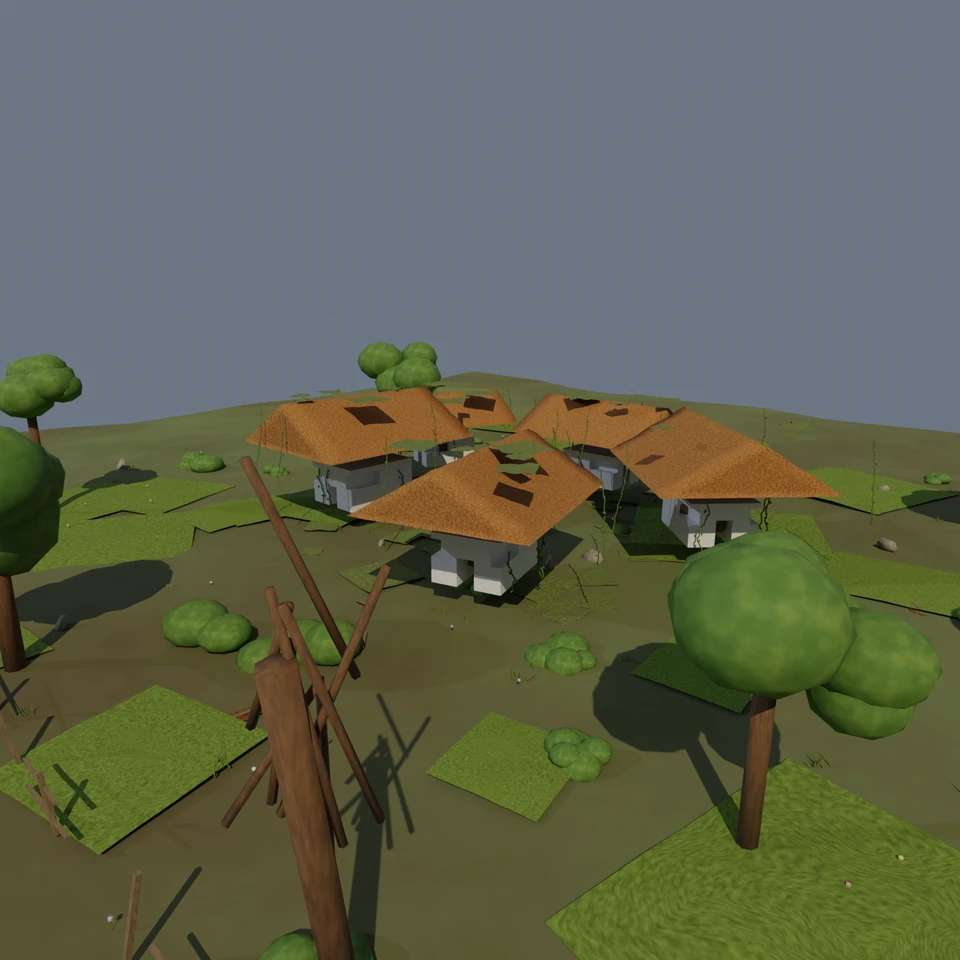
camera + framing set up by the AI contestant
3D Viewport — abandoned-village User Persp
LOADING 3D VIEW
$0.18Cost
703sDuration
29Tool calls
28Turns
Blender 5.1.0MCP 1.22026-07-15
Tokens: 496425/21368Vision: ✗Votes W-L-T: 15-3-0DONE ✓
B-BENCH — TRANSCRIPT Z.AI / GLM 5.2 · r1 · 2026-07-15
RUN LOG — abandoned-village · Z.AI / GLM 5.2 · r1 · ok
SYSTEM PROMPTthe control — every model on this task got these instructions
PROMPTblender-bench v7HARNESSraw-v2
SHOW FULL PROMPT · 2016 chars
You are participating in Blender-Bench, a public benchmark where AI models complete the same Blender task.

Your result will be compared head-to-head with another model. Anyone on the internet can vote, based only on the published visual outputs they can inspect: the interactive 3D scene and rendered presentation.

Complete the request as well as you can. The benchmark does not prescribe a workflow or visual style; use whichever Blender techniques you consider appropriate. Make the important requirements evident in the published result, save a complete scene, and present the work clearly in every requested output.

The final published capture is rendered by the benchmark from your saved scene using Cycles at 1536 x 1536, 64 samples, denoising enabled, and GPU acceleration when available with a CPU fallback. The saved scene is also exported to GLB with geometry, materials, the contestant camera, and supported lights for interactive inspection. Preview and validate your materials, lighting, color management, and camera composition in Cycles, and do not rely on EEVEE-only effects for the final appearance.

## Harness Instructions

You are operating Blender through the provided tools. The scene starts empty. Build what the user's prompt asks for in the current scene. Work step by step and verify your own work. Before you finish, set up a camera and lighting to frame a single, well-composed presentation image of your result — position and aim the camera, and add or adjust lights so the subject reads clearly. The final benchmark capture overrides the scene render settings and renders in Cycles at 1536x1536, 64 samples, with denoising and GPU acceleration (CPU fallback). Preview and validate materials, lighting, color management, and composition in Cycles; do not rely on EEVEE-only effects. The saved scene is also exported to GLB with geometry, materials, your camera, and supported lights for interactive inspection. When you are finished, reply with the single word DONE and no tool calls.
--TASK abandoned-village: ## Task
Complete the following Blender task:
<task>
An abandoned village slowly reclaimed by nature. Weathered houses with rusted, corroded metal roofs; overgrown foliage creeping up the walls and through broken windows; moss, grass, and vines spreading across the ground and over the rooftops. Convey age, decay, and the quiet return of the wild.
</task>
22:46ai>I'll build an abandoned village scene reclaimed by nature. Let me start by checking the scene state and available integrations.
22:46>>get_scene_info({"user_prompt":"An abandoned village slowly reclaimed by nature with weathered houses, rusted roofs, overgrown foliage, moss, grass, and vines."})
22:46<<{
"name": "Scene",
"object_count": 0,
"objects": [],
"materials_count": 2
}
22:46>>get_polyhaven_status({"user_prompt":"Check PolyHaven availability for textures and HDRIs"})
22:46<<PolyHaven integration is currently disabled. To enable it:
1. In the 3D Viewport, find the BlenderMCP panel in the sidebar (press N if hidden)
2. Check the 'Use assets from Poly Haven' checkbox
3. Restart the connection to Claude
22:46>>get_hyper3d_status({"user_prompt":"Check Hyper3D availability"})
22:46<<Hyper3D Rodin integration is currently disabled. To enable it:
1. In the 3D Viewport, find the BlenderMCP panel in the sidebar (press N if hidden)
2. Check the 'Use Hyper3D Rodin 3D model generation' checkbox
3. Restart the connection to Claude
23:08ai>I'll build everything procedurally. Let me start by creating the ground, houses, and environment step by step.
23:08>>execute_blender_code({"code":"\nimport bpy\nimport bmesh\nimport math\nimport random\nfrom mathutils import Vector, Euler\n\n# Clear scene\nbpy.ops.object.select_all(action='SELECT')\nbpy.ops.object.delete(use_global=False)\nfor mat in bpy.data.materials:\n bpy.data.materials.remove(mat)\nfor mesh in bpy.data.meshes:\n bpy.data.meshes.remove(mesh)\nfor curve in bpy.data.curves:\n bpy.data.curves.remove(curve)…)
23:08<<Error executing code: Communication error with Blender: Code execution error: 'ShaderNodeValToRGB' object has no attribute 'interpolation'
23:26>>execute_blender_code({"code":"\nimport bpy\nimport bmesh\nimport math\nimport random\nfrom mathutils import Vector, Euler\n\n# Clear scene\nbpy.ops.object.select_all(action='SELECT')\nbpy.ops.object.delete(use_global=False)\nfor mat in bpy.data.materials:\n bpy.data.materials.remove(mat)\nfor mesh in bpy.data.meshes:\n bpy.data.meshes.remove(mesh)\nfor curve in bpy.data.curves:\n bpy.data.curves.remove(curve)…)
23:26<<Code executed successfully: Ground created
23:55ai>Now let me create the houses with weathered walls and rusted metal roofs.
23:55>>execute_blender_code({"code":"\nimport bpy\nimport bmesh\nimport math\nimport random\nfrom mathutils import Vector, Euler\n\nrandom.seed(42)\n\n# ---- MATERIALS ----\n\n# Weathered wall material (old plaster/wood)\nwall_mat = bpy.data.materials.new(\"WeatheredWall\")\nwall_mat.use_nodes = True\nnodes = wall_mat.node_tree.nodes\nlinks = wall_mat.node_tree.links\nnodes.clear()\n\noutput = nodes.new(\"ShaderNodeOutputMat…)
23:55<<Code executed successfully: Materials created
24:33>>execute_blender_code({"code":"\nimport bpy\nimport bmesh\nimport math\nimport random\nfrom mathutils import Vector, Euler\n\nrandom.seed(42)\n\n# Get materials\nwall_mat = bpy.data.materials[\"WeatheredWall\"]\nroof_mat = bpy.data.materials[\"RustedRoof\"]\ndark_wood_mat = bpy.data.materials[\"DarkWood\"]\n\ndef create_house(name, location, rotation, width=4, depth=5, height=3, roof_height=1.5):\n \"\"\"Create a we…)
24:33<<Code executed successfully: Created 10 house parts for 5 houses
25:04ai>Now let me add overgrown foliage - grass, vines, moss on rooftops, and bushes.
25:04>>execute_blender_code({"code":"\nimport bpy\nimport math\nimport random\nfrom mathutils import Vector\n\nrandom.seed(42)\n\n# ---- FOLIAGE MATERIALS ----\n\n# Grass material\ngrass_mat = bpy.data.materials.new(\"Grass\")\ngrass_mat.use_nodes = True\nnodes = grass_mat.node_tree.nodes\nlinks = grass_mat.node_tree.links\nnodes.clear()\n\noutput = nodes.new(\"ShaderNodeOutputMaterial\")\nbsdf = nodes.new(\"ShaderNodeBsdfPr…)
25:04<<Code executed successfully: Foliage materials created
25:21>>execute_blender_code({"code":"\nimport bpy\nimport math\nimport random\nfrom mathutils import Vector\n\nrandom.seed(42)\n\ngrass_mat = bpy.data.materials[\"Grass\"]\nvine_mat = bpy.data.materials[\"Vine\"]\nmoss_mat = bpy.data.materials[\"Moss\"]\n\n# ---- GRASS PATCHES (using displaced planes with grass material) ----\n# Create scattered grass patches around the village\nfor i in range(40):\n x = random.uniform(-2…)
25:22<<Code executed successfully: Created grass patches
Created moss patches on roofs
25:48>>execute_blender_code({"code":"\nimport bpy\nimport math\nimport random\nfrom mathutils import Vector\n\nrandom.seed(42)\n\nvine_mat = bpy.data.materials[\"Vine\"]\n\n# ---- VINES CREEPING UP WALLS ----\n# Create vine curves on house walls\nwall_objects = [obj for obj in bpy.data.objects if \"walls\" in obj.name.lower()]\n\nvine_count = 0\nfor wall in wall_objects:\n bbox = [wall.matrix_world @ Vector(corner) for co…)
25:49<<Code executed successfully: Created 21 vines on walls
26:10>>execute_blender_code({"code":"\nimport bpy\nimport math\nimport random\nfrom mathutils import Vector\n\nrandom.seed(42)\n\nbark_mat = bpy.data.materials[\"Bark\"]\nleaf_mat = bpy.data.materials[\"Leaf\"]\nmoss_mat = bpy.data.materials[\"Moss\"]\n\n# ---- BUSHES AND SHRUBS ----\n# Scattered around the village\nfor i in range(25):\n x = random.uniform(-20, 20)\n y = random.uniform(-20, 20)\n # Avoid center\n …)
26:13<<Code executed successfully: Created bushes
Created 6 trees
Created ground moss near houses
26:51>>execute_blender_code({"code":"\nimport bpy\nimport math\nimport random\nfrom mathutils import Vector\n\nrandom.seed(42)\n\n# ---- BROKEN WINDOWS (dark interior visible) ----\n# Add dark planes behind window openings to simulate dark interiors\ndark_wood_mat = bpy.data.materials[\"DarkWood\"]\n\nwall_objects = [obj for obj in bpy.data.objects if \"walls\" in obj.name.lower()]\n\nfor wall in wall_objects:\n bbox = [w…)
26:53<<Code executed successfully: Created dark interiors for houses
Created rocks and debris
Created broken fence
27:24>>execute_blender_code({"code":"\nimport bpy\nimport math\nimport random\nfrom mathutils import Vector\n\nrandom.seed(42)\n\n# ---- VINES ON ROOFS ----\nvine_mat = bpy.data.materials[\"Vine\"]\n\nroof_objects = [obj for obj in bpy.data.objects if \"roof\" in obj.name.lower() and \"moss\" not in obj.name.lower()]\nvine_on_roof_count = 0\n\nfor roof in roof_objects:\n bbox = [roof.matrix_world @ Vector(corner) for corn…)
28:18<<Code executed successfully: Created 20 vines draping from roofs
Created grass tufts
28:35>>execute_blender_code({"code":"\nimport bpy\nimport math\nimport random\nfrom mathutils import Vector\n\nrandom.seed(42)\n\n# ---- CAMERA ----\n# Remove existing cameras\nfor obj in bpy.data.objects:\n if obj.type == 'CAMERA':\n bpy.data.objects.remove(obj, do_unlink=True)\n\nbpy.ops.object.camera_add(location=(14, -16, 9))\ncam = bpy.context.active_object\ncam.name = \"MainCamera\"\n\n# Aim at center of vill…)
28:35<<Code executed successfully: Camera and lighting set up
28:47>>execute_blender_code({"code":"\nimport bpy\nimport math\n\n# ---- FOG/ATMOSPHERE ----\n# Add a subtle volumetric fog for atmosphere\nworld = bpy.context.scene.world\nwnodes = world.node_tree.nodes\nwlinks = world.node_tree.links\n\n# Add volume to world\nvol_output = wnodes.new(\"ShaderNodeOutputWorld\")\nvol_scatter = wnodes.new(\"ShaderNodeVolumeScatter\")\nvol_scatter.inputs['Density'].default_value = 0.015\nvol_sc…)
28:49<<Code executed successfully: Added atmospheric fog
Created scattered planks
Total objects in scene: 1103
Cameras: 1
Lights: 2
Meshes: 1059
Curves: 41
28:54ai>Good, the scene has 1103 objects. Let me now do a quick render preview to validate the look, and adjust as needed.
28:54>>execute_blender_code({"code":"\nimport bpy\n\n# Quick low-res preview render to check composition\nscene = bpy.context.scene\nscene.render.resolution_x = 512\nscene.render.resolution_y = 512\nscene.cycles.samples = 32\nscene.cycles.use_denoising = True\n\n# Render to file\nscene.render.filepath = \"/tmp/village_preview.png\"\nscene.render.image_settings.file_format = 'PNG'\nbpy.ops.render.render(write_still=True)\npri…)
28:55<<Code executed successfully: Preview rendered
29:11>>execute_blender_code({"code":"\nimport bpy\nimport math\nfrom mathutils import Vector\n\n# Let's adjust the camera for a better composition\ncam = bpy.data.objects[\"MainCamera\"]\n\n# Move camera slightly for a better angle - more elevated and showing depth\ncam.location = (16, -18, 11)\ntarget = Vector((-1, 0, 1.5))\ndirection = target - cam.location\nrot_quat = direction.to_track_quat('-Z', 'Y')\ncam.rotation_euler…)
29:12<<Code executed successfully: Camera adjusted
Added foreground dead tree
29:17>>execute_blender_code({"code":"\nimport bpy\n\n# Quick preview again\nscene = bpy.context.scene\nscene.render.resolution_x = 512\nscene.render.resolution_y = 512\nscene.cycles.samples = 32\nscene.cycles.use_denoising = True\n\nscene.render.filepath = \"/tmp/village_preview2.png\"\nbpy.ops.render.render(write_still=True)\nprint(\"Preview 2 rendered\")\n","user_prompt":"Render second preview to check updated composition"…)
29:18<<Code executed successfully: Preview 2 rendered
29:39>>execute_blender_code({"code":"\nimport bpy\nimport math\nimport random\nfrom mathutils import Vector\n\n# Let me add more detail: overgrown grass around house bases, and some \n# weeds growing through windows\nrandom.seed(42)\ngrass_mat = bpy.data.materials[\"Grass\"]\nvine_mat = bpy.data.materials[\"Vine\"]\n\n# Grass/weeds growing through window openings\nwall_objects = [obj for obj in bpy.data.objects if \"walls\" …)
30:43<<Code executed successfully: Created weeds at wall bases
Adjusted fog density
Final settings applied
30:50>>execute_blender_code({"code":"\nimport bpy\n\n# Final preview at higher quality\nscene = bpy.context.scene\nscene.render.resolution_x = 768\nscene.render.resolution_y = 768\nscene.cycles.samples = 64\nscene.cycles.use_denoising = True\n\nscene.render.filepath = \"/tmp/village_final_preview.png\"\nbpy.ops.render.render(write_still=True)\nprint(\"Final preview rendered\")\n","user_prompt":"Render final high-quality prev…)
30:54<<Code executed successfully: Final preview rendered
31:16>>execute_blender_code({"code":"\nimport bpy\nimport math\nimport random\nfrom mathutils import Vector\n\nrandom.seed(42)\n\n# Let's enhance the scene further with some additional details\n\n# 1. Add some fallen/broken roof panels (corrugated metal sheets on ground)\nroof_mat = bpy.data.materials[\"RustedRoof\"]\n\nfor i in range(8):\n x = random.uniform(-12, 12)\n y = random.uniform(-12, 12)\n if abs(x) < 2 an…)
31:19<<Error executing code: Communication error with Blender: Code execution error: name 'grass_mat' is not defined
31:35>>execute_blender_code({"code":"\nimport bpy\nimport math\nimport random\nfrom mathutils import Vector\n\nrandom.seed(42)\n\ngrass_mat = bpy.data.materials[\"Grass\"]\nroof_mat = bpy.data.materials[\"RustedRoof\"]\n\n# 1. Fallen roof panels\nfor i in range(8):\n x = random.uniform(-12, 12)\n y = random.uniform(-12, 12)\n if abs(x) < 2 and abs(y) < 2:\n x += 4\n \n bpy.ops.mesh.primitive_plane_add(s…)
31:56<<Code executed successfully: Created fallen roof panels
Created wildflowers
Final total objects: 1614
32:00>>execute_blender_code({"code":"\nimport bpy\n\n# Final preview render\nscene = bpy.context.scene\nscene.render.resolution_x = 768\nscene.render.resolution_y = 768\nscene.cycles.samples = 64\nscene.cycles.use_denoising = True\n\nscene.render.filepath = \"/tmp/village_preview3.png\"\nbpy.ops.render.render(write_still=True)\nprint(\"Preview 3 rendered\")\n","user_prompt":"Render preview 3 to check all additions"})
32:05<<Code executed successfully: Preview 3 rendered
32:16>>execute_blender_code({"code":"\nimport bpy\nimport math\nfrom mathutils import Vector\n\n# Let me refine the camera angle slightly - try a slightly lower angle for more dramatic feel\ncam = bpy.data.objects[\"MainCamera\"]\n\n# Position camera for a more immersive, slightly lower angle\ncam.location = (15, -17, 8)\ntarget = Vector((-1, 0, 1.8))\ndirection = target - cam.location\nrot_quat = direction.to_track_quat('-Z…)
32:17<<Code executed successfully: Final setup complete
Camera location: <Vector (15.0000, -17.0000, 8.0000)>
Camera rotation: <Euler (x=1.3112, y=0.0000, z=0.7551), order='XYZ'>
Render engine: CYCLES
Resolution: 1536x1536
Samples: 64
Denoising: True
View transform: Filmic
Total objects: 1614
32:23>>execute_blender_code({"code":"\nimport bpy\n\n# Do a final render at full resolution\nscene = bpy.context.scene\nscene.render.resolution_x = 1536\nscene.render.resolution_y = 1536\nscene.cycles.samples = 64\nscene.cycles.use_denoising = True\n\nscene.render.filepath = \"/tmp/village_final.png\"\nbpy.ops.render.render(write_still=True)\nprint(\"Final render complete\")\n","user_prompt":"Render final full-quality image"…)
32:42<<Code executed successfully: Final render complete
32:55ai>The scene is complete. Let me verify everything is saved properly.
32:55>>execute_blender_code({"code":"\nimport bpy\n\n# Verify scene is saved\nscene = bpy.context.scene\nprint(\"=== SCENE VERIFICATION ===\")\nprint(f\"Scene name: {scene.name}\")\nprint(f\"Render engine: {scene.render.engine}\")\nprint(f\"Resolution: {scene.render.resolution_x}x{scene.render.resolution_y}\")\nprint(f\"Samples: {scene.cycles.samples}\")\nprint(f\"Denoising: {scene.cycles.use_denoising}\")\nprint(f\"View tra…)
32:55<<Error executing code: Communication error with Blender: Code execution error: Error: Cannot open file <repo>\apps\console\tmp\abandoned_village.blend@ for writing: No such file or directory
33:07>>execute_blender_code({"code":"\nimport bpy\n\n# Verify scene\nscene = bpy.context.scene\nprint(\"=== SCENE VERIFICATION ===\")\nprint(f\"Render engine: {scene.render.engine}\")\nprint(f\"Resolution: {scene.render.resolution_x}x{scene.render.resolution_y}\")\nprint(f\"Samples: {scene.cycles.samples}\")\nprint(f\"Denoising: {scene.cycles.use_denoising}\")\nprint(f\"View transform: {scene.view_settings.view_transform}\")…)
33:07<<Error executing code: Communication error with Blender: Code execution error: Error: Unable to save an unsaved file with an empty or unset "filepath" property
33:11>>execute_blender_code({"code":"\nimport bpy\n\n# Save to the working directory\nimport os\nsave_path = os.path.join(os.getcwd(), \"abandoned_village.blend\")\nbpy.ops.wm.save_as_mainfile(filepath=save_path)\nprint(f\"Scene saved to: {save_path}\")\n","user_prompt":"Save scene file"})
33:11<<Code executed successfully: Info: Saved as "abandoned_village.blend"
Scene saved to: <repo>\apps\console\abandoned_village.blend
33:21ai>The scene is complete and saved. Let me verify the final render was produced correctly by doing a quick check.
33:21>>execute_blender_code({"code":"\nimport bpy\n\n# Final verification - list all key scene elements\nprint(\"=== FINAL SCENE SUMMARY ===\")\nprint(f\"Total objects: {len(bpy.data.objects)}\")\nprint(f\"Total materials: {len(bpy.data.materials)}\")\nprint(f\"\\nLights:\")\nfor l in [o for o in bpy.data.objects if o.type == 'LIGHT']:\n print(f\" {l.name}: type={l.data.type}, energy={l.data.energy}, color={l.data.color}…)
33:22<<Code executed successfully: === FINAL SCENE SUMMARY ===
Total objects: 1614
Total materials: 62
Lights:
FillLight: type=SUN, energy=0.800000011920929, color=<Color (r=0.5000, g=0.6000, b=0.8000)>
KeyLight: type=SUN, energy=2.5, color=<Color (r=1.0000, g=0.8500, b=0.6000)>
Camera: MainCamera
Location: <Vector (15.0000, -17.0000, 8.0000)>
Lens: 26.0mm
Render: CYCLES, 1536x1536
Cycles: 64 …
33:39ai>The scene is complete and saved. Here's a summary of what was built:
**Abandoned Village Reclaimed by Nature** — 1,614 objects, 62 procedural materials
**Architecture:**
- 5 weathered houses with faded, stained plaster walls
- Window and door cutouts revealing dark interiors
- Corrugated rusted metal gable roofs with surface displacement and bump detail
- Dark wooden interior boxes visible throu…
33:39--status: ok · DONE declared
>
LOADING COMPLETE TRANSCRIPT…